Up next in 10



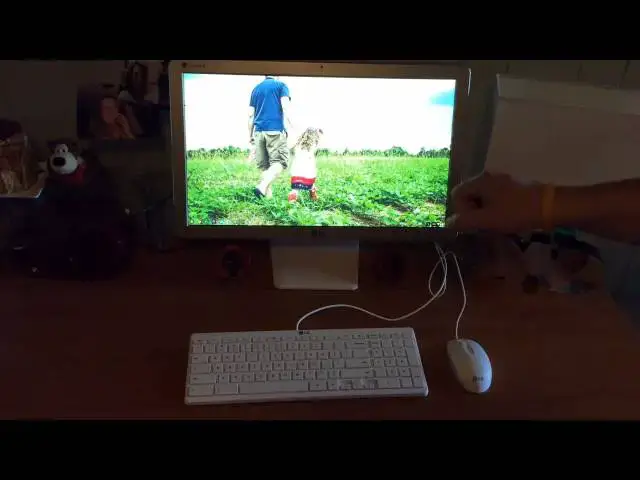
In this video I review the LG Chromebase. The end abruptly cuts out and I'm not sure why. I was just made aware of this...oh well. Must have been a glitch in the upload!
Show More Show Less View Video Transcript
0:00
hey folks robbie payne with chroma box
0:02
coming at you today with a review
0:04
of the lg chromebase
0:06
now those of you who uh are subscribed
0:08
to the channel
0:10
you've seen the unboxing of the
0:11
chromebase quite a few weeks ago and
0:13
actually i'm at the point where i've got
0:15
to get this guy sent back immediately
0:17
and the reason i've kind of put this one
0:18
off is because my usage of this device
0:21
has been a little bit hit and miss it's
0:23
at home for me
0:25
it's not at the office where i work so
0:27
we've honestly used it as a home
0:29
computing device
0:30
and i'll say this off the bat it's
0:32
caused me to actually reconsider whether
0:34
or not i was going to return it and
0:35
think about actually just buying it and
0:37
keeping it for the house
0:39
and we'll get into why that is here in
0:40
just a few minutes
0:42
i want to go over the specs of it uh
0:44
this is a little bit more of a difficult
0:45
thing to video um because of the nature
0:48
of the product so i'm going to try to
0:50
spin the guy around here and show you
0:51
some ports and stuff first off you get a
0:54
22 inch
0:55
hd ips screen fantastic looking colors
0:59
are really good viewing angles from top
1:01
bottom left and right look fantastic
1:04
it never really loses much of its color
1:05
or anything at all from any angle so
1:07
it's beautiful for viewing media on
1:10
everything looks nice and crisp and if
1:12
you watch my review of the chromebook 2
1:14
from samsung
1:16
samsung crams a 1080p screen onto that
1:18
chromebook but it's at 13.3 inches which
1:21
causes the scale to be a little weird
1:23
text is kind of small all your icons are
1:25
kind of small 1080p stretched across 22
1:27
inches is perfect it's it's absolutely
1:29
gorgeous
1:30
everything renders really beautifully
1:33
things just look really awesome and so
1:35
and the screen is quite bright you can
1:37
kind of tell in the review everything
1:38
looks dark around the screen
1:40
i assure you it actually isn't dark
1:42
however the screen is putting off a lot
1:44
of light so uh it does it does well in
1:46
those environments
1:48
along with the device at that 350 price
1:50
point you get a front-facing camera
1:52
which does pretty good i have a decently
1:54
dark room in here it's not the brightest
1:55
thing in the world and it did it did
1:57
quite well
1:59
i can actually show that to you real
2:00
quick
2:07
and you can see like i said there's the
2:09
the camera guitar on the wall that kind
2:11
of stuff like i said that's this is a
2:12
decently dimly lit room it's a little
2:15
grainy 720p cameras tend to be that way
2:18
but it will do you just fine in a chat
2:20
situation it also has built-in speakers
2:23
and again the entire chrome everything
2:26
is built right into the monitor so it's
2:27
just one piece here
2:28
um
2:30
the
2:31
inbuilt speakers are
2:33
so so they're like laptop speakers they
2:35
didn't really do a very good job with
2:36
that but again 350 dollars let's be
2:39
careful what we're asking for here
2:41
um alongside the front here we also have
2:43
just a kind of really standard cheap
2:46
laser mouse but
2:48
nothing fancy here two buttons and a
2:50
scroll wheel uh it did its job i prefer
2:52
trackpad especially with chrome os and
2:54
the gestures but it does the job just
2:55
fine uh and the keyboard is actually
2:57
really quiet really good actions on the
2:59
keys i wish they were wireless but again
3:01
we come back to that price point uh
3:03
makes a difference here
3:04
i'm gonna attempt to spin this guy
3:06
around on the desk here and you'll see
3:09
where we start getting into some of this
3:10
wire clutter and well that's just the
3:13
the nature of having a uh a wired
3:16
desktop style device right
3:19
around the back you can kind of see um
3:21
the things designed well so uh in use
3:24
cases like hotel lobbies or uh in a
3:26
business area or something like that the
3:28
thing just looks nice it looks really
3:30
pretty it has a clasp back here to put
3:31
those cords into i never bother with
3:33
that it's sitting on my desk we have the
3:35
hdmi uh input which is very interesting
3:38
because this as i mentioned in the
3:40
unboxing can act just as a monitor so
3:42
you could have your windows uh
3:44
pc hooked into it i did that for a
3:46
little bit and again i haven't used my
3:48
pc it's sitting down there collecting
3:49
dust uh it's not turned on but if i were
3:52
going to keep this that's something i
3:53
would have on tap you can hit the chrome
3:55
button on the front uh it actually flips
3:57
the input and it'll just bring up your
3:59
windows pc and so this could be a 350
4:02
dollar monitor plus chrome os um so that
4:04
could be a cool thing we've got a few
4:06
usbs here i believe there's some on the
4:08
side yeah there's one more over here
4:11
and from the looks of it all of them
4:14
yeah all of them look like usb 2.0 so if
4:16
you're looking for a 3.0 solution here
4:18
i think you might be out of luck uh we
4:20
actually have an ethernet port here
4:22
again which makes this nice for lobbies
4:23
hotel rooms that can stuff hard wiring
4:25
as possible and then your power jack
4:28
along the side you have your earphone
4:29
jack i have that hooked into my
4:31
my desktop speakers here little sony
4:33
speakers
4:34
and so that's about it as far as from a
4:36
hardware perspective
4:38
i wanted to comment more on usage
4:39
because internally guys this is the same
4:42
thing that we see in every chromebook
4:44
almost that's out right now it's it's
4:47
the haswell class uh celeron processor
4:49
2995u it is two gigs of ram it's
4:53
16 gigs internal memory i've seen some
4:56
stuff online where people cracked open
4:57
and changed those things
4:59
but it's not easy um and so i would not
5:02
recommend that hopefully they'll come
5:04
out with one that at least gives a slot
5:05
to upgrade this stuff or
5:07
some different options or something like
5:09
that one other thing i found kind of
5:11
cool is the buttons up here on the front
5:13
so if we go to menu these are actually
5:14
just little capacitive buttons across
5:16
the front here so no clicking none of
5:17
that stuff which is kind of nice that's
5:19
a nice touch and like i said before if
5:21
you hit the chrome button i don't have
5:23
anything hooked into it right now it
5:24
would flip over to whatever you have
5:26
coming in on that hdmi so even if you
5:27
have a television or something like that
5:29
you could have something else anything
5:31
hdmi coming into that and then you hit
5:33
that back and you're right back into
5:34
your chrome desktop it's a nice touch
5:37
i think it's a great gap device for some
5:39
people that are looking for a really
5:40
nice monitor because it is that it's a
5:42
nice monitor with a webcam built in
5:44
and speakers good or bad and you know a
5:47
couple peripherals for 350 bucks i mean
5:49
you're going to spend 150 to 200
5:52
uh on a nice monitor like this i i just
5:55
got a really good deal for about a
5:57
hundred and i think it was 130 140
6:00
on a 23 inch 1080p display but it was on
6:03
sale on a big cut sale and it was going
6:05
to the sale was going to go away and it
6:06
was going to go back up to 200
6:08
and so if 200 bucks is kind of going
6:10
right to 230 240 for monitor like this
6:14
for 100 bucks more you're getting some
6:15
accessories and you're getting a
6:18
desktop chrome os environment so you
6:20
don't always have to jump into windows
6:24
for our family we all use chromebooks
6:25
anyway it's been a really nice device to
6:28
have sitting here whether we need to
6:30
print some things up i've had to design
6:31
a few things
6:33
look at some photos online i sat with my
6:35
daughter the other night she's just
6:36
discovered the uh anagraph analgraph 3d
6:40
you know the red blue 3d glasses and so
6:42
we looked up a bunch of 3d pictures and
6:44
saw on this big nice sharp display they
6:46
looked really awesome
6:48
i worked from home a couple days on this
6:50
device
6:51
so having this at the desktop and not
6:53
having to hook anything else in it's
6:54
just there and ready
6:56
there's been a couple times where i've
6:57
just needed to look up something really
6:59
quickly instead of going to my bag and
7:00
pulling my chromebook out opening up and
7:02
granted it's open ready to go
7:05
my phone wasn't close i just plop down
7:07
wiggle the mouse boom we're ready to go
7:09
and i'm and i'm jumping online so it
7:11
really has given me a couple second
7:13
pauses of thinking you know i kind of
7:15
want to keep this thing here um but
7:17
honestly again we have three chromebooks
7:19
in the house already and then i'm
7:21
constantly rotating ones out for uh
7:23
review units so it seemed like a little
7:25
overkill for us just because of that
7:27
particular dynamic in our family but
7:29
overall
7:30
i highly recommend the lg chromebase
7:34
if you're looking for things for
7:35
business where these things are just
7:36
setting in a classroom scenario in a
7:38
computer lab in a business office in a
7:40
hotel
7:42
out front in the hotel heck in a hotel
7:44
room i mean
7:45
that the limitlessness of this device
7:48
is pretty astronomical i
7:50
i've just been really impressed by it
7:52
and again it runs