Up next in 10



Sponsored by NordVPN. For a limited time, grab the 3-year plan with 70% off! Click here: https://chromeunboxed.com/nordvpn
・・・・・・・
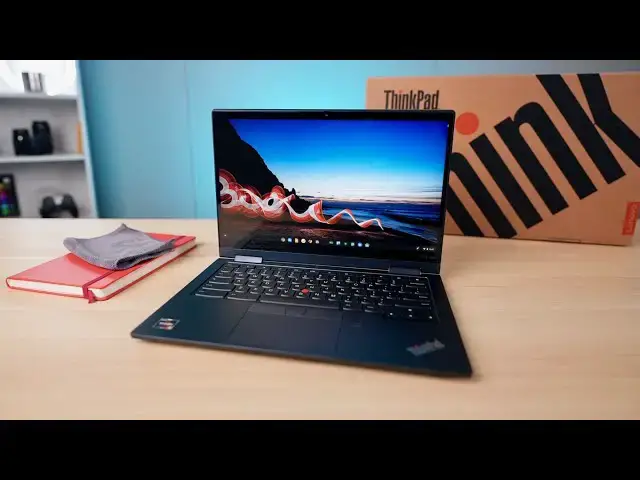
Here in the early stages of 2021, we know we're on the cusp of a massive wave of new Chromebook hardware, and it seems that our first unboxing of the year is the very-unique Lenovo ThinkPad C13 Yoga Chromebook. Aside from the ridiculous naming of this device, the spec sheet really speaks for itself. With the new AMD Ryzen processors, plenty of RAM and storage options, a stowable USI pen, backlit keyboard, bright screen, metal build, fingerprint scanner, and convertible form factor, this Chromebook has a lot to offer.
Read more: https://chromeunboxed.com/lenovo-thinkpad-c13-yoga-chromebook-unboxing-hands-on
Join our newsletter: http://bit.ly/2WjCDm7
・・・・・・・
Join our Patreon community for exclusive extras, an ad-free website experience, access to our private Discord server, and more: https://www.patreon.com/chromeunboxed
Shop Chromebooks on CHROME SHOP: https://chrmshop.com/
Subscribe to the channel: http://bit.ly/2xFuj6L
The Music We Use - PERFECT for YouTube: http://bit.ly/31W6PYP
Follow us:
Show More Show Less View Video Transcript
0:00
hey guys today lenovo has sent over the
0:02
thinkpad c13
0:05
yoga chromebook i think for some reason
0:08
the title of this thing just will not
0:09
stick in my head but it's a thinkpad
0:11
it's a c13 it's powered by ryzen chips
0:14
it's got all kinds of cool internal
0:15
stuff it's got a stowable stylus full hd
0:18
screen great build quality all that kind
0:20
of stuff is what we are expecting but we
0:22
got the box in and wanted to just hop on
0:24
camera and get this thing out of the box
0:26
and see what it looks like
0:30
today's video is brought to you by
0:31
nordvpn they're the vpn of choice for
0:33
millions of consumers because they're
0:34
awesome at what they do which is keeping
0:36
your browsing safe and secure whether
0:38
you're at home or out and about if you'd
0:40
like to learn more about them head over
0:42
to chromeunbox.com forward slash nordvpn
0:45
where you can learn more and get started
0:46
today okay so without any further ado
0:48
let's hop in the box and as far as
0:50
chromebook boxes go i mean this is kind
0:52
of a nicely branded one it's got that
0:54
whole thinkpad thing going on on the
0:56
outside but ultimately it is just a big
0:59
brown box with a chromebook inside
1:01
there's not a whole lot of surprises
1:03
when we come to unboxings and honestly
1:05
like the phone industries getting into
1:07
this too so we're losing chargers and no
1:09
headphones in the box anymore so even
1:11
phone unboxings are kind of getting a
1:12
little bit more boring so we don't want
1:14
to spend a whole lot of time on the
1:15
packaging and all the junk in here we
1:17
just want to get a first impression of
1:19
this chromebook so i'm going to get it
1:21
out of the bag here and just set it down
1:23
let's make sure there's no other goodies
1:24
here inside
1:26
um nope your general paperwork
1:29
and
1:32
yeah nothing surprising as far as the
1:34
charger goes it's a usb type-c charger
1:37
again all of this is just par
1:39
for the course when it comes to
1:40
chromebooks so
1:42
just get all of this stuff
1:45
out of the way and get to what you came
1:47
here for which is this new c13 thinkpad
1:50
from lenovo
1:52
and right off the bat i love the color
1:55
of this thing it's like a
1:58
dark navy almost black but just a really
2:01
nice finish
2:03
very substantial which isn't surprising
2:05
i mean think pad devices whether they're
2:07
windows or chromebooks are generally
2:09
built for
2:10
enterprise this one's no different this
2:12
is definitely aimed at the enterprise
2:13
market it's not that it's not available
2:15
for consumers but they're building this
2:17
thing with enterprise in mind and that
2:19
means it is just really rigid very nice
2:22
and firm and this is not a cheap
2:23
chromebook by any stretch of the
2:25
imagination uh it's it's in anywhere
2:28
from 800 to over well over a thousand
2:30
dollars depending on how you get it
2:31
outfitted but the chief thing about this
2:34
is that it's one of the first
2:36
chromebooks to come out with amd's new
2:38
processors in it so the one they sent
2:39
over to us specifically is the ryzen 5s
2:42
of the 3500c processor 8 gigs of ram and
2:46
256 gigs of internal storage and that is
2:49
of the emmc or not emdmc i'm sorry nvme
2:52
variety
2:53
but again this is just kind of first
2:55
initial
2:56
thoughts here we got lots of i o lots of
2:58
good port selection here so
3:00
uh if you can see on the side we've got
3:02
full size hdmi we've got a usb type-c
3:05
over here volume rocker power button
3:08
speakers on the side there so we'll have
3:11
to see how those sound and then the
3:12
other side you get two full size
3:14
usb 3.0 ports another usb type-c and
3:18
then your micro sd card headphone jack
3:20
so honestly as far as like
3:22
old peripherals you want to plug in full
3:25
size hdmi for meetings usb type-c stuff
3:28
docking solutions it's all here
3:30
you've got all the stuff you need in
3:32
front of you so let's just open this
3:33
thing up hinge is nice and firm you're
3:36
not going to get a one-hand lift and we
3:37
generally don't see that whenever you
3:39
are dealing with a convertible
3:41
but while we're at it
3:43
we'll we'll look at that hinge as well
3:46
and see if this thing
3:48
yeah we'll have to cut away to power it
3:49
on but
3:50
you know we flip the hinge around it's
3:52
it's a general convertible chromebook
3:54
nothing surprising there as well
3:56
16 by nine screen so full hd
3:59
300 nit screen again convertible form
4:02
factor and just like any other
4:04
chromebook that converts it doesn't feel
4:06
like a great tablet or anything but when
4:08
you want to set it you know in a
4:09
presentation mode or something like that
4:11
it will work really well for that it's
4:13
going to be nice to flip it around and
4:14
get to the stove stylus that we'll talk
4:16
about here in just a second but
4:18
let's take a second and get this thing
4:20
booted up and let me sign in real quick
4:21
so i can give you a little more of a
4:23
full rundown okay now that we are all
4:25
logged in booted up and all that kind of
4:27
stuff that whole process of just kind of
4:29
getting a chromebook set up usually
4:31
informs me a lot about a bunch of stuff
4:34
on a chromebook again this isn't a
4:35
review we're just talking about some
4:36
quick hands-on impressions but this
4:38
device has a lot of good stuff going for
4:41
it uh first up and i'm not gonna blow
4:43
hopefully blow the shot out here is the
4:46
screen is actually
4:47
really nice and bright it's rated at 300
4:49
nits from what i understand so
4:51
um it's not gonna be crazy bright
4:54
compared to a handful of other
4:55
chromebooks but the colors look really
4:57
great the viewing angles even as i'm
4:59
looking straight down the screen right
5:00
now i can see everything on the screen
5:02
so the viewing angles look good the
5:04
colors look good again 16x9 full hd 13.3
5:08
inch screen here so nothing crazier out
5:10
of the ordinary but say you've used a
5:12
pixelbook go you kind of would be
5:14
familiar with the the screen size the
5:16
the dimensions the resolution and the
5:19
brightness uh it feels a lot like that
5:21
screen which is a good thing it's a it's
5:23
a solid screen there is a 4k model of
5:26
this that has a 400 nits screen i
5:28
believe on it but i personally think 4k
5:30
at this resolution is just absolute
5:32
overkill so a very good screen uh just
5:35
even moving the the hinge around and
5:37
just like the rigidity of the top part
5:40
of this thing the whole thing just feels
5:41
incredibly well built already uh just
5:43
from messing around but you can already
5:45
tell there's all kinds of cool stuff
5:47
going on here so yeah great i o so great
5:50
port selections
5:51
you've got a backlit keyboard that you
5:53
don't see a ton of light bleed all
5:54
around so you just kind of get this nice
5:56
glow from the top there's a little bit
5:58
another unique thing that we have on
6:00
this particular chromebook that we've
6:02
kind of not seen in a little while is a
6:04
stowed stylus so
6:06
a couple unique things about this
6:08
particular stylus one it's usi
6:11
so that means that it would work
6:13
technically i could take the stylus and
6:14
go pick up any other chromebook with a
6:16
usi stylus screen and start writing on
6:19
it would work
6:20
the other thing is hopefully you can
6:22
focus on that and see that there are
6:23
actually some leads there
6:25
usi stylus pins need battery well this
6:28
one obviously still has some sort of
6:30
battery inside of it and those leads are
6:32
what this chromebook uses to charge it
6:35
whenever you've placed it right back
6:36
here in this holster so that's kind of a
6:38
unique first thing with uh with chrome
6:40
os is to have a chromebook that has a
6:43
stylus that not only is stowable in the
6:45
device
6:46
also stowable in the device as a usi
6:48
stylus that also recharges whenever it's
6:51
put away you've obviously got the nub
6:53
we'll talk about that here in just a
6:54
second you've got a world-facing camera
6:56
so if we flip into presentation modes
6:59
you know if you're in this mode here you
7:01
can actually get
7:03
a video
7:05
going this way if you have the thing in
7:06
tablet mode or something like that i
7:08
don't know how useful these are uh
7:10
especially in enterprise stuff but like
7:11
maybe if you're scanning things you're
7:13
taking pictures of inventory that kind
7:14
of stuff will obviously test out these
7:16
cameras and see if they're any good or
7:17
not but usually the world facing cameras
7:20
are a little bit better than your
7:21
standard webcam that is included and
7:23
then you get
7:24
some interesting things going on here so
7:26
first a fingerprint scanner i set that
7:28
up as i first opened the chromebook up
7:30
and it works just like any other
7:31
fingerprint scanner the positioning is a
7:33
little strange
7:34
but it works
7:36
it's quick and it unlocks your
7:37
chromebook very fast and keeps you
7:39
secure the trackpad is glass it has a
7:42
very nice quiet like you probably can't
7:44
even pick this up
7:46
no that's barely making any noise but
7:48
it's a very satisfying good feeling
7:50
track pad so that's very cool and you
7:52
get physical buttons up here so three of
7:54
them and this is a thinkpad thing so
7:56
this is something that uh thinkpads do
7:58
on windows devices and when the first
8:00
thinkpad came out it was
8:02
a few years back that lenovo made a
8:04
thinkpad chromebook uh they google made
8:06
them nicks these and now they've they've
8:08
i guess figured out a way to make them
8:10
happy and and so they're back so you
8:12
have obviously left right and then you
8:13
have the center click button as well so
8:15
it'd be the same thing as if you clicked
8:16
on the mouse wheel but really what those
8:18
are for is if you're using that nub to
8:21
move around with and
8:22
when we first started talking about this
8:24
on a chromebook a lot of people were
8:26
like what's the point of this you got a
8:27
track pad why would you need this
8:29
and we all negate the idea that uh
8:33
there are people that have to work that
8:34
wear
8:35
some sort of gloves whether they be huge
8:37
like construction type gloves that are
8:39
heavy and hard to like manipulate stuff
8:41
with or even just rubber gloves that are
8:43
going to mess with using a track pad
8:45
well these little nubs help you move the
8:47
mouse around the screen and then you
8:48
have these hard buttons down here to
8:51
actually use it and so in a lot of
8:53
environments honestly outside of sitting
8:55
at a desk or a cubicle that little nub
8:58
probably comes in very very handy so
9:00
it's cool to see that come along i mean
9:01
that's just a lot of stuff going on here
9:04
world-facing camera fingerprint scanner
9:06
we're going to use all of it mess around
9:07
with all of it and see how all of it
9:09
works but what i can tell you right off
9:11
the bat is yeah i know this thing is
9:13
expensive it's an expensive chromebook
9:15
and yes it's aimed at enterprise and
9:17
working individuals but just off the bat
9:20
it feels great it feels like a
9:23
professional level chromebook and
9:26
you know think pads have come a long way
9:27
they used to be really really ugly and
9:29
kind of clunky and this one is
9:31
kind of attractive looking it's a little
9:33
frankensteinish you know there's a lot
9:34
of stuff going on here but it's a good
9:36
looking chromebook i need to spend some
9:39
time
9:40
with the device in order to figure out
9:42
how well the processors work we've we've
9:44
messed with a couple amd devices at this
9:46
point with this ryzen 5 chipset in them
9:49
and the benchmarks aren't great but i
9:51
need to use it on a day-to-day basis to
9:53
find out what it actually feels like to
9:55
use it is it slow is it fast the
9:57
benchmarks aren't amazing they're
9:59
nowhere near what we get from 10th and
10:01
11th gen intel processors but benchmarks
10:04
don't tell the whole story these amd
10:06
chips have much better gpus in them so
10:08
that could make up for a lot of things
10:10
it's going to be hard to tell until i
10:11
spend some time with it what i can tell
10:12
you right off the bat is that this is a
10:14
great feeling chromebook that has a lot
10:17
of unique features for a lot of working
10:19
class people that honestly may appeal to
10:22
a lot of you so i'm interested to you
10:25
know take this thing for a test drive
10:27
really get in and review it see how it
10:28
performs see how all the extra little
10:30
bits and pieces actually add up for you
10:33
a better or just a average chromebook
10:35
experience we won't know till we review
10:37
it so obviously we will be doing that
10:39
but guys that's it for this one if you
10:41
like this video give us a thumbs up head
10:43
down there and hit that subscribe button
10:45
and make sure to hit the notification
10:46
icon as well the little bell if you'd
10:48
like to be alerted when we make future
10:50
videos just like this one until next
10:52
time we'll see
10:54
[Music]
11:05
you
#Computers & Electronics