Up next in 10



Subscribe to the channel: http://bit.ly/2xFuj6L
Shop Chromebooks: https://amzn.to/2NE2wKq
Read more: https://chromeunboxed.com/
Follow us: https://www.instagram.com/chromeunboxed
https://twitter.com/chromeunboxed
https://www.facebook.com/Chromeunboxed
https://plus.google.com/+Chromeunboxed
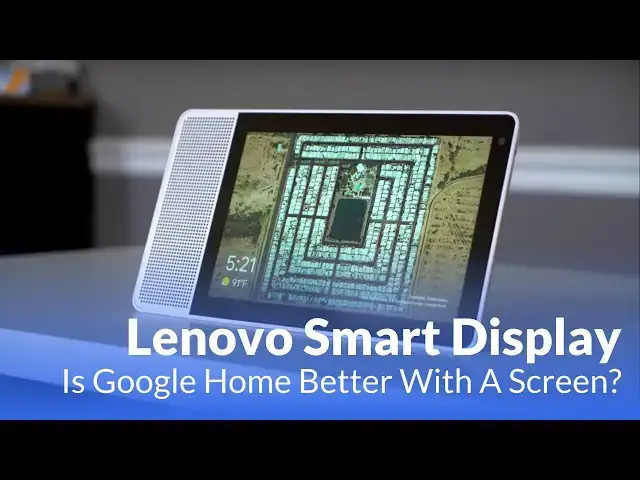
The Lenovo Smart Display is the first Google Home device with a display to hit the market. Does the addition of visual feedback change the overall experience for the better?
Show More Show Less View Video Transcript
0:00
[Music]
0:19
hey Bo's probably paying with chrome
0:21
unboxing today we're gonna be taking a
0:23
look at the Lenovo smart display now
0:25
this is the first smart display that's
0:26
shipping there are others coming from
0:28
Sony and JBL and maybe Google itself at
0:30
some point but this is Lenovo stab at it
0:32
and it's gonna be the first one to
0:33
market if you remember back in January
0:36
CES we got to spend a little bit of time
0:38
looking at this and I say looking at not
0:40
messing with because back at CES this
0:42
thing was so early in production we
0:44
didn't actually get to even mess with it
0:45
we were taken into a room and we were
0:47
shown it and demoed it so we actually
0:51
had a chance to actually play with the
0:52
device yet and so lenovo sent one over
0:55
we've got to spend a little bit of time
0:56
with it now i want to talk to you guys
0:57
about specifically why i think that
1:00
adding a screen to the google home
1:02
family of products makes a big
1:04
difference and talk about whether or not
1:06
this is actually worth the extra money
1:08
all right let's start with hardware real
1:09
quick and there's not a lot to talk
1:10
about here it's just it's different than
1:12
a smart speaker for obvious reason it's
1:14
got a big screen on it and the screen
1:16
looks great we're gonna talk about all
1:18
the things you can do with the screen
1:19
here in just a second but overall the
1:21
viewing angles even if the angle I'm
1:22
sitting at when I'm looking at this
1:24
device right now a viewing angles look
1:26
great the colors look great so when it's
1:27
sitting on your shelf or in the kitchen
1:29
or something like that the screen just
1:31
looks really good it's it's great for
1:32
consuming content for navigating all the
1:35
stuff and so screen is a great thing
1:37
the overall build is plastic and that's
1:40
fine it's a nice white plastic it kind
1:42
of feels a little googley the back part
1:44
is covered in this nice bamboo and it's
1:46
got this nice curve that probably gives
1:48
some room for the speakers there in the
1:49
one end and overall it's just a nicely
1:52
put together package and of the other
1:54
smart displays that we've seen I haven't
1:56
got my hands on any of them just yet but
1:58
other ones we've seen I like the look of
2:01
this one probably the best and it just
2:02
looks really nice on a shelf I'm sitting
2:04
anywhere and additionally on the
2:05
hardware and you get a heart volume
2:07
rocker on this one so with Google homes
2:10
you have your slides and you tap that
2:11
kind of stuff this one actually has a
2:13
hard volume button but you can access it
2:15
on the screen as well but what Google
2:17
has done especially in light of all the
2:19
kind of privacy things around big tech
2:20
companies that I really like here is
2:22
they've added a slider that allows you
2:25
to mute the speaker or mute the
2:27
microphone similar to what you get on
2:29
the other one so when you do that you
2:30
hear the mic is muted
2:32
which is nice so you know Google's not
2:34
listening at that point but this one has
2:36
a camera on it as well for duo vo calls
2:38
and hopefully other video calls down the
2:40
road as this thing expands and you can
2:42
flip that switch and write on screen you
2:44
see cameras off and so in it physically
2:47
is covering the camera you can see the
2:49
mechanism moving in there so you know if
2:51
you want to you can close off the mic
2:53
and close off a camera full privacy so
2:55
that's that's a nice addition that
2:57
lenovo has put in there not from what we
2:59
understand all smart displays will have
3:01
that functionality but really that's
3:03
about it I mean it's a nice display a
3:05
couple hardware buttons and a pretty
3:07
good sounding speaker so yeah let's talk
3:09
about the biggest difference in this one
3:11
and this one like I said it's the screen
3:13
and so let's talk about all the things
3:14
you can do with this screen first off
3:16
it's a really great digital picture
3:18
frame so sitting on the desk sitting on
3:21
a table sitting in your kitchen whatever
3:23
you can set that ambient display to show
3:25
just a clock face if you want to and
3:26
there's a few choices in there and
3:28
everything is controlled with the Google
3:30
home app just like any other Google home
3:31
but you can also set your Google photos
3:34
and if you're not using Google photos
3:35
you should so you could set house to
3:38
show in here you can set just great
3:40
photos so it's a lot like setting up a
3:43
chromecast and ambient display there if
3:45
there's different things you can choose
3:46
you can do a mix of them right now I'm
3:48
just showing you some general photos
3:49
just you can kind of see the fact that
3:50
it shows weather and time but as I had
3:53
it and I was using it personally I put
3:55
my personal photos on there and just
3:56
chose some folders that I had and some
3:59
some albums that I created and the cool
4:01
part about this is I don't usually
4:03
display photos digitally anywhere
4:06
sometimes I put them on chromecast but
4:07
honestly they don't show up very often
4:09
or I put other artwork because some of
4:11
this stuff fascinates me but with this
4:14
having those personal photos up it was
4:16
really cool because we take tons of
4:18
photos and this allows you now to start
4:20
seeing and reliving some of those things
4:21
that I just forgotten pictures where my
4:23
kids were really small and just as a
4:26
digital photo frame just by itself if I
4:27
said hey it's a Google home speaker and
4:30
ain't a digital photo frame that's
4:32
already a benefit that's already a plus
4:33
but this display does way more than that
4:37
so on here you're always gonna get your
4:39
time and your weather which is nice
4:40
glance over here you see how warm it is
4:42
outside you see what time it is really
4:44
quick
4:45
the minute you touch the screen you're
4:46
gonna go to what Google calls the home
4:48
state and so this is a place where
4:49
you're gonna get cards served up over
4:51
time similar to what you would see in
4:53
the Google feed or if some of you
4:55
remember Google now you know it's just
4:57
kind of smartly put some of the stuff up
4:58
here so for your morning some stuff here
5:02
some videos on YouTube it's serving up
5:03
because of things I've watched just like
5:05
it would do in the app google play music
5:08
here's an album I was playing just this
5:09
morning so let's put that up here the
5:12
calendar events will show up here but
5:14
let me show you that that you know that
5:16
stuff's nice and the animations are
5:17
great and there's some basic ways you
5:19
navigate and we'll talk about that in a
5:21
second but that stuff's all fine and
5:23
good but you know getting into a bunch
5:25
of stuff that you have to sit there and
5:27
touch it with that's not what this
5:28
thing's about it's about delivering that
5:30
Google assistant Google home experience
5:32
while also giving you a bit of visual
5:34
context I must show you why that's
5:36
important I can touch the weather and
5:37
get the same thing but since we're
5:38
talking to Google let's talk to Google
5:40
hey Google what's the weather today and
5:44
you'll still be in elizabethtown it'll
5:46
be partly cloudy with a forecasted high
5:48
of 81 and a low of 61 right now it's 76
5:53
and sunny so if you pay attention as I
5:57
as I spoke you can actually see just
5:59
like on your phone you can see what
6:00
you're saying in here so you know right
6:02
off the bat if it caught what you're
6:03
saying or if it's just completely missed
6:05
the boat which is nice you don't get
6:06
that on just a speaker but now if I
6:08
asked that question
6:09
you heard what the response was it would
6:11
be the exact same here but now I've get
6:13
this why I had this really nice display
6:16
today in Elizabethtown it will be partly
6:18
we're gonna turn Google down so even
6:20
without being able to really hear Google
6:21
at this point I get this really nice
6:23
visual display I get an hourly thing I
6:25
can scroll through here you see just a
6:29
lot of stuff high low all the stuff that
6:31
you can visually take in and see whether
6:33
you heard Google or not because I don't
6:34
know about you there sometimes I ask
6:36
Google something and then I turn my
6:37
attention somewhere then I'm I didn't
6:39
even hear what the answer was and now I
6:41
gotta ask it again this way you get that
6:43
visual representation up here some of
6:45
the cool software stuff that we have is
6:48
stuff like YouTube or getting a recipe
6:50
and I'm gonna show you a couple of those
6:52
things we're not gonna get too deep into
6:53
and all the stuff because there are some
6:55
bugs here you're gonna see that
6:57
the reviews honestly it's the first
6:59
smart display so we're gonna see some
7:01
limitations in the software for a little
7:03
bit maybe six months down the road I
7:04
would say developers will start thinking
7:06
hey I can with my Google assistant thing
7:09
that I've already built this action
7:11
already made I can put a visual element
7:13
with it to now and they'll start
7:14
thinking through those things as time
7:16
goes on but you remember this is first
7:18
this is early days but there's some
7:19
really cool stuff you could do with this
7:21
so from here if I want to is there
7:23
anything that we can watch sure there we
7:25
go lean launcher I don't you know what
7:27
this is click it boom YouTube loads up
7:30
video starts playing and again with a
7:34
great screen this is a great thing to
7:36
used to consume some content and it
7:38
works just like you'd expect touch it
7:40
you get pause you can swipe up and get
7:47
to other video it's that kind of stuff
7:48
so the stuff you would normally expect
7:50
from YouTube and we can swipe away and
7:52
get back to our home state but
7:54
additionally like I'm a YouTube TV
7:56
subscriber so the other day the kids
7:59
were looking at this and playing with it
8:00
and they wanted to watch Mickey Mouse
8:01
Clubhouse and I was watching something
8:03
on the TV so I said hey Google Play
8:07
Mickey Mouse Clubhouse from YouTube TV
8:15
and tada you've got YouTube TV loading
8:19
up and it'll probably start in the
8:22
episode last episode they watched and
8:24
why record it on YouTube TV boom right
8:26
there and it looks great plays back
8:29
really well so for media consumption
8:30
it's really good but here's probably one
8:32
of the coolest things software-wise of
8:34
this thing can do right now and help
8:35
hopefully help you get your head around
8:37
how this can be more beneficial so say
8:40
we want to make some low-carb brownies
8:42
hey Google show me a recipe for low carb
8:46
brownies okay and you get a nice visual
8:51
instead of it reading to you imagine a
8:54
speaker saying flourless brownies low
8:57
carb double chocolate walnut like I
8:59
don't know what any of those gonna look
9:00
like and no visual reference for them
9:02
but now this is taking and distilling a
9:04
website into something that you can
9:07
count consume really quickly so I go
9:09
hanis fabula that sounds great so we'll
9:12
click that one and boom you get this
9:14
basically a web view here okay but
9:17
recipes a lot of times and if you ever
9:21
look at cooking blogs you know this is
9:23
true they're gonna tell you a story
9:24
about the recipe so that you got to look
9:26
at some ads first but eventually you get
9:29
down here and they've created I think a
9:30
standard recipe card kind of thing that
9:32
embeds itself in here and so what Google
9:34
can do is just yank that thing right out
9:36
and lays you out this perfect
9:40
step-by-step thing in order to get you
9:42
through your recipe and it's gonna tell
9:45
you when you're ready and if you just
9:47
reach up next ingredient boom next
9:49
ingredient okay and so you can just go
9:51
right through these or you can talk to
9:52
it if you want to hands are dirty it's
9:54
listening it's ready next
9:56
ingredient okay so we're gonna skip to
9:59
the instructions and this is where it
10:00
gets really beneficial when you're in
10:01
there cooking you got crap all over your
10:03
hands and you've just made a mess of
10:04
everything you don't need to pick up
10:05
anything at this point you've got this
10:07
right here and you can just tell it next
10:09
step but imagine the step takes you two
10:12
or three minutes to get done well you
10:14
might have forgotten what it all it's
10:16
set to do and then you're confused as to
10:18
what to do next and I what was the last
10:21
step no not that step I want the next
10:22
step on here you see it and so you can
10:25
just click to the next step you can tell
10:26
it to go to the next day
10:27
but you can look up and have a visual
10:28
element to see what's on the screen and
10:30
what you're supposed to do next and so
10:31
these small benefits add up to be major
10:34
benefits over time when we're talking
10:36
about smart speakers is it's gonna
10:38
replace a tablet for you no way
10:39
is it gonna replace a cell phone for you
10:42
no not a chance but if you like using
10:45
smart speakers and you like the idea of
10:46
being able to talk to stuff because
10:48
there are other things you can do here
10:50
with it - you can make duo calls
10:51
obviously with the camera you can make
10:53
phone calls just like you can over here
10:55
so there's all these things you can do
10:57
with it
10:57
if you're bought into saying hey I like
10:59
all the stuff that this can do the
11:01
screen literally just makes it all
11:02
better there's nothing you lose with a
11:04
smart display device you don't it's not
11:06
like oh I'm gonna sacrifice this or this
11:08
because the speaker sounds just as good
11:10
as the standard Google home the display
11:12
looks awesome this is just an additional
11:14
thing so every feature that comes here
11:16
is just additional to what you get over
11:18
here and so if you're looking at smart
11:21
home things if you're looking at
11:22
something to control your lighting to
11:24
help you with recipes to be a second
11:27
display around the kitchen to watch some
11:29
videos to watch YouTube to listen to
11:31
music to do any of the things that these
11:33
things do to only pay about 130 dollars
11:36
this one starts at 249 there's a smaller
11:39
model for 199 the standard Google Homes
11:42
130 so you're talking 120 bucks more so
11:44
twice as much is it worth it yes 100%
11:48
even with some of the bugs and some of
11:49
the weird stuff that's going on with it
11:51
right now eventually once this stuff
11:52
gets ironed out this thing is worth your
11:55
money it I love it I don't want to send
11:57
it back and when it comes out I'm
11:58
probably gonna get one for our house
12:00
because I just love all the things it
12:02
can do and I love the idea of all the
12:04
things that's going to be able to do
12:05
over time I would say six months to a
12:07
year from now these things will displace
12:10
the smart speakers in general for most
12:13
users now is it gonna replace it these
12:15
little leads around your house that are
12:16
just quick commands probably not because
12:18
they're cheap and they're easy and
12:19
they're small and out of the way but
12:20
when people are thinking about buying
12:22
maybe not the max because it's for you
12:24
know high-definition audio but the
12:26
regular smart speaker the regular Google
12:28
home and some of the other competitors
12:30
that have been made that like that
12:31
device that are in the hundred of $200
12:33
range I think it's going to displace
12:35
most of them because we're going to see
12:37
more from other manufacturers
12:38
and it is just a fantastic overall user
12:41
experience that's only going to get
12:42
better with time so if you're watching
12:43
this going I'm trying to decide if I
12:45
want to buy this or a regular speaker if
12:47
you're not buying it just for the
12:49
speaker like Google max $400 type thing
12:51
if you're buying it for an assistant
12:53
that you can have in your house and get
12:55
a lot of stuff done with this thing is
12:56
absolutely worth your money I've loved
12:58
spending time with it and I think you
13:00
will too and I think you'll find the
13:02
benefit once you use it for just a
13:03
little bit it's well worth a little bit
13:05
extra money it cost over just the stand
13:07
alone speaker guys I hope we've helped
13:08
you make a purchasing decision here and
13:10
I hope this helps out in that decision
13:12
if you like this video guys give it a
13:14
thumbs up hit subscribe below and you're
13:16
gonna see something new below our videos
13:17
now as well we've actually got some
13:19
merch down here and so youtube has
13:22
started this whole thing where you can
13:23
create merchandise around your brand and
13:25
we've got some chrome unbox stuff we're
13:27
going to keep adding things to that and
13:28
we'll make a video standalone about that
13:30
whenever we get the first little bit of
13:33
stuff in to show you but it's down there
13:35
and so it's legit if you see it and want
13:38
to grab some chrome and box March it
13:39
sits down there for you to grab but guys
13:41
until next time we'll see
13:44
[Music]
#TV & Video Equipment
#Home Automation