Up next in 10



Join our Patreon community for exclusive extras, an ad-free website experience, access to our private Discord server, and more: https://www.patreon.com/chromeunboxed
・・・・・・・
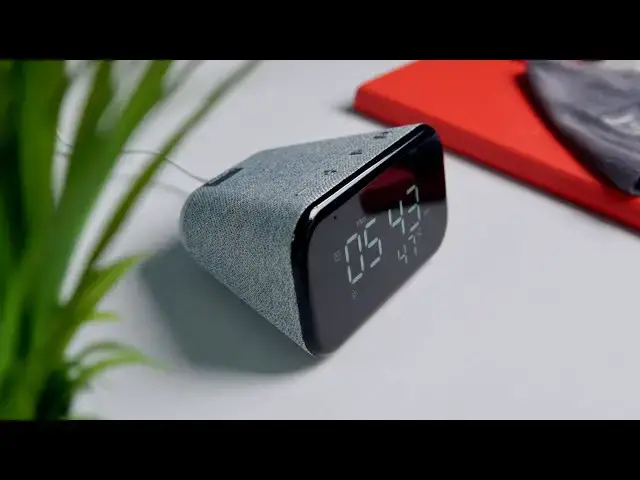
As we near the holiday shopping season and lots of electronics start plummeting in price, we thought it a good time to get our hands on the new Lenovo Smart Clock Essential as it is becoming available for as little as $25 as of the writing of this post. For that small asking price, the smallest smart clock Lenovo makes brings a lot to the table in a package that accomplishes much of what you need out of a smart alarm clock and little else. Let's take a look.
Read more: https://chromeunboxed.com/lenovo-smart-clock-essential-hands-on-big-value/
Join our newsletter: http://bit.ly/2WjCDm7
・・・・・・・
Shop Lenovo Smart Clock Essential at Best Buy: https://fave.co/2HRNp21
Shop Chromebooks on CHROME SHOP: https://chrmshop.com/
Subscribe to the channel: http://bit.ly/2xFuj6L
The Music We Use - PERFECT for YouTube: http://bit.ly/31W6PYP
Follow us:
Show More Show Less View Video Transcript
0:00
not long ago lenovo debuted this guy the
0:03
smart clock essential
0:04
and when it debuted we kind of felt like
0:06
this was going to be a great play for
0:08
the holidays it would go on sale it'd be
0:10
easy to get a hold of and it's a clock
0:13
and a smart speaker kind of all in one
0:15
and so it just looked like this great
0:17
gift idea this great
0:19
smart speaker smart home kind of device
0:21
and so now that it's on sale at quite a
0:23
few places for only 25 bucks we wanted
0:25
to get our hands on it
0:26
unbox it and see if it's worth your
0:28
money
0:30
[Music]
0:44
all right so without any further ado
0:46
let's just jump into this box here and
0:49
we're not expecting a whole lot of uh
0:51
crazy amazing things with the boxing
0:53
here because
0:54
again this thing is 25 bucks and we
0:57
bought this
0:58
at our local best buy and i would assume
1:01
that we'll see
1:02
similar deals at other stores as the
1:05
next couple months wear on
1:07
but this device from lenovo's not trying
1:09
to do anything
1:10
special it's not trying to create some
1:13
brand new experience or
1:15
blow your mind in any way it's essential
1:17
just like it says on the box and
1:19
the whole idea here is to basically
1:21
create the most
1:22
minimal experience you need it doesn't
1:24
have a crazy display on it that's doing
1:26
anything special
1:27
it's just a clock display that's going
1:28
to get you a speaker that has some
1:30
smarts to it
1:31
and gets out of the way and i'll be
1:33
frank
1:34
in my bedroom this is kind of an
1:36
attractive package here because
1:38
ultimately we have an alarm clock uh
1:41
sitting
1:42
on a table in our in our room that we
1:44
can see from the bed so if i wake up and
1:46
look i can kind of see that that clock
1:48
but it's got that huge green kind of
1:50
back light to it so
1:51
honestly when i wake up and at two or
1:53
three o'clock in the morning and trying
1:54
to orient and figure out what time it is
1:56
i look over and that thing is just
1:57
blinding and
1:58
i don't know i just don't love it it's
2:00
battery powered and it's awkward and it
2:01
doesn't do anything other than show us
2:02
the time this gives us time some weather
2:05
and again it gives us a smart speaker so
2:07
i could replace one of my
2:09
nest minis that's in in our bedroom and
2:13
kind of gives all of those
2:14
functionalities in one thing assuming
2:16
the speaker sounds decent so
2:17
we're kind of hopeful that the speaker's
2:18
at least going to sound good and that
2:20
the display is nice and crisp looking
2:22
and easy to see from across the room
2:24
let's see here
2:26
i'm let's be honest i'm not going to
2:28
read this you're not going to read this
2:30
um but you know some basic paperwork
2:32
there what do we got
2:33
and barrel charger i was kind of hoping
2:35
for usb type c but again it's 25 bucks
2:38
so the lesser development that they can
2:40
do is probably what they're going to go
2:41
for
2:42
every single time because ultimately
2:45
with usbc
2:46
even though it is universal they've got
2:48
to put some effort into it to make the
2:49
charging and stuff work so
2:52
generally when we're unboxing cheaper
2:55
or more affordable hardware the usb
2:57
type-c is not going to be part of the
2:58
equation
2:59
man see how you love the way this thing
3:01
looks look at that it's got that cool
3:02
cloth look to it here
3:04
uh the back section here that you can
3:06
see it looks a little uh transparent
3:07
it's actually like a night light so not
3:09
sure how exactly that works whether it's
3:11
motion or you gotta touch it or
3:13
not sure and then you got like some
3:15
clicky buttons up top
3:18
so plus and minus obviously for volume
3:20
it looks like a play button
3:22
uh maybe that's play pause uh we'll
3:25
figure that part out
3:26
and then i'm assuming the alarm is where
3:27
you'll click to set your alarm
3:29
so if you're old school and you want
3:30
that alarm clock like next to your bed
3:32
that you can
3:32
hit something i don't know how the
3:34
snooze will work on this either we'll
3:35
have to figure that part out
3:37
but ultimately this is going to be that
3:39
kind of simple uh
3:40
clock interface that a lot of us are
3:42
used to just a straight up digital clock
3:44
again
3:44
we're not talking about some fancy uh
3:46
lcd screen here that has touch capacity
3:49
i don't know that this is a touch screen
3:50
at all this is just a clock
3:52
with a decent speaker in it with a nice
3:55
aesthetic
3:56
that's pretty affordable for you to use
3:58
with a night light
3:59
and there's a usbc or a usb-a i'm sorry
4:02
port right here on the back that you can
4:04
actually plug a charging peripheral into
4:06
so if you need to charge something like
4:07
a smart watch or something like that
4:09
you can use this to to plug that thing
4:12
into
4:12
and charge your accessories as well and
4:15
then clearly a
4:17
mute switch for the mic here and then
4:19
just your power so
4:20
again it's simple there's not a whole
4:22
lot going on but as you can see
4:25
this thing is very attractive like very
4:27
very attractive looking
4:28
very nice and compact it's going to look
4:30
good on just about any table i would
4:32
assume
4:32
so uh oh and i don't know if you can
4:36
pick those up there
4:36
but we actually have a dual array
4:38
microphone here too so usually when you
4:40
have a couple mics it means it's better
4:41
at picking your voice up from across the
4:43
room so
4:44
i think there's going to be a lot of
4:45
things to like about this nice solid
4:47
rubber feet there so once you got it
4:48
set it is going to stick in place as
4:50
well but we are going to plug this thing
4:52
in
4:52
and get it set up on our network real
4:54
quick and see how the screen looks
4:57
see what the speaker sounds like most
4:59
importantly and see what these buttons
5:00
do
5:01
exactly real quick okay so we got this
5:03
thing all set up and
5:04
just like any other smart speaker the
5:06
setup process is pretty simple
5:07
get the google home app on a tablet or a
5:10
phone or whatever
5:11
it'll see the device click through the
5:13
buttons
5:14
attach it to your account all that good
5:15
stuff and then you're set up and ready
5:17
to go and one of the cool perks here is
5:19
that
5:19
since this is a smart clock even though
5:22
the the face of it is very much like a
5:24
clock face it doesn't do anything
5:25
special or have any
5:27
funky animations or screens to swipe
5:29
through sometimes with
5:30
a face this simple you would think i'm
5:32
gonna have to go set the time and
5:34
everything well it's a smart clock so
5:35
it you know caught up on the time
5:37
immediately caught up on the weather so
5:39
it's it's good to go
5:40
ready to go right out of the box and
5:41
that's just kind of a nice touch of
5:43
having a
5:44
a smart clock uh set up via the google
5:46
assistant because you don't have to mess
5:48
with all of that kind of stuff now
5:49
onto it as a smart speaker we did play
5:52
back a couple songs we can't do all that
5:54
stuff on camera because of licensing and
5:56
all that stuff but
5:57
ultimately it sounds really nice i think
5:59
ness mini kind of sounds so nice and
6:01
round and surprisingly full for
6:03
something this tiny
6:05
and it's probably gonna be really good
6:06
for spoken audio not gonna blow your
6:08
mind it's not gonna hear every bit of
6:10
the bass lines that are
6:11
present in all songs but i think for a
6:14
speaker that's going to live
6:16
in your room probably right beside your
6:17
bed it's gonna
6:19
do really well for basic audio playback
6:21
and most songs are going to sound pretty
6:22
nice on it one of the other primary
6:24
functionalities this thing will serve as
6:26
is as an alarm clock and ultimately i
6:28
did have to go and break the paperwork
6:30
back out and figure out how to
6:31
manipulate the buttons to remove
6:33
alarms because i kept setting alarms and
6:35
messing around with stuff and next thing
6:36
i knew i had like eight of them set the
6:38
whole interface is pretty simple
6:39
as far as checking your alarms removing
6:41
your alarms snoozing your alarms
6:43
but setting them isn't so easy but you
6:45
can just use your voice to do that so
6:47
say i need to set an alarm for mondays
6:50
at 7 00 am
6:51
ok google set a repeating alarm for
6:54
mondays at 7 00 am
6:57
every monday at 7 00 am set and you can
7:00
see
7:01
as soon as i hit the alarm button you
7:02
see 7 am you see monday and it has an 01
7:05
down there showing that that's
7:06
alarm number one if i go and set more
7:07
alarms it'll just keep kind of stacking
7:09
them in there
7:10
and then if i want to delete them i just
7:11
click through my alarms
7:13
by clicking the alarm let me set a
7:14
second one hey google
7:16
set an alarm for tomorrow at 5 00 pm
7:19
tomorrow at 5 p.m so now now we'll see
7:22
i've got the original one to set
7:23
click it again i've got the 5 pm and it
7:25
just keeps kind of cycling through
7:27
but i don't want that alarm for 5 pm
7:29
tomorrow so i'm just going to hit the
7:30
minus the volume minus and the alarm
7:31
button
7:32
and that one gets deleted and it's gone
7:34
so uh it's a nice touch it's an easy way
7:36
to get through all of your alarms and
7:38
have your alarm set you can set multiple
7:39
days you can set every other day
7:41
you can start repeating except one time
7:42
alarms and all that kind of stuff and
7:44
then when that alarm does go off you
7:45
click any of the three buttons that is
7:47
not the alarm button the alarm button
7:48
will dismiss it
7:49
but the first three buttons will snooze
7:51
it for 10 minutes and so it's a nice
7:53
basic setup for an alarm clock again
7:55
i wouldn't go through the problem and
7:57
the the difficulty of
7:58
trying to manually create the alarms you
8:00
got to click through the buttons and up
8:02
and down and that feels like an old
8:03
alarm clock that
8:04
i frankly don't want to mess with using
8:07
your voice
8:07
feels like the way you're supposed to
8:08
set an alarm in 2020 and so this thing
8:10
does a really good job of that i don't
8:12
know what the max amount of alarms a
8:14
single hole that we had eight or nine i
8:15
think in here at one point in time so
8:17
i don't know how many alarms most people
8:18
need but i would assume that the number
8:20
that it can hold is going to do
8:22
enough for you and probably whoever you
8:24
need to set this alarm for and finally
8:26
this is kind of just an add-on perk that
8:28
you have here but it's got a night light
8:30
around the back we kind of showed you
8:31
that there at the beginning when we got
8:33
out of the box all you have to do is
8:34
hold the volume down
8:36
and it will come on and it looks pretty
8:39
dim right here
8:40
i would imagine that's probably plenty
8:42
at night if you sleep in the dark
8:43
but you can ask google to adjust it hey
8:46
google
8:47
change the nightlight brightness to 100
8:52
and honestly under studio lights that
8:53
looks pretty bright and i would assume
8:55
that that's way too bright
8:56
probably somewhere around 50 is what
8:58
you're going to want but once you get up
9:00
do what you got to do
9:00
lay back down hold that minus button
9:02
down for a second
9:03
and off goes the night light so again a
9:06
nice little functional
9:07
thing for you to have next to you in the
9:09
bed and i think
9:11
you know some of the smart displays are
9:13
nice and they do a lot of stuff that
9:15
this doesn't do
9:16
and that's great but ultimately for
9:18
something that's going to sit beside my
9:20
head at night when i go to bed
9:21
i just need it to be able to wake me up
9:23
maybe play a little bit of music for me
9:25
and that night light functionality is
9:27
just kind of a nice add-on perk
9:28
and it can charge one of my devices like
9:30
this is a great thing to have
9:32
at your bedside table and for 25 bucks i
9:35
mean
9:36
it's just an easy sell i think it's a
9:38
great device it'd make a great gift this
9:39
holiday season
9:40
and for me personally i mean we didn't
9:42
get this as a review unit
9:44
i went and bought it for 25 bucks i i
9:46
want this as my alarm clock sitting next
9:48
to my bed so that
9:49
i could set it maybe as a backup to my
9:50
phone or something like that
9:52
and always just kind of have something
9:53
there to wake me up in the morning as a
9:54
night light
9:55
charge my smart watch all that kind of
9:57
stuff so i think lenovo's killing it
9:59
with this thing it's uh it's going to
10:00
sell well and do really well
10:02
and it's uh it's been pretty cool just
10:03
to unbox it and see it all in action
10:05
here but guys that's been it for this
10:06
one if you like this video
10:08
make sure you give it a thumbs up hit
10:09
that subscribe button as well and don't
10:11
forget to hit the notification bell
10:12
if you'd like to be alerted when we make
10:14
future videos just like this one until
10:15
next time
10:16
we'll see
10:19
[Music]
#Consumer Electronics
#Home Automation