Up next in 10



Sponsored by NordVPN. Buy a 3-year deal at 70% off, get an extra plan on top! Click here: https://chromeunboxed.com/nordvpn
・・・・・・・
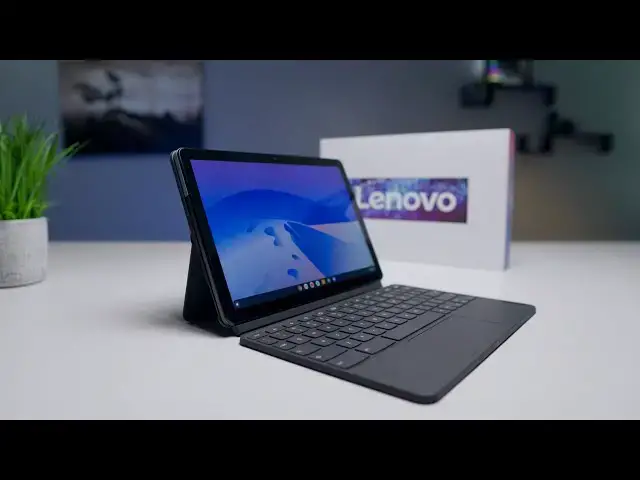
The day is finally here! Nearly 5 months to the day since we first laid eyes on the Lenovo Chromebook Duet, the company has delivered one to our office and we're taking off the wraps to reacquaint ourselves with the 10-inch Chrome OS tablet. It's no secret we and countless others have been looking forward to this device for months, so we're very excited to begin the review process.
Read more: https://chromeunboxed.com/unboxing-the-lenovo-chromebook-duet/
Join our newsletter: http://bit.ly/2WjCDm7
・・・・・・・
Shop Chromebooks on CHROME SHOP: https://chrmshop.com/
Subscribe to the channel: http://bit.ly/2xFuj6L
The Music We Use - PERFECT for YouTube: http://bit.ly/31W6PYP
Become a member of Chrome Unboxed to help us make our channel even better, and for access to exclusive perks: http://bit.ly/CU-join
Follow us:
Show More Show Less View Video Transcript
0:00
well today is the day lenovo has
0:02
delivered
0:03
our review unit of the chromebook duet
0:05
and we can finally
0:06
get in the box and re-remember what this
0:08
thing feels like
0:10
and remember again if this is going to
0:12
be the device we think it's going to be
0:14
this
0:15
entry-level very affordable premium
0:18
feeling kind of package that i think is
0:20
going to appeal to a lot of you so let's
0:21
get in the box and check it out
0:22
[Music]
0:27
today's video is brought to you by
0:28
nordvpn they're the vpn of choice for
0:30
millions of consumers because they're
0:31
awesome at what they do and that's
0:32
keeping your browsing secure and safe
0:34
when you're at home or out and about and
0:36
on the go
0:37
if you'd like to learn more about them
0:38
and their services head over to
0:40
chromeunbox.com forward slash nordvpn to
0:42
learn more and you can get started today
0:44
so without further ado let's hop in the
0:46
box here
0:48
and again like this trend of 2020 is
0:52
nice boxing for chromebooks and it i've
0:55
had people in the comments say i can't
0:56
believe you're getting excited about a
0:57
box
0:58
but again you got to remember we've been
1:00
doing this for years
1:01
and we've always opened brown plain
1:04
boxes and so
1:05
to see a manufacturer take a little bit
1:07
of extra time just you know to add some
1:09
color and some whiteness to the box and
1:10
it's just a little nicer feeling
1:12
especially for a sub 300 chromebook this
1:15
is just a nice touch so
1:16
right up off the top we've got the
1:18
tablet that is just as thin
1:20
and light and like firm we'll get into
1:23
it in a second
1:24
that i remember it in vegas uh
1:31
probably a charger here
1:37
yeah so oh i forgot that's in the box um
1:40
so yeah just a
1:41
small charger and a lot of the
1:43
accessories here kind of feel like phone
1:44
accessories because you got to remember
1:46
the processor inside this tablet is
1:48
actually a basically a phone processor
1:51
so probably as far as power delivery and
1:54
all that kind of stuff yeah
1:54
usb type c to a so this is going to
1:57
charge with any usb type c but
1:59
it's not going to take uh from what i
2:00
can tell it's not going to take a whole
2:02
lot of
2:03
power you don't have to use a laptop
2:04
charger for instance to actually get
2:06
this thing charged up um
2:08
it's too shiny i can't read it but if
2:10
it's like the 10e i think it's just a
2:11
two amp charger so
2:13
kind of a normal phone charger um and
2:15
then in the box you also get this usbc
2:17
two headphone uh jack because there is
2:20
not a headphone jack on
2:22
this device so it's nice they included
2:24
that kind of wish they would have put a
2:26
headphone jack on here
2:27
i don't know i feel like a tablet has
2:29
enough space for one but then you have
2:30
to put
2:31
a dac inside and all that kind of stuff
2:33
so who knows
2:34
i this thing's gonna get a ton of passes
2:37
for me all over the place when we do our
2:39
review and anything else with it because
2:41
you know even at the higher spec one
2:43
that this is the 128 gig
2:44
model you know it's it's 299 dollars and
2:47
it'll probably go on sale be even
2:49
cheaper than that down the road so
2:50
it's going to get a ton of passes
2:51
because ultimately it's it's super
2:53
affordable so
2:54
a lot of people will be able to get a
2:56
hold of the 279 version of this which
2:58
has 64 gigs of internal storage
3:00
so those things are always going to be
3:03
worth noting
3:04
because ultimately price informs our
3:07
opinions on things and when stuff is
3:09
cheap
3:10
it feels pretty nice we can just kind of
3:12
let it slide with some stuff so here's
3:13
that keyboard
3:15
let me peel this off there yeah just as
3:18
kind of nice and rigid as i recall it i
3:21
mean
3:22
again you got to consider how much this
3:24
thing cost
3:25
you're not going to get like a full
3:27
aluminum amazing you know
3:29
magic whatever apple calls their
3:31
keyboard thing experience out of this
3:33
thing that thinks 350 dollars that the
3:35
keyboard for the the
3:36
ipad pro costs more than this entire
3:38
package so uh
3:39
but yeah key travel feels good here
3:43
trackpad is nice and clicky so again and
3:46
it's nice that it's included in the box
3:47
so that's that's added benefit here and
3:50
then this is just the
3:52
back portion that that gives us the
3:55
stand functionality has that really nice
3:58
cloth kind of texture on the back of it
4:00
and
4:02
yeah so it's got that kind of hinge i'll
4:04
uh you know
4:05
microsoft surface um that kind of
4:09
just allows you to bend the tablet back
4:11
at multiple angles
4:12
uh so we'll attach all this stuff here
4:13
in just a second and
4:16
let me check real quick obligatory
4:19
paperwork that no one reads
4:21
yeah okay so let's not forget at the end
4:23
of the day this thing still
4:25
is a chromebook but it's also a tablet
4:27
and
4:28
so it's just going to be an interesting
4:30
use case ultimately with
4:32
the lenovo because again i
4:36
i'm not sure how many people want to
4:37
work from this thing all day every day
4:40
but i could see you know like my kids
4:43
using it
4:44
uh on a regular basis and you know i've
4:47
again i i've reviewed the 10 e so i've
4:49
spent some time staring at it
4:51
a screen that's exactly the same as on
4:53
this one and i can tell you it's
4:55
like you can kind of get used to it and
4:57
it's nice to have on the go it's light
4:58
it's something you can just run down to
4:59
the coffee shop
5:00
uh get some tasks done on but really
5:03
starting to leverage chrome os as a
5:05
tablet os that's
5:06
i think gonna be the the use case here
5:08
for this thing is
5:09
trying to figure out what it's like to
5:11
really use chrome os on tablet because
5:13
we honestly haven't had a good chance to
5:15
do so like the slate i know i bang on
5:16
the slate all the time
5:18
but it was it was just too big to be a
5:19
good tablet it was better suited when it
5:22
was in a keyboard case or something and
5:23
so
5:24
i always wanted it to be a chromebook
5:26
and just kind of lean that way
5:27
this thing feels like these are these
5:30
are like additions these are things that
5:31
i'll have with me
5:33
and use on occasion but ultimately i
5:36
want to pick this thing up and use it
5:37
the way it is here so that's kind of the
5:39
way i'm going to approach this device
5:40
but
5:41
ultimately a little fingerprinting
5:44
already
5:44
um so keep that in mind but this nice
5:47
metal chassis down here
5:49
and what lenovo's calling like a plastic
5:52
glass
5:52
something up here i'm guessing this is
5:54
up here so that all your antennas can
5:56
get through
5:57
but you got the dual microphone array up
5:58
here speaker ports up there
6:01
we've got a power button volume rocker
6:03
again no headphone jack on the side
6:06
usb type c input and that will serve as
6:09
charging and
6:11
display output as we noted on the 10e
6:15
unless they've changed something on this
6:17
the display out isn't the best in the
6:19
world you don't get as many options as
6:20
you would like probably from chrome os
6:22
but
6:22
we'll test that obviously then you get
6:24
your pogo pins and your kind of
6:25
alignment nub
6:26
things that go with the keyboard so
6:28
let's actually pop this thing together
6:31
yeah that's nice
6:35
yeah that's nice and firm and three out
6:37
of three it lines right up so
6:39
it's nice to see you know devices that
6:42
use magnets just
6:43
pop into place and when they kind of
6:44
miss and don't quite line up
6:47
that's kind of annoying and that yeah
6:48
drops right on there
6:50
uh not perfect not the strongest magnets
6:53
i mean once it's on there
6:55
you know that thing is that thing's on
6:56
there pretty good but it didn't i didn't
6:58
just have to drop it on see like i
7:00
dropped it and it
7:01
kind of missed a little bit so you'll
7:03
have to take your time
7:04
when you're dropping that on but all
7:06
together once you put all the stuff
7:07
around it like put its armor on
7:09
basically
7:10
uh it's not like super lightweight like
7:12
this kind of feels like carrying a small
7:14
chromebook so
7:15
again you got to keep these things in
7:16
mind like if you're going to use it with
7:18
all these accessories
7:19
it's not going to be the mobile light
7:21
thin little thing that it was before you
7:23
put all this stuff onto it but we'll
7:25
flip it up
7:28
and that hinge feels great uh and this
7:30
you know this is a pretty smooth table
7:32
so
7:33
um i'm gonna have to get logged in and
7:35
everything here but
7:37
yeah that feels nice
7:41
and ultimately flip it closed slap it
7:43
down boom
7:44
and then the converse is true you open
7:47
it up
7:48
pop this off pop that off and boom
7:50
you're ready to go yeah i mean
7:53
i like what i'm seeing here um we're
7:55
obviously gonna have to do all kinds of
7:57
testing on this thing because
7:59
ultimately it comes down to is this
8:00
thing fast enough to use as a chromebook
8:02
is using a chromebook tablet like this
8:06
something that
8:07
people are gonna want to do what i can
8:09
definitely say is from just the
8:11
the feel the firmness of this thing uh
8:14
how good the screen looks again we
8:15
talked about this with the tinney it's a
8:16
400 nits screen it's full hd
8:18
plus so it's 1920 by 1200 it's got the
8:22
mediatek p60t
8:23
processor otherwise known as the 8183 so
8:27
you know it's got a decent enough
8:28
processor in it to get some stuff done
8:31
you can see even as i'm you know
8:32
flipping it moving into
8:34
multiple display modes like nice and
8:37
quick
8:39
things seem pretty fast on it again we
8:41
have a lot of testing to do with this
8:42
thing
8:43
uh part of today was just opening it up
8:45
see if it feels as premium
8:47
as i remember it because again using the
8:49
10e the the
8:50
education model of it it kind of felt a
8:52
little clunky and thick
8:53
this thing is thin it is light less than
8:55
a pound
8:56
and definitely something i want to pick
8:58
up and use like this as a tablet i want
9:00
to read stuff on it i want to
9:01
hold and jot notes and that kind of
9:03
thing on it so
9:05
i think it's going to be a great device
9:06
for a lot of people mainly because of
9:07
the price
9:08
at 300 this is going to be the nicest
9:10
package in an overall chromebook i think
9:11
that you can get across the board i mean
9:14
right now it's hard to get chromebooks
9:15
at all and this one is less than 300
9:18
bucks and you're getting a lot of
9:19
premium materials here and i think
9:20
lenovo's done a great job
9:22
so far with all that again we got to see
9:24
how it performs we got to see how it
9:25
feels to actually use this thing as a
9:27
chromebook
9:27
as a tablet and do our whole review
9:29
process with it but
9:31
so far i can tell you that i'm as
9:33
impressed as i was in las vegas with
9:35
this thing just having it out of the box
9:37
again having it in front of me
9:38
holding it touching it using it for just
9:40
a few seconds but
9:41
obviously we'll have to hold everything
9:44
for our full review that will be coming
9:46
pretty soon hopefully
9:47
and if you'd like to see that make sure
9:49
and go down there and hit the subscribe
9:50
button like this video if this has
9:51
helped you out at all
9:52
make sure and hit the notification bell
9:54
as well if you'd like to get
9:55
notifications when we do
9:56
release that review and other videos
9:58
like this and don't forget to hit the
9:59
join button as well
10:01
if you'd like to see all the stuff that
10:02
our members get like custom emoji and
10:04
behind the scenes footage but until next
10:05
time guys
10:06
we'll see
#Laptops & Notebooks
#Consumer Electronics