Up next in 10



Sponsored by MediaTek who is powering our On The Run To 200K giveaway! Learn more and enter to win here: http://bit.ly/runTo200k
・・・・・・・
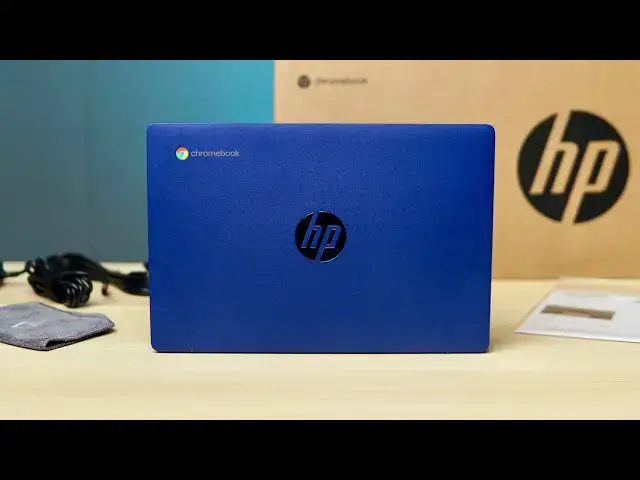
The HP Chromebook 11a is in the office with its bold colors, compact design, and super-affordable price tag. This Chromebook does what most affordable Chromebooks do: get you to the basics on the lowest possible budget. If you're looking for a small, portable, fun little device to do basic web-based tasks like social media, banking and general web browsing, the HP Chromebook 11a has a lot to offer at a very low starting price.
Read more: https://chromeunboxed.com/hp-chromebook-11a-mediatek-mt8183-unboxing-review/
Join our newsletter: http://bit.ly/2WjCDm7
・・・・・・・
Join our Patreon community for exclusive extras, an ad-free website experience, access to our private Discord server, and more: https://www.patreon.com/chromeunboxed
Shop Chromebooks on CHROME SHOP: https://chrmshop.com/
Subscribe to the channel: http://bit.ly/2xFuj6L
The Music We Use - PERFECT for YouTube: http://bit.ly/31W6PYP
Follow us:
Show More Show Less View Video Transcript
0:00
today we have the hp chromebook 11a in
0:02
the office
0:03
and we're going to hop in the box and
0:04
see if this small
0:06
very blue mediatek powered chromebook
0:10
is actually a good option for those of
0:11
you looking for a low priced
0:13
simple chromebook solution for basic use
0:15
around the house or remote learning
0:17
[Music]
0:20
but before we get into that big shout
0:22
out to mediatek for making
0:24
our on the run to 200k giveaway possible
0:27
you may not know this but we're rapidly
0:28
approaching 200 000 subscribers here on
0:31
our youtube channel and
0:32
as a celebration of that milestone we've
0:34
partnered with mediatek to give away a
0:36
bunch of sweet prizes along the way that
0:38
are
0:39
all powered by mediatek if you want to
0:41
get entered to win check the link in the
0:42
description to claim your entries and
0:44
good luck all right so let's hop in the
0:47
box here there's not a whole lot going
0:49
on
0:49
obviously with this box there's not a
0:51
whole lot going on with a whole lot of
0:52
chromebook boxes to be honest they're
0:54
all pretty much brown boxes
0:55
but one cool part about this particular
0:57
chromebook a is the price a hundred and
1:00
sixty nine dollars uh 179 dollars it
1:03
kind of goes on sale for different
1:04
numbers
1:05
it's going to get you into this
1:06
chromebook and so it is one of the
1:09
very very low cost devices and that was
1:12
what kind of piqued our curiosity with
1:13
it
1:13
it's also blue which is kind of cool and
1:17
it has a mediatek processor in it so
1:19
like i said we're
1:20
you know doing this whole run to 200k
1:23
powered by mediatek well
1:25
we're actually going to be giving away
1:26
this chromebook so i just wanted to
1:28
spend a little bit of time with it and
1:29
so to be straightforward with you
1:31
i've already opened this thing up and
1:33
and logged into it and messed with it
1:34
for a few minutes because
1:36
ultimately i just wanted to see if a
1:38
cheap chromebook like this
1:40
is actually worth any of you picking up
1:42
uh we don't tend to review a lot of
1:44
chromebooks in this price range
1:46
uh it's just kind of the way it is
1:49
because a lot of them are the same but
1:50
when they dip down in price this
1:52
low it's worth getting them out of the
1:54
box real quick checking to make sure
1:55
they
1:56
are good and especially if we're giving
1:58
it away i you know
1:59
we don't want to give away stuff that we
2:01
wouldn't like to give to a family member
2:03
or a friend or something like that so
2:05
you know i wanted to open it up hey make
2:07
sure it works
2:08
but b also make sure it's just not kind
2:10
of crappy
2:11
uh and good news is it's not
2:14
uh here's the charger you don't care
2:17
about any of that stuff but i'm gonna
2:18
set it down
2:19
nice and gently though because like i
2:21
said we're giving this one away
2:23
and here we are and i hope that color is
2:25
coming off
2:26
on camera because it's really attractive
2:30
i think indigo blue is the the color
2:32
they
2:32
they talk about with this one i just i
2:34
love the way this chromebook looks
2:36
i'm a big fan now especially in in lower
2:38
cost chromebooks
2:39
uh or even higher in chromebooks of
2:41
getting away from just having silver i
2:43
mean
2:44
don't get me wrong i like the way
2:45
macbooks look but i don't love the fact
2:48
they're all silver it's a dark silver or
2:49
light silver but it's just you know
2:51
silver
2:51
and gray and kind of bland chromebooks
2:54
don't need to be that way there's lots
2:55
of people that make chromebooks there's
2:56
lots of different manufacturers and
2:58
processors and all that kind of stuff we
3:00
should have some color and some
3:01
some interesting things to look at on
3:03
the outside and
3:05
i really like this it's all all that
3:07
same blue
3:08
through and through hinge every bit of
3:09
it uh some speaker grilles on the bottom
3:11
two nice big feet and io is uh okay
3:15
you got a single usb type a on one side
3:18
and then a usb type c and a micro sd
3:21
card slot headphone jack
3:23
again for a low-cost chromebook a simple
3:25
chromebook
3:27
honestly it's about all you need that's
3:28
going to connect you to all the things
3:29
you need to get connected to
3:31
and looks pretty sweet so i did put that
3:34
back
3:35
and i can tell you you know the inside
3:37
of it again you get that same indigo
3:39
blue color the keyboard the keys are
3:43
quiet
3:45
decently clicky uh again this is a low
3:47
end keyboard so we're not getting the
3:49
highest end keyframe here
3:50
but the keys feel good uh there's
3:52
obviously no backlighting going on here
3:54
this model doesn't have a touch screen
3:57
but
3:57
one thing you normally get in a device
3:59
this cheap is a really
4:01
terrible track pad this one clearly is
4:04
plastic
4:05
but the surface is really good and hp
4:07
has gotten really good at making track
4:08
pads and there's no like weird flopping
4:10
around it's not loose
4:11
the click mechanism is nice and quiet
4:15
so all in all even though i've only used
4:17
this trackpad for
4:18
a little bit of time i can tell you it's
4:20
actually pretty good and that's that's
4:22
important because you need the trackpad
4:24
to work well
4:24
on a device that doesn't have a
4:26
touchscreen it's the main way that
4:27
you're going to move the mouse around
4:29
your screen it's the main way you're
4:30
going to gesture it's the main way
4:31
you're going to get around the entire
4:32
interface since you can't reach up and
4:34
touch things so
4:35
it's really cool that hp took the time
4:38
to put a good trackpad in this
4:40
particular device
4:40
apart from that you get this standard
4:42
720p camera that's
4:44
kind of okay and you're getting a 720p
4:48
class screen so 1366 by 768 it's a tn
4:52
panel
4:53
it uh it doesn't look great and
4:55
hopefully you can kind of see it here on
4:57
camera
4:58
but you know this is what you expect in
5:00
this kind of price range with a
5:01
chromebook like this this
5:03
is a panel that is not going to get
5:05
crazy bright it's about 220 nits
5:08
it's like what you've seen in a lot of
5:09
low-end chromebooks the viewing angles
5:11
don't look great so you can probably see
5:13
it getting dark there and it'll get
5:15
really white and washed out there
5:17
so you really got to play with it to get
5:18
the angle right but
5:20
if there's one redeeming factor to
5:22
screens like this in chromebooks this
5:24
size
5:24
it's the fact that with a smaller screen
5:26
you can kind of dial in the sweet spot
5:28
if you get it just right and it looks
5:30
okay it's workable it's fine
5:32
uh you know that that's not to say it's
5:34
it's a great screen
5:35
but there's an option if you go up to
5:37
like a 230 dollar version of this like
5:39
target has it i believe that actually
5:40
has the touchscreen so if you get the
5:42
touch version of this
5:43
it's still a 1366 by 768 display
5:46
but it is an ips screen so you're going
5:48
to get much better colors
5:49
much better viewing angles i don't know
5:51
that you're going to get much more
5:52
brightness out of it however so two
5:54
other things i want to talk about with
5:55
this one again this is a very very
5:57
affordable chromebook basically if it
5:59
turns on and gets you on the internet
6:00
it's doing its job
6:02
but i was really surprised with how
6:04
rigid the thing feels so watch i'm gonna
6:05
wrench
6:06
on this thing really good like i mean
6:08
that's
6:09
impressive for 170 chromebook uh and
6:12
even once i open it up
6:13
and flip it around this way and really
6:15
kind of give it a wrench
6:16
you can see some give there but uh and
6:19
i'm not calling anybody out here
6:21
it's no worse than the samsung galaxy
6:23
chromebook was and that's a 700
6:25
chromebook so you know it's it's
6:27
impressive to see them put something
6:29
together that's that's this good because
6:30
obviously they had to cut
6:31
tons of corners to get under 200 for any
6:34
chromebook
6:35
and the other part i want to talk about
6:36
is performance
6:38
it shouldn't be any surprise to you that
6:39
this isn't going to be the fastest
6:40
performing chromebook on the market
6:42
it's a mediatek powered so 8183 mt-8183
6:45
same thing that's in the lenovo
6:47
chromebook duet the benefit you're going
6:49
to get here over the duet
6:50
is just pixels when you're talking about
6:53
low-end processors
6:54
they're going to benefit more than a
6:57
high-end processor when you cut the
6:58
number of pixels down on the screen so
7:00
the duet and other devices like it are
7:04
a 16 by 10 so 1920 by 1200 i think it's
7:08
the resolution on those
7:09
that's a lot of pixels to be pushing
7:10
around for a low end processor 1366 by
7:13
768 cuts those
7:14
down quite a bit you're getting 600 or
7:16
so pixels off this way and
7:18
a few hundred pixels off the bottom that
7:20
makes processing
7:21
every one of those pixels a lot easier
7:23
and so it to me
7:25
this chromebook feels a lot faster than
7:27
the duet
7:28
even though they're the exact same
7:29
processor and this particular one comes
7:31
with 64 gigs of storage as well so
7:33
you're getting four gigs of ram 64 gigs
7:35
of internal storage
7:36
there are other ones out there with four
7:37
gigs and 32 gigs of internal storage
7:40
and that's pretty much the only two
7:42
variants you're going to see of this
7:43
particular device but all in all that's
7:45
it you know
7:46
again this is a an affordable chromebook
7:48
that has a really cool look to it
7:50
that's that's relatively thin and light
7:52
it feels good in the hand
7:54
it's going to look really good on a
7:55
table or coming out of a bag and if
7:57
you're looking for something to just
7:58
kind of have around the house
8:00
to get some bills paid to jump on
8:02
facebook to do some banking
8:03
you know that kind of stuff web-based
8:05
task that's going to do great it's
8:07
actually going to do great with quite a
8:08
few android apps as well
8:10
but again you gotta remember you don't
8:11
have a touch screen so if the android
8:13
app isn't optimized for keyboard and
8:15
trackpad
8:16
you're gonna run into some issues
8:17
getting around those apps so i i
8:18
wouldn't buy this as an android
8:20
first kind of device the duet's gonna do
8:22
that a whole lot better
8:24
but in general i mean i'm kind of
8:26
impressed with this for the price point
8:27
i'm excited now that we're giving it
8:29
away because i think it's going to
8:30
make a nice addition for someone that
8:32
again is looking for something to use on
8:34
the couch
8:35
or for remote learning i don't know that
8:37
i would recommend this for remote work
8:39
but one other thing i will say it's hard
8:41
to show this or
8:42
show it to you on camera necessarily but
8:45
the speakers are actually
8:46
kind of surprisingly good they're not
8:48
crazy loud
8:49
but especially for spoken voice and
8:51
stuff like that the speakers sound
8:53
really good
8:54
so you know if you're taking some calls
8:55
again kids are in google meet or zoom
8:57
classes or something like that it's
8:59
going to do a really good job with that
9:00
too and
9:01
again for sub 200 price tag it could
9:04
make a nice little workhorse edition
9:06
around the house but guys that's it for
9:08
this one i hope you enjoyed this video
9:10
if you did
9:11
give us a thumbs up go down there and
9:13
hit that subscribe button and make sure
9:14
and ring the notification icon that's
9:16
next to that
9:16
if you'd like to be alerted when we make
9:18
future videos just like this one but
9:20
until next time
9:21
we'll see you
9:28
[Music]
#Consumer Electronics
#Gadgets & Portable Electronics