Up next in 10



Sponsored by NordVPN. For a limited time, grab the 3-year plan with 70% off! Click here: Click here: https://chromeunboxed.com/nordvpn
・・・・・・・
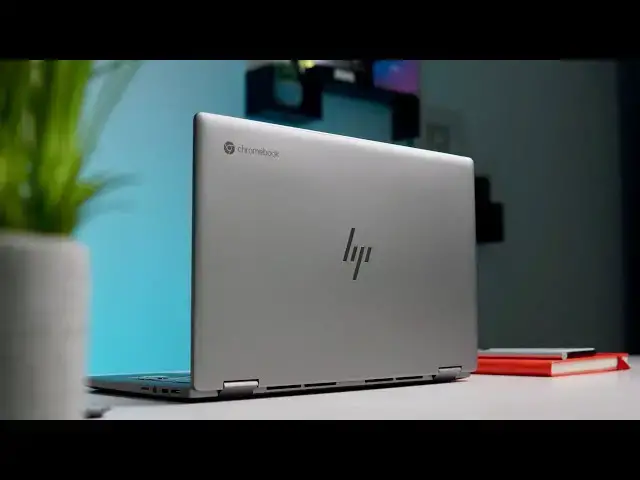
The HP Chromebook x360 14c is a solid offering from HP that takes the formula from its 18 month old predecessor and improves on it in nearly every way. Just like that earlier iteration of the x360 14, this latest version delivers a great overall Chromebook experience and does so while getting pretty aggressive price reductions along the way. After all, the original HP x360 14 wasn't the best overall Chromebook you could buy on most days, but it was often the best deal you could find because of those frequent sales. With price drops basically on day one, HP is making the same case again with this well-built successor to one of our favorite Chromebooks of all time, so let's take a look at what the x360 14c brings to the table and find out if it is a good fit for you.
Read more: https://chromeunboxed.com/hp-chromebook-x360-14c-review-solid-upgrade/
Join our newsletter: http://bit.ly/2WjCDm7
・・・・・・・
Shop Chromebooks on CHROME SHOP: https://chrmshop.com/
Subscribe to the channel: http://bit.ly/2xFuj6L
The Music We Use - PERFECT for YouTube: http://bit.ly/31W6PYP
Become a member of Chrome Unboxed to help us make our channel even better, and for access to exclusive perks: http://bit.ly/CU-join
Follow us:
Show More Show Less View Video Transcript
0:00
this device right here the hp chromebook
0:02
x360 14c
0:04
is the follow-up like the proper
0:05
successor to the original x360
0:08
chromebook that hp unveiled
0:10
about 18 months ago and that device was
0:12
always aggressively priced and it was an
0:14
easy to recommend chromebook because
0:16
it did a lot of stuff new in the space
0:18
back then when it was announced that
0:20
other chromebooks weren't doing in that
0:21
price category
0:23
but these days things are a little bit
0:25
different and great chromebooks are
0:26
coming down in price and so as we look
0:28
at
0:29
all of the things that hp has updated
0:30
here in this latest version of the x360
0:33
chromebook
0:33
we need to decide and help you all
0:35
decide is this one worth your money
0:38
[Music]
0:42
today's video is brought to you by
0:43
nordvpn they're the vpn of choice for
0:44
millions of consumers because they're
0:46
awesome at what they do and that's
0:47
keeping your browsing secure and safe
0:49
whether you're at home or out and about
0:51
and on the go if you'd like to learn
0:52
more about their services
0:53
head over to chromeunbox.com forward
0:55
slash nordvpn and you can learn more
0:57
and get started today in order to make
0:59
that decision and figure out if this is
1:01
the right device if this is the right
1:02
upgrade for you we need to go through
1:04
our normal spots here and talk about all
1:06
the things we normally do in a review so
1:08
let's start off with the build quality
1:09
it is very good here so hp has
1:12
upgraded this thing over the original
1:14
x360 it's aluminum on top aluminum on
1:17
the keyboard just like the original was
1:18
and plastic on the bottom but
1:20
the plastic on the bottom for one is
1:21
very convincing it feels
1:23
almost like the rest of the aluminum
1:25
that's on this one and there are no
1:27
creaking
1:27
areas there's no seams that don't come
1:29
together properly and the whole thing
1:31
just
1:31
feels substantial and well put together
1:34
and just
1:34
premium honestly whenever you pick it up
1:36
but you're going to notice it's
1:37
substantial because it's heavy at 3.64
1:40
pounds this comes in
1:41
much heavier than most other 14 inch
1:44
thin and light laptops and
1:46
it's not really thin either at almost 18
1:48
millimeters so
1:49
if you're looking for like the thinnest
1:50
lightest thing that you can carry around
1:52
easily this is not going to be it you're
1:54
going to notice that weight whenever you
1:55
pick it up but again it's not a weight
1:57
that feels like ridiculous or not well
1:59
thought out it just feels substantial
2:01
and well put together
2:02
it is an x360 chromebook so obviously
2:04
the hinge
2:05
functions as a clamshell and then flips
2:07
it all the way around into all the modes
2:09
you would expect a convertible laptop to
2:10
do
2:11
interestingly enough whenever you flip
2:12
it into tablet mode there's like an
2:14
offset between the screen and the
2:15
keyboard that's
2:16
a little strange and i don't know if
2:18
it's on purpose or there's a reason
2:19
behind it
2:20
it doesn't hurt the overall experience
2:22
it's just something you should note if
2:23
you like to use
2:24
14-inch laptops in tablet mode a lot
2:27
let's talk about the screen now and this
2:28
is another
2:29
part where hp has actually upgraded this
2:31
device over its predecessor
2:33
it's still a 14-inch ips 16x9 1080p so
2:37
1920x1080 panel
2:39
so they didn't change any of those
2:41
things but the bezels are much smaller
2:43
around the screen so it looks a lot more
2:44
modern and it gets a little bit brighter
2:46
the original x360 is like 220 nits or
2:48
something like that this one
2:50
is 250 nits and if that sounds low it is
2:53
honestly when i used it in most lighting
2:55
conditions i found myself reaching for
2:57
that brightness
2:58
adjustment trying to get it to go a
3:00
little bit brighter and then found it
3:02
was maxed out most of the time and so
3:04
i lived with this chromebook almost on
3:06
max brightness at all times and so if
3:08
this is something you're looking at
3:09
you're looking at buying and thinking
3:11
hey i need to be able to use this near a
3:12
window or
3:13
in brightly lit environments all the
3:15
time and this might not be the
3:17
chromebook for you
3:18
that being said the colors are great
3:20
they're nice and accurate
3:21
they're punchy the viewing angles look
3:23
good and again the bezels make it look
3:25
nice and modern it's not a bad display
3:27
it just doesn't get quite bright enough
3:29
for my taste
3:29
it is worth noting that hp upgraded this
3:31
screen over its predecessor with the
3:33
addition of usi pen support and
3:35
while we don't have any usi pins laying
3:37
around and we have a pre-production one
3:39
and we're holding off judgment on how
3:42
this all works with chromebooks
3:43
it is worth noting that it is there and
3:45
then as these pens begin to roll out
3:46
later in the year
3:47
you'll have the ability to go grab a pen
3:49
and use it with this chromebook as we
3:51
move on down to the keyboard and the
3:52
trackpad
3:53
i really don't feel like hp had a whole
3:54
lot to improve upon here on the older
3:56
generation of this device
3:58
because i really love the keyboard the
4:00
backlit keyboard of the original x360
4:02
and i love the glass trackpad it was
4:04
part of the whole reason that i would
4:06
easily recommend that device and
4:08
same goes here like hp has killed it
4:10
with this keyboard it's fantastic
4:12
it's backlit you don't get a lot of
4:13
bleed around the keys it's quiet
4:15
it's clicky it's super enjoyable to type
4:18
on no
4:19
negative things to say about the
4:20
keyboard whatsoever and same goes for
4:22
the trackpad it's wide it's large
4:24
it's glass it feels great under the hand
4:26
the click mechanism is great
4:27
so keyboard trackpad isn't necessarily
4:30
an improvement per se
4:31
but i don't think that they needed to
4:33
improve too much on this model of this
4:35
device they just kept it
4:36
made some small refinements and it's
4:38
just fantastic across the board a couple
4:40
clear
4:41
notable improvements they did make on
4:43
this keyboard deck however
4:44
is the inclusion of a fingerprint
4:46
scanner which i will always welcome
4:48
across the board it works well it's fast
4:49
it's easy to set up and it works just
4:51
like you would see on other chromebooks
4:52
that have them and then they've put the
4:54
speakers on either side of the keyboard
4:56
and if you remember well honestly if you
4:58
think of any hp device that comes with
5:00
bang
5:00
olufsen speakers they always kind of
5:03
disappoint
5:03
and while these speakers aren't amazing
5:05
and mind-blowing they're not
5:07
pixelbook go speakers they do sound
5:09
really good they're very clear they're
5:11
very loud and because they're upward
5:12
firing
5:13
you get nice stereo separation and when
5:15
we talk about the
5:16
landscape of laptop speakers this has to
5:20
be in the upper portion of them
5:21
especially when we're talking about
5:22
chromebooks these are good speakers
5:24
they're enjoyable to listen to and it's
5:25
a nice addition here as we look around
5:27
the sides of the
5:28
device there's not really any surprises
5:30
here well save one we'll get to that in
5:31
just a second but as far as ports go
5:33
nothing out of the ordinary usb type-c
5:35
on both sides that can handle all the
5:37
things usb type-c
5:38
has gotten good at you also get a usb
5:39
type-a port so if you have a
5:41
legacy peripheral or something you need
5:42
to plug in you don't want to carry a
5:44
dongle around you have that it's got a
5:45
strange
5:46
jaw drop thing going on with it not
5:48
really even sure why that's there with
5:49
this particular device because it's not
5:51
super thin
5:52
so i don't know why that's there but
5:53
whatever it looks kind of cool you also
5:55
get a micro sd card slot headphone
5:57
microphone jack so
5:58
all your bases are covered there from a
5:59
general i o standpoint
6:01
but there's also a switch on the side
6:03
that is unique
6:04
and it's one of the few chromebooks i
6:06
think this year that will have this it's
6:08
the first one out so far this year that
6:09
has it
6:10
and it's basically just a switch that
6:12
physically turns off your camera so
6:14
if you've ever worried about your camera
6:16
and you want to make sure it's covered
6:17
this isn't a
6:18
physical switch you slide across like
6:20
what we saw on the flex 5 which is nice
6:22
i like that option too
6:23
this is actually just a switch that just
6:25
flips the camera off and it's kind of
6:27
nice and it's subtle on the side and it
6:29
works just like you'd expect
6:31
if you're in your camera app or you're
6:32
in a chat or whatever and you don't want
6:33
to find a button to turn something off
6:35
flip that switch camera turns off you
6:37
get a nice different light up there by
6:38
the camera so you know that it's turned
6:40
off
6:41
and it's kind of cool to see on this
6:42
especially in the age we're in where
6:44
more and more people are using video
6:45
chats finally we need to talk about
6:47
internal specs on this device and
6:49
here again obviously hp updated things
6:53
they're not going to launch it just like
6:54
they do with the x360 and 8th gen
6:56
processors this comes equipped with a
6:57
core i3
6:58
10th gen processor from intel which
7:01
means it also comes with wi-fi 6 and
7:03
bluetooth 5 inside so your connectivity
7:05
is going to be stronger it also comes
7:06
with 8 gigs of ram and that's great and
7:09
honestly i like the
7:10
10th gen core i3 in chromebooks compared
7:12
to the i5 isn't a huge performance
7:14
difference so if you can save some money
7:16
and spend it on other things great core
7:18
i3 great eight gigs of ram great
7:20
64 gigs of internal storage though
7:22
especially emmc
7:23
variety which is a slower rewrite speed
7:26
feels like a bit of a misstep for a
7:27
device in this price category i'd like
7:29
to at least see 128 gigs of emmc
7:31
storage or switch it over to 64 gigs of
7:34
something like nvme or just a regular
7:36
ssd storage
7:37
that a user could swap if they so choose
7:40
in the future but
7:41
as it stands this is the one that hp's
7:43
put out and it probably won't change
7:45
core i3 8 gigs of ram 64 gigs of emmc
7:48
storage day-to-day performance has been
7:50
really solid a core i3 again this 10th
7:52
gen core i3 is a monster
7:54
in chromebooks it chews through
7:56
everything you could throw at it
7:58
eight gigs of ram obviously is good and
8:00
again it's 64 gigs of emmc storage
8:02
isn't going to hurt your performance i
8:04
just wish there was more space for
8:05
people to store stuff
8:06
and you can expand that with the sd card
8:08
slot so as i was working from this
8:10
device there was never a spot where i
8:12
thought oh man if i had more storage
8:13
this thing would be faster
8:15
it's fast and it's going to do
8:16
everything you would expect it to do
8:18
very very quickly
8:19
and honestly because that core i3
8:21
doesn't get too hot and doesn't get too
8:23
bothered by chrome os
8:24
the fans that are included yes there are
8:26
fan ports and there are fans in this
8:27
device
8:28
i don't think ever kicked on and if they
8:30
did i never actually heard them and just
8:32
like its predecessor
8:34
as far as battery goes this thing's been
8:35
a champ i mean this is a 10 plus
8:37
hour battery no problems whatsoever and
8:40
part of that's probably due to the fact
8:41
that the screen doesn't get that bright
8:43
i mean ultimately when a screen doesn't
8:44
get very bright it doesn't have to push
8:46
more power to the screen to do so
8:47
so even though i spent most of my time
8:49
at 100 screen brightness
8:51
i was easily getting 10 plus hours i
8:53
think if you kept that under wraps and
8:55
didn't have a million things running at
8:57
the same time
8:58
you could probably see somewhere around
8:59
what hp claims to be 12 or 13 hours out
9:02
of this thing so
9:03
an absolute battery champ here
9:09
[Music]
9:16
so you might have noticed over the
9:19
course of us going through all the
9:20
pieces of this device i kept
9:22
referencing the x360 the original one
9:24
and i did that for a reason not because
9:26
i want to compare these two devices this
9:28
is clearly an upgrade in just about
9:29
every single way over that original
9:31
device
9:32
but i wanted to compare it because it
9:33
seems like hp is taking a similar
9:35
strategy
9:36
this time around so with this device
9:37
within a week of its release we've
9:39
already seen it go on sale and that's
9:40
part of the
9:41
intrigue of the original x360 14. it was
9:44
on sale all the time
9:46
and it's msrp we never really
9:47
recommended it but it was always on sale
9:49
for like
9:50
150 or 200 off and at that price point
9:53
it was easy to recommend
9:54
this one's going to be the same case i
9:56
think at msrp
9:57
it has to go toe-to-toe with things like
9:59
the acer chromebook spin 713 which
10:02
to me it's just a better chromebook
10:03
overall at that price
10:05
but within a week of this thing being
10:07
released it was on sale already 130
10:09
bucks off and then they had student
10:11
deals that dropped another 100 bucks off
10:12
i mean you could get this chromebook for
10:14
3.99 i think it was just a couple weeks
10:17
ago
10:17
it's actually right now while we're
10:19
filming this it's 130
10:21
off again and so within a month it's
10:23
already had two massive sales
10:25
it seems like hp has priced this thing
10:27
to put it on sale
10:28
and if that's the case if we continue to
10:30
see price reductions on this thing of
10:32
100 to 150
10:34
it's an easy recommend it's a fantastic
10:36
chromebook at a four to five hundred
10:38
dollar price range
10:39
i just don't think it's worth 630
10:40
dollars when there's other competition
10:42
out there
10:43
that are just better chromebooks at that
10:45
price range but if hp continues to be
10:47
aggressive at putting it on sale
10:49
it's an easy one to recommend and it's a
10:50
solid chromebook all around and a great
10:53
upgrade to an already great chromebook
10:56
but guys that's it for this one if you
10:57
liked it
10:58
give it a thumbs up go down there and
10:59
hit that subscribe button and make sure
11:01
and hit
11:01
the notification bell as well if you'd
11:03
like to be alerted when we make future
11:04
videos just like this one and don't
11:06
forget to hit the join button
11:07
if you'd like to see all the cool stuff
11:08
that our members get like behind the
11:10
scenes footage
11:11
early access to review videos and some
11:13
custom emoji
11:14
until next time we'll see
#Consumer Electronics
#Software
#Product Reviews & Price Comparisons