0:00
announced all the way back in the fall
0:01
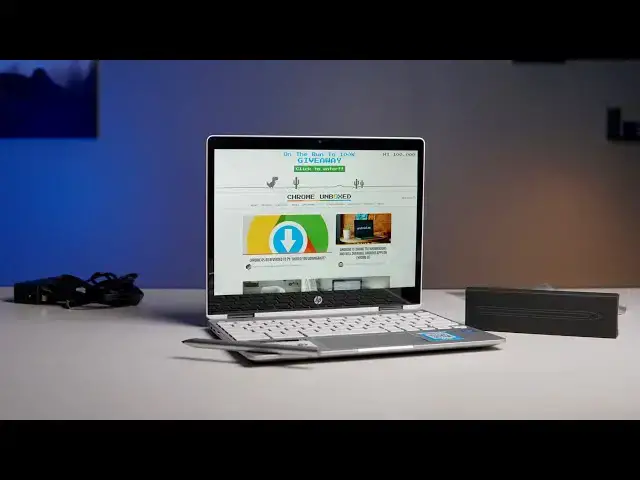
of 2019 the HP Chromebook x3 6012 be
0:05
crazy naming aside was one of the first
0:08
Chromebooks announced with the new USI
0:11
stylus initiative and all that really
0:13
means is that eventually the day will
0:15
come that we'll have one type of stylus
0:18
that will work on all sorts of devices
0:20
Chromebooks Windows devices who knows of
0:23
Apple come along for the ride but
0:24
basically you could buy one stylus and
0:26
know that as you change Chromebooks or
0:28
whatever you can actually use that same
0:29
stylus on each Chromebook that goes
0:31
forward well the rollout of some of
0:33
other devices that were announced about
0:35
the same time by HP happened and they
0:37
showed up and they were widely available
0:39
but the 12b kind of took some time to
0:41
show up on shelves and we just got in
0:44
contact with HP not too long ago and
0:46
they offered us up a review unit of the
0:48
12 B so we just got this thing in
0:50
haven't really had any hands-on time
0:52
with it prior to this so we figured it
0:54
was time to do a good old fashioned
1:03
before we jump into the box today's
1:05
video is brought to you by Nord VPN
1:06
there the VPN of choice for millions of
1:08
consumers because they're awesome at
1:10
what they do and that is keeping your
1:11
browsing safe and secure whether you're
1:13
at home or out and about if you'd like
1:14
to learn more about them head over to
1:16
Chrome and voxcom forward slash Nord VPN
1:18
to learn more and get started today so
1:21
let's dig into the box here it says on
1:23
the side this is basically the
1:25
entry-level version of this so we're
1:27
talking the Gemini lakes and 4000
1:30
processor four gigs of ram 32 gigs of
1:32
internal storage there are some
1:34
different configurations I think you can
1:35
get up to eight gigs of RAM and I think
1:36
they have a Pentium silver available in
1:38
certain markets but it's nice to use the
1:41
base level on these things because that
1:43
gives us an idea of what we're gonna get
1:45
for the introductory price here and as
1:50
always since this Chromebook is
1:52
technically months old at this point I
1:54
couldn't even tell you what it goes for
1:56
right now it's probably gonna be
1:58
somewhere in the three to four hundred
2:00
dollar range obviously as we write up
2:02
the article that go along with this
2:04
video it'll be linked in the description
2:05
below it'll tell you a little bit more
2:08
about where we're at price-wise with
2:10
this device right now but again at
2:13
Chromebook prices fluctuate pretty
2:15
wildly so it's almost impossible many
2:18
months in to know exactly how much the
2:19
Chromebooks going to go for at any given
2:21
time it's another box in theory well
2:26
look at that this came with the USI
2:28
stylus so up until this point we have
2:31
not been able to track down the HP
2:32
stylus the actual USI stylus for
2:35
purchase anywhere in the state so it
2:38
appears as if there's one that comes
2:40
with this so that's an added bonus I
2:42
actually didn't know like we knew that
2:44
the USI stylus support was in this
2:45
Chromebook we didn't realize that the
2:47
actual stylus was available and we've
2:49
looked just within the last week for
2:52
this device in the US market because a
2:54
lot of people have asked about it and we
2:56
still can't find it actually for sale so
2:58
it looks like if you want one of these
2:59
by this chromebook apparently everything
3:02
else in the box is pretty standard
3:09
and that's kind of unfortunate so you're
3:11
getting a pretty standard power brick
3:13
I mean it's USB type-c which is expected
3:16
but kind of like the little little wall
3:18
blocks especially with those gallium
3:20
nitride chargers that are out nowadays
3:22
you get the nice 45 a 30 watt charger
3:24
for much smaller real estate but nothing
3:28
else really surprising in the box I'm
3:30
really surprised about this so actually
3:34
let's let's look at the pin first see
3:36
so nothing super wild here so it's
3:42
rechargeable and looks like there's a
3:45
little getter for the noobs yeah we've
3:49
got an aluminum pin yeah the ability to
3:52
look at that that's pretty cool you can
3:56
actually just slide this out and there's
3:59
the USB type-c charger so the charger
4:01
that's in the box for this device will
4:03
charge your pin as well no idea at this
4:05
point on what the battery life is for
4:08
that it's also got a flat side so I'm
4:10
assuming it magnets itself nope there we
4:14
go oh that's a nice a nice sturdy magnet
4:20
so two things of surprise here a that
4:23
the usi stylus is in the box and B it's
4:25
got a nice flat side with a very sturdy
4:27
magnet that holds it on to the side of
4:30
the Chromebook I mean that the things on
4:31
there really good if you've ever used
4:32
one of the surface line of devices or an
4:35
iPad pro it's that kind of level of
4:38
stickiness so I mean that thing's not
4:40
gonna go anywhere you can move the
4:42
Chromebook around it's not gonna fly off
4:44
alright so let's talk about the
4:45
Chromebook real quick
4:46
same anodized aluminum top that we've
4:49
seen you know on HP devices for the last
4:51
I don't know a couple years so not a
4:53
huge surprise there but always welcome
4:55
it looks good it feels good bottom feels
4:58
like it's plastic for sure and I get
5:02
this thing opened up a keyboard deck
5:07
feels aluminum so that's a good sign
5:11
track that is plastic so feels like the
5:14
trackpad that's on the HP Chromebook 15
5:19
not glass but it feels really good and
5:21
not surprisingly you know HP's done a
5:24
great job with their Chromebooks lately
5:25
building really good input methods
5:27
keyboard feels very much like the HP
5:30
x360 14 and the g1 and all those really
5:34
nice Chromebooks they have really great
5:38
ya know backlighting on the keys which
5:41
is not surprising for a Chromebook this
5:43
is kind of a mid-range
5:44
entry level type Chromebook but the
5:46
standout we get here is the 3 by 2
5:49
display so we've got it's like a HD plus
5:53
so think of a 1366 by 768 screen and add
5:57
some pixels at the bottom so it's 1366
5:59
by 912 it gives it that nice three by
6:01
two and you have some pretty slim bezels
6:04
on the sides as well which leads to
6:06
interesting choices need to be made on
6:08
the keyboard side of things so there's a
6:10
basically no room here on either side
6:13
when we're talking about the keyboard
6:14
because you know the screen is tall
6:16
versus wide so you're getting a 12 inch
6:19
HD plus screen so it's not gonna be pin
6:23
sharp but it's gonna look pretty nice
6:25
and it's not gonna extra tax the
6:27
processor inside of here which is good
6:29
because in 4,000 is good it's not
6:31
amazing so let's take a look at this
6:33
thing and you know I'm a fan of three by
6:36
two screens so I like the inclusion of
6:39
what HP is done here with that even in a
6:43
lower resolution screen as I said before
6:45
the keyboard feels pretty excellent the
6:49
trackpad feels great we have B&O branded
6:51
speakers here again we'll test those in
6:53
the review if older Chromebooks are
6:56
anything to go by I'm not expecting too
6:59
much here but since we're in here I will
7:03
at least get into guest mode real quick
7:07
and we'll at least run a speed test and
7:10
see how quick this thing's going but
7:13
overall I can tell you I love the way
7:15
this thing looks and kind of feels I
7:17
mean even in kind of having it in a
7:18
tablet mode that 3x2 aspect ratio really
7:21
helps to I don't know give it more of a
7:23
tablet II appearance now there's a
7:25
little bit of a kind of a bounce here
7:29
happening here so I don't want to sell
7:31
this thing as like the perfect tablet
7:32
and it's a tad bit heavy as well in this
7:35
mode but I could see you know the
7:36
benefits of being able to flip the
7:38
Signet Alamo grab your pen off here
7:40
you know jot a handful of notes and then
7:42
drop the pen back on to its magnetic
7:44
little clasp and move on and not really
7:46
think much more about it again I still
7:48
like a stowable stylus but this is
7:50
definitely a close second to that the
7:54
hinges feel good you know and these are
7:56
things that most manufacturers are kind
7:58
of gotten down at this point there's a
8:00
tad bit of wobble which is to be
8:02
expected on a convertible device but the
8:04
screen feels decently bright again we'll
8:07
test this in the review I would rate it
8:10
probably around where the rest of HP's
8:11
are somewhere no 220 to 215 it's
8:14
something like that but one last thing
8:17
before we finish up here for this
8:18
unboxing I did want to run that speed
8:21
test and running an octane on this I got
8:23
a fifteen thousand eight hundred and
8:25
seventy three and again octane is
8:28
outdated and maybe not the best measure
8:31
but it's the easiest one for us to
8:32
measure past Chromebooks against and
8:34
when we start getting into the fourteen
8:36
fifteen sixteen thousand on octane
8:39
you're getting to the place where you
8:40
can move around Chrome OS with relative
8:43
ease in general and not feel all kinds
8:46
of lag and stuttering and animation
8:47
drops and all that kind of stuff so it's
8:49
very encouraging to see this chipset
8:51
perform this well with an octane score
8:54
because again with the minimal
8:56
resolution on the screen and I'm having
8:58
so many pixels to push around it's not
9:00
doing a quad HD or anything like that it
9:02
should perform really well again we have
9:04
to get into all the review stuff and we
9:06
have to deal with all that stuff and
9:07
really actually use it day to day before
9:09
we can say that but this is encouraging
9:11
to start off with and again I love this
9:14
three by two aspect ratio and I just
9:16
like the way this thing looks on the
9:17
desk already that I love I love the more
9:21
square versions of Chromebooks but again
9:24
until we get some more testing done on
9:25
this and I can tell you hey the
9:26
resolution helps the N 4000 to get along
9:30
nice and Swift feeling and I didn't have
9:31
problems with multitasking and the
9:33
keyboard feels this way and the trackpad
9:35
does this and hey in tablet mode I found
9:37
this and the USI stylus is great at this
9:39
there's so many unknown things with this
9:41
and honestly the fact that it comes with
9:44
this USI stylus out-of-the-box really
9:46
changes the whole review process here
9:48
because again this is the first time
9:49
we're actually getting to use USI stylus
9:52
on any Chromebook whatsoever at this
9:54
point so I'm really excited to spend
9:56
some time with this use it as my daily
9:58
driver my workhorse for the next week or
10:00
so and then you know we'll get back to
10:01
you with a full on review and I'll give
10:03
you all my you know impressions at that
10:05
point but guys that's been it for this
10:06
one if you like this video give it a
10:08
thumbs up go down there and hit that
10:09
subscribe button and be sure and hit the
10:12
join button down there below to see all
10:14
the benefits and all the extras all of
10:16
our members get like behind-the-scenes
10:18
footage and custom emojis and stuff like
10:21
that till next time we'll see you