Up next in 10



Buy The HP Chromebook X360 on Amazon: http://amzn.to/2xH14Be
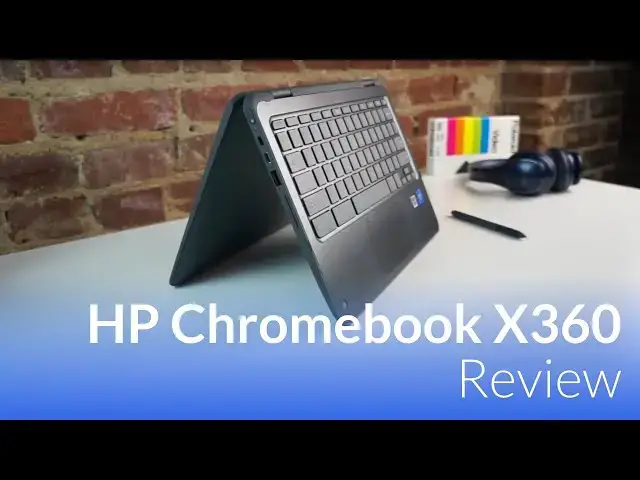
The newest Chromebook on offer from HP features an Apollo Lake processor, 8GB or 4GB or RAM, 32GB or 64GB of storage, a convertible hinge and an EMR stylus. With a spec sheet so loaded up, we expect this device to impress on many levels. Will be impressed or let down?
Show More Show Less View Video Transcript
0:01
[Music]
0:07
hey folks probably paying with chrome
0:10
unboxing today we're gonna be reviewing
0:11
the HP x 360 Chromebook 11 now this
0:16
device is actually aimed at the
0:18
education sector but they'll be
0:19
releasing one likely if HP follow suit
0:22
for the consumer market so this is going
0:24
to serve as our review of both of those
0:26
devices now this device actually comes
0:28
to us packing some interesting specs a
0:30
it's the first production Apollo Lake
0:33
device that we've gotten our hands on
0:34
second has an EMR touchscreen and stylus
0:38
input and it comes with 64 gigs of
0:42
internal storage and 8 gigs of RAM
0:44
so all that should add up to a pretty
0:46
great Chromebook right well let's find
0:48
out so first and foremost this device
0:51
honestly kind of feels a little
0:53
uninspired from a company that once
0:56
brought us the HP Chromebook 13 g1 and
0:59
it's slim design and all aluminum build
1:02
and even going all the way back to
1:04
probably what I would consider the first
1:05
Chromebook that you'd really get work
1:07
done on in the HP Chromebook 14 this
1:10
design just feels absolutely bland and
1:13
boring the plastic is it's cheap it
1:16
doesn't feel good in your hands and
1:18
overall it just looks like something
1:21
that was built maybe three or four years
1:22
ago I'm not really gonna pull any
1:23
punches in this review because I think
1:25
HP can do a lot better than what it's
1:27
done in this device but let's look
1:29
around this thing real quick outside you
1:31
have some basic cheap kind of sharp
1:33
edges that hit your palms whenever
1:35
you're typing on it it's got a massive
1:37
bezel that you can't help but notice as
1:40
soon as you open the device up and the
1:42
keyboard will talk about in a second but
1:45
the deck of the keyboard is actually
1:46
pretty flimsy and you can put some
1:47
pressure on it and see it give pretty
1:50
easily
1:50
overall the hinge though it's 360 and
1:53
can help it convert into other form
1:55
factors it's really loose and if I pick
1:58
the device up just a little bit too
1:59
swiftly it actually Falls wide open the
2:02
tablet mode while again is accessible
2:05
it's probably too thick and too heavy to
2:07
actually ever use in that way and it
2:10
does have dual cameras a normal front
2:13
facing camera and then the world facing
2:14
camera but both of them are pretty bad
2:17
and so when you hold the device in
2:19
tablet mode and expect to be able to
2:20
take a
2:21
kind of like with a big awkward camera
2:23
the shots terrible because the camera is
2:25
not good overall the design of this
2:28
device leaves a lot to be desired and
2:31
for something that comes in at four
2:33
hundred and seventy nine dollars for the
2:34
model that we're testing it does go down
2:35
to $4.99 for a 32 gig and eight-hour 4
2:38
gig variation this device is not great
2:42
especially when you consider their
2:44
devices on the market like the Samsung
2:46
Chromebook plus we'll talk a little bit
2:47
more about that as we move through the
2:49
review so when we look around the device
2:51
we see part of this where HP actually
2:53
did something pretty good here we have
2:55
four USB ports total two of them are
2:58
type a to type C and the type C's can be
3:01
used for HDMI out that can be used for
3:03
charging and there's one of each on each
3:05
side of the device so that was actually
3:07
really well done you have a micro SD
3:08
card slot headphone microphone jack and
3:11
a Kensington lock so the selection of
3:14
ports around the device is actually well
3:15
done and again aimed at an education
3:17
market that's something that really
3:19
needs to be done right and HP did do its
3:21
homework here and did this device
3:24
justice with this moving on to the
3:25
screen we're looking at an 11.6 inch
3:28
1366 by 768 display and honestly that
3:32
resolution at this size isn't terrible
3:34
but as we're starting to see high res
3:37
displays all over the place it's
3:39
starting to feel a little bit dated and
3:41
on top of that the fact that though this
3:43
is labeled an IPS display it really has
3:47
some odd off angle viewing the colors
3:50
don't invert or change it's just the
3:51
brightness off angle is really bad and
3:54
overall the display is really dim I
3:56
would guess somewhere around 200 nits so
3:59
you add that glossy cover over the
4:01
screen and a dim screen and it's
4:04
actually pretty hard to see in a lot of
4:05
environments the colors are decent but
4:08
the loss of rightness off-angle the
4:11
glare on the screen it just makes for a
4:13
poor experience using the device and
4:16
again I have to come back to the bezel
4:18
on this thing is just gargantuan they
4:21
probably could have fit a 12 and a half
4:22
to 13 inch screen in here if they would
4:25
have cut this bezel down just a little
4:26
bit so open to this point I've been a
4:28
little bit tough on this device but the
4:30
keyboard the trackpad in the
4:32
which comes in the box are actually
4:35
places where HP did some pretty good
4:37
work here let's start off with a
4:38
keyboard a good travel decent feeling
4:41
keys and it's pretty quiet when you're
4:43
using it again I talked about the
4:45
keyboard flexing a little bit whenever
4:47
you pushed on it but overall the key
4:49
travel on this thing is actually pretty
4:51
good and it's actually a joy to type on
4:52
echo that for the trackpad as well the
4:55
trackpad is nice and smooth it's pretty
4:57
resistant to oils and the click
4:59
mechanism is really really good as well
5:00
so I don't really have any nags with the
5:02
trackpad either and when we're talking
5:04
about the pin overall there's a lot of
5:06
people that don't like using Samsung's
5:09
pin because it kind of feels like a
5:10
toothpick and it's smaller than a normal
5:11
pin HP includes a pen that's
5:14
normal-sized and it actually has a small
5:17
clickable capacitive part of the stylus
5:19
up here so for apps that take advantage
5:21
of a finger input for instance like
5:23
squid you can actually turn this over in
5:25
the back side of it would act just as
5:27
your finger would which means it's an
5:28
eraser so it's kind of nice when you're
5:29
taking notes if you need to erase just
5:31
turn it over and actually erase with it
5:33
so the Pens actually pretty good it's
5:35
not the most robust feeling thing in the
5:37
world it kind of feels like a Bic pen
5:39
kind of like plasticy feel but riding
5:42
with it was pretty good now I have to
5:45
say with inking taking notes with this
5:48
device for instance the pen responds
5:51
really well the screen responds really
5:53
well but the resolution on the screen
5:54
because it's kind of blocky and
5:57
pixelated actually takes away from the
6:00
actual feeling of writing and it makes
6:02
it feel very very digital versus feeling
6:04
analog like Samsung does because of the
6:07
high resolution display on the
6:09
Chromebook pro and plus but overall this
6:11
is a decent pen in the pen input and the
6:14
way the screen responds is actually
6:15
pretty good so all the external bells
6:17
and whistles don't really mean much if
6:19
the device isn't perform well and the
6:21
opposite is true as well if it's lacking
6:23
a bunch of bells and whistles but really
6:25
performs well you can kind of forgive
6:27
some of those things unfortunately this
6:28
is another place where the HP really
6:31
struggles we're looking at an atom in
6:33
3350 there is a 3450 which is a beefier
6:36
processor but that's not what's in this
6:38
HP here and while this one has eight
6:41
gigs of ram and 64 gigs of internal
6:42
storage there's also an option for
6:45
little bit less money that has four gigs
6:47
of RAM and 32 gigs of internal storage I
6:50
would say even though we tested the one
6:52
with 8 and 64 I'd say that if you've got
6:56
the lesser one it wouldn't make that
6:57
much of a difference in performance
6:58
because this chipset kind of struggles
7:01
over all I know speedometer is the new
7:04
go to benchmark but we still look at
7:07
octane scores as well and the octane
7:10
scores on this were barely any better
7:11
than brass well I actually went back and
7:14
looked at some of the brands well
7:16
devices that we tested and they were
7:17
getting close to 9000 and that's just
7:19
about all I got out of this Apollo Lake
7:21
chip and this is the next generation
7:22
from Intel and the seller online so I
7:25
was really disappointed with that
7:26
because I noticed on the day-to-day it
7:29
didn't really feel like it was moving
7:30
very fast it didn't feel like it was
7:33
actually an upgrade at all over a
7:34
Braswell and that's pretty unfortunate
7:36
to see a generation jump and not to see
7:39
any real performance improvements that
7:41
was kind of a bummer and overall I don't
7:44
think those performance improvements had
7:45
anything to do with ran because I used
7:47
the Chromebook Pro from Samsung on a
7:49
daily and it's got four gigs of RAM and
7:51
I never noticed so I don't think
7:53
upgrading RAM is that big of a deal in
7:55
this device so if you are looking at
7:57
buying it you're possibly going to get
7:58
it for your schools definitely stick
8:00
with the four gig 32 and lastly I have
8:02
to mention again the price so for the 32
8:05
gig 4 gig of ram version of this device
8:08
you can get it for about 399 the one
8:10
we're testing again 8 gigs of ram 64
8:13
gigs of internal storage is 479 for that
8:15
price point you can easily go and buy a
8:17
brand new Samsung Chromebook plus and a
8:20
lot of times the pluses on say almost
8:22
down to $400 so you're looking at the
8:24
same internal specs from a ram and
8:26
storage perspective and the device looks
8:29
a ton better it has a much better
8:31
display in all the upsides that come
8:34
along with the Samsung Chromebook plus
8:36
vs. this device and it probably is going
8:38
to end up being cheaper it's not a real
8:41
hard decision to make it needs to be
8:43
mentioned as well that Android apps
8:45
actually work out of the box with this
8:46
device and while they're not running on
8:48
the latest build of Android they do work
8:51
without any extra setup steps in the
8:54
beginning so when soon as you log in
8:55
you're going to be met with the Play
8:57
Store and the ability to go ahead and
8:58
start
8:59
stalling your Android apps and honestly
9:01
they run pretty well on here it doesn't
9:03
take a ton to run Android apps and so
9:04
the performance with Android app so it's
9:06
actually relatively good with this
9:08
device so to wrap things up this becomes
9:10
a really difficult device to recommend
9:12
to basically anyone with devices like
9:15
Samsung's Chromebook plus a lot of times
9:18
that are cheaper than this device and
9:20
performed just as well if not better
9:21
have better screens much better build
9:24
quality and all the same features it's
9:27
difficult to say why you should buy this
9:28
over that especially given the fact that
9:31
we've shown some videos and talked about
9:33
some stuff on the site that Samsung's
9:35
Chromebook plus is actually really
9:36
really durable I mean guys are jumping
9:38
on it and walking all over it and all
9:40
this kind of stuff and it stands up to
9:41
those things so saying that this is a
9:43
education device and it can withstand a
9:46
bunch of bumps and all that kind of
9:47
stuff seems a little silly when you
9:49
start talking about devices that look
9:50
and perform like Samsung's and are the
9:54
same price and then think about the fact
9:56
that acer has a device coming out in the
9:57
c7 71 probably in the next few weeks
10:01
that's kind of the successor to the c7
10:03
20 that's going to start the base model
10:06
of it we'll start with a seller on 3855
10:08
you that will run circles around the
10:10
seller on in this device and it's going
10:12
to start out at 279 329 if you add the
10:16
touchscreen in so you're coming in a
10:17
hundred to 150 dollars less than this
10:20
device and it will run circles around it
10:22
and outperform it I hate to knock
10:25
devices
10:26
I hate to do reviews whenever we have to
10:28
be harsh on devices but some devices
10:30
especially for manufacturers the size of
10:32
HP need to have harsh reviews done of
10:35
them
10:35
this device is just not up to snuff and
10:38
for the price I can't recommend anyone
10:40
buy it guys if you like this and you
10:43
like videos like this give us a thumbs
10:45
up subscribe to the channel and until
10:47
next time we'll see
10:50
[Music]
#Consumer Electronics