Up next in 10



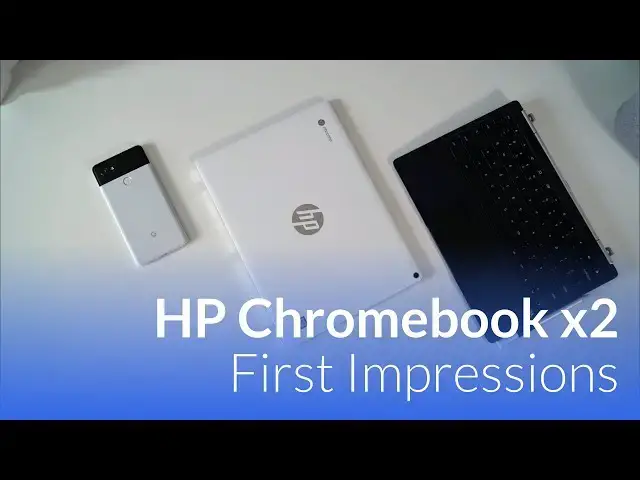
In an emerging market like Chromebooks offer, we get to experience a bunch of firsts. The first convertible, the first touchscreen, the first pen input, the first tablet, the first 3:2 screen, the first high-res screen…the list goes on and on. With this being the first detachable Chromebook, we want to spend a great deal of time talking about the HP x2 and all the pros/cons of the device so you can decide if it is the Chromebook for you.
Buy the HP Chromebook x2 direct - http://fxo.co/5gxe
Shop Chromebooks: https://amzn.to/2NE2wKq
Read more: https://chromeunboxed.com/
Follow us: https://www.instagram.com/chromeunboxed
https://twitter.com/chromeunboxed
https://www.facebook.com/Chromeunboxed
https://plus.google.com/+Chromeunboxed
Show More Show Less View Video Transcript
0:01
[Music]
0:14
[Music]
0:22
hey folks probably paying with chrome
0:24
unboxed and today we want to take a
0:26
quick initial look at the HP Chromebook
0:29
x2 now we were able to actually get our
0:31
hands on this device from a Best Buy
0:33
pretty local to us the device actually
0:36
isn't released just yet it's supposed to
0:38
be coming out in the first week week and
0:40
a half of the month of June so by the
0:42
time you're viewing this video you can
0:44
likely get your hands on one probably in
0:46
a Best Buy store or soon after you'll be
0:48
able to do so or you can go in preorder
0:50
one and hopefully it will become
0:51
available and through multiple channels
0:53
in the coming weeks but we were able to
0:55
score one a little bit early and so we
0:57
wanted to give you some quick
0:58
impressions and a quick note about this
1:00
video a lot of times we're called chrome
1:02
unboxed right so we would normally do an
1:04
unboxing video but for this one we're
1:07
not going to the device is right here
1:09
what you're seeing in the box is pretty
1:11
standard Chromebook fair and so honestly
1:14
I don't want to waste your time with all
1:15
that stuff we opened it up everything's
1:17
in plastic kind of exactly the way every
1:19
other Chromebooks ever been packaged up
1:21
and so instead we wanted to start taking
1:23
a different approach with some of these
1:24
videos whenever the packaging is kind of
1:26
boring and actually spend at least a
1:28
little bit of time in this case just you
1:30
know a little over 24 hours with the
1:32
device actually getting in logging in
1:34
using it for a couple things and just
1:36
giving you these quick first impressions
1:38
of the device before we actually get
1:39
into a full review so we want to do that
1:42
exact thing right now so here we have it
1:44
the HP Chromebook x2 now if you're
1:49
watching this and you haven't heard of
1:50
this device before this one does a
1:52
really really special thing and that is
1:54
it's the world's first detachable
1:56
Chromebook and so the whole thing just
1:58
lifts off it's magnetic so we'll talk
2:00
through a few of the things that I've
2:02
liked so far with it
2:03
a few of the things that I'm concerned
2:04
with and you're seeing one of them right
2:07
there actually putting the thing back
2:08
together sometimes the magnets just a
2:10
little bit aggressive but we'll get
2:11
there overall though the aesthetic is
2:14
pretty nice the device is relatively
2:16
thin and light feels really good we'll
2:19
talk through a few of the things here
2:20
before we actually get logged in and up
2:23
and going and we'll talk about
2:24
performance and what I've noticed
2:25
already so far but overall the build
2:27
quality feels really good
2:28
feels really sturdy it's not the camera
2:31
this thing is white on the top and now
2:33
it is aluminum but it's kind of got some
2:35
sort of I don't want to say paint job
2:37
I'm not really sure what they did to get
2:38
white on here but it looks very
2:40
reminiscent of my very first like real
2:42
Chromebook the HP Chromebook 14 now the
2:46
bottom is kind of a dark dark black you
2:48
got a pin loop over here for the pin and
2:50
you kind of see this substantial hinge
2:52
over here on the edge you know it's not
2:55
the most attractive thing in the world
2:57
but it's a pretty good-looking device if
3:00
not pretty functional looking so as you
3:03
set it down and open it up you do notice
3:05
the top piece is a little bit heavier
3:07
than the rest of it and that's just
3:09
what's expected from convertible device
3:11
like this you know all of the internals
3:13
the battery everything is in this upper
3:15
portion here so it's just kind of the
3:17
way it's going to be now there's two
3:19
ways that most companies go about doing
3:20
a detachable device and so you have
3:23
something like this where the hinge
3:25
takes all of the stress of opening the
3:29
device up and closing it down and then
3:31
you have something like a surface pro
3:32
where there's actually a kickstand on
3:33
the back that kind of holds the device
3:34
in place
3:35
what's a win here is in your lap you can
3:38
pick the device up like this now you can
3:40
feel some wobble and you can probably
3:41
see it on camera there but you can hold
3:43
the device like this just as you would
3:45
expect you can't really do this at the
3:47
surface there's the weird kickstand and
3:49
it just kind of gets a little bit
3:50
awkward so handling the device feels way
3:52
more like a clamshell here additionally
3:55
because the way this device is laid out
3:56
you can just flip this around drop it on
4:00
and now you have kind of your
4:02
presentation mode or your tent mode if
4:05
you so prefer and then when you close it
4:07
up this way if you have to carry the
4:08
keyboard around with you in your kind of
4:10
tablet mode you don't have keys on the
4:12
back so definitely some benefit here to
4:16
this form factor but like I said there's
4:18
gonna be a little bit of wobbliness when
4:20
it's ever whenever it's in laptop mode
4:21
just because it doesn't have anything
4:23
back you're holding it in all of its
4:24
weights on top that being said so far in
4:28
my use of it that hasn't bothered me too
4:30
much using in my lap hasn't been a big
4:31
deal using it on the desk as I'm in a
4:33
big deal at all and you get this kind of
4:35
nice
4:35
elevation on the keyboard and and this
4:38
part feels pretty substantial even
4:40
though the tops
4:41
bit wobbly I don't know that there's any
4:43
way that you can get around that going
4:45
around the device here we've got a front
4:47
facing five megapixel and rear-facing 13
4:49
megapixel camera what I'll say really
4:51
briefly on those even though those stats
4:53
are much better than any Chromebook that
4:55
we've seen before
4:55
the camera software and here is still
4:57
just as bad as it's always been and it
4:59
honestly doesn't feel like you have good
5:00
cameras at all they're actually very
5:02
very terrible to use in real world usage
5:05
so hopefully something's gonna happen
5:08
with the camera hopefully we can just
5:10
get the Google camera on here working on
5:12
a Chromebook that would be the easiest
5:13
path I would think but for right now the
5:15
cameras just are it's if they're just
5:18
terrible to use if I'm being honest a
5:20
couple other things about the hardware
5:23
that are kind of unique we do have front
5:24
firing speakers so they're right here on
5:27
the left and right portion of the screen
5:28
and they're decently loud and great
5:32
granite because they're pointed directly
5:33
at your face you know the sounds coming
5:35
right at you and you get pretty good
5:36
stereo separation so all those things
5:38
are pluses they don't have a lot of bass
5:40
response but that's not that huge of a
5:42
deal another cool thing that I've
5:44
noticed is when it's in tablet mode the
5:46
power button works as you'd expect on a
5:48
tablet puts it right to sleep
5:49
wakes it right back up volume rockers
5:51
over here nice clicky tactile buttons
5:53
and when it's in tablet mode and you're
5:56
carrying it around this way it's
5:57
relatively thin here's my pixel two for
6:03
reference it's in a case and so the
6:04
pixel 2 is a little bit thicker because
6:05
of that it's roughly the same thickness
6:07
and definitely lied enough to use as a
6:11
tablet I've held it in written books
6:13
watched movies videos all that kind of
6:14
stuff and so it's been actually really
6:16
good in this mode I've been really
6:19
really impressed Chrome OS still needs a
6:20
little bit of work and tablet mode in
6:22
general but overall it's been pretty
6:24
cool ok last few notes about the
6:26
hardware the keyboard in general it's
6:29
sitting on this like floe leather debt
6:32
here and it's it's pretty comfortable
6:35
the the keys are well spaced they have a
6:38
decent I'm gonna click and they've have
6:40
a decent amount of travel I mean HP
6:41
usually puts pretty good keyboards if
6:43
you've used the Chromebook 13 you're
6:45
gonna feel pretty much at home here I
6:47
really don't have any complaints about
6:48
the keyboard I kind of missed my pixel
6:50
book while I was using it for
6:52
for the day or so but in general it
6:55
works really well and I'm quite pleased
6:57
with that the trackpad equally is good
7:00
it's not as good as a pixel book it's
7:02
not I don't think it's glass I'm not
7:05
quite sure but it's relatively smooth
7:07
resist aisles pretty well and the click
7:09
mechanism is great so no complaints
7:11
there at all we've got plenty of space
7:12
and size and overall just the the input
7:15
methods feel pretty good so far we'll
7:17
see as time goes by if the keyboard
7:19
gives me any issues there there is one
7:21
problem I've come across already we've
7:23
reached out to HP and we have heard
7:25
anything back yet specifically on this
7:27
one but HP lists this with a backlit
7:29
keyboard we've had some pictures from
7:31
people with their keyboards being
7:32
backlit this one we've moved all the way
7:34
up to developer mode just to see if we
7:36
can get it working no backlighting on
7:39
the keyboard and yes I've tried all
7:40
brightness up and down nothing happens
7:42
I've had plenty of Chromebooks with
7:45
backlit keyboard so I kind of know how
7:47
to make it work and not work and so that
7:49
none of that's in question it just seems
7:52
like the device doesn't have it and so I
7:53
don't I'm not sure if it doesn't have it
7:54
or if it's an issue we're waiting to see
7:57
on that but you know it's an early build
7:59
of the software and it's a little bit of
8:01
an early build of the device itself so
8:03
we probably really need to wait till
8:05
mid-june before we make a judgement call
8:06
on that we'll talk about that more in
8:08
the full review but overall you know the
8:10
hardware is is nice you're getting dual
8:13
USB seaports you have a headphone jack
8:15
and they were at least thoughtful enough
8:17
to put those USB C ports down below so
8:19
plugging in I worked from this thing for
8:21
an entire day having those down there
8:22
makes a lot of sense a lot of tablet
8:24
type devices they'll put them in weird
8:26
spots and so then you've got a dongle
8:28
sticking out of the side of this thing
8:29
when it's sitting at a desk so overall I
8:32
really didn't feel like I was moving on
8:34
for my pixel look that much it didn't
8:36
feel like oh gosh you know sometimes I
8:38
go to test a device and I'm used to
8:40
using a pixel book and I go slide
8:41
something else in and it it's it's it's
8:43
troubling to have to use something
8:44
that's a little cheaper a little less
8:49
well-made and this device didn't feel
8:51
that way at all I didn't feel like I
8:52
really missed a beat just kind of got in
8:55
with my work and and did what I needed
8:57
to do and it handled all those things
8:58
the last thing I'm going to talk about
9:00
real quick is performance thus far now
9:03
like I said I've worked
9:04
one full day on this thing so all of the
9:06
workload I normally put on a pixel book
9:08
I've put on this thing and it rolled
9:10
right through it without any issue this
9:12
is the core m3 so it's a seventh gen
9:14
khorium three with four gigs of RAM 32
9:16
gigs of internal storage it does have an
9:17
SD card slot so you can add storage to
9:20
it which is nice
9:21
pixel book doesn't have that it's got
9:22
huge internal storage but this one has
9:25
the ability to add it from the side but
9:27
what really shocked me whenever I got
9:30
into using this device was a it didn't
9:32
seem to hiccup through anything and so I
9:34
was like well I'm gonna run a few
9:35
benchmarks on it real quick and my pixel
9:38
books usually gets around 27,000 on
9:40
octane and yes I know it's been retired
9:41
but it's still a great benchmark for us
9:44
to kind of test against other devices
9:45
this one's giving about twenty five
9:48
thousand so that core m3 jumped from six
9:51
gen which is what's in the Samsung
9:52
Chromebook pro to this seventh gen is a
9:55
massive massive improvement there was no
9:58
stutter no hiccups no issues whatsoever
10:00
animations state great it's got the same
10:02
high resolution screen the exact same
10:04
panel that's in the pixel book so that's
10:06
why I haven't even talked about the
10:07
screen it's a three by two aspect ratio
10:09
2400 1600 super-bright 400 nits nice and
10:12
high-res but sometimes all those extra
10:14
pixels make things move a little bit
10:16
slow as we saw on the same Sun
10:17
Chromebook pro m+ not the case here this
10:20
thing just powered right through it no
10:22
problem again from a performance
10:24
standpoint I didn't feel like I was
10:25
stepping way down from a pixel book and
10:28
so the last thing I want to say because
10:29
again I need to spend more time with
10:31
this before we get a review the last
10:33
thing I want to say on this is this
10:34
thing is 600 bucks the pixel book in
10:37
general there's some sales that are
10:38
going on here and there but in general
10:40
the pixel looks a thousand dollars if I
10:42
were to look at somebody and they want a
10:44
high performance machine and they're
10:45
gonna spend some decent amount of money
10:47
on it it would be hard for me so far I
10:50
don't want to put everything out on the
10:52
table yet but it'd be hard for me so far
10:53
not to point them in the direction of
10:55
this device right now the versatility of
10:57
the tablet the beauty of the screen the
11:01
quality of the build thus far the pen
11:04
input the pen comes with the device it's
11:06
a similar pen that the Chromebook Pixar
11:08
the pixel book has everything kind of
11:11
lines up and you get that pixel book
11:13
type experience and it's $400 cheaper
11:17
so that can't be understated there's
11:19
going to be an i-5 eight gig device
11:22
coming out of this but I I just don't
11:26
know that you would need it and so you
11:28
know we need further testing here I'm
11:30
gonna work a few more days from it spend
11:32
some time doing some other things that
11:33
the kids really kind of dig into it all
11:35
that kind of stuff and we'll cover all
11:37
that stuff in the review but initially
11:39
after just you know a little over a day
11:40
of use I'm pretty impressed this thing
11:43
is is pretty nice and again the form
11:46
factor is a little clunky and I'm kind
11:48
of learning my way around dealing with
11:50
handling a detachable device at all
11:53
times but in general for for what you're
11:55
getting for your dollar this thing is
11:57
gonna be really really hard to beat for
11:59
the rest of 2018 but guys that's it for
12:01
this one if you liked this video give it
12:03
a thumbs up hit that subscribe button
12:04
down below and until next time we'll see
12:08
[Music]