Up next in 10



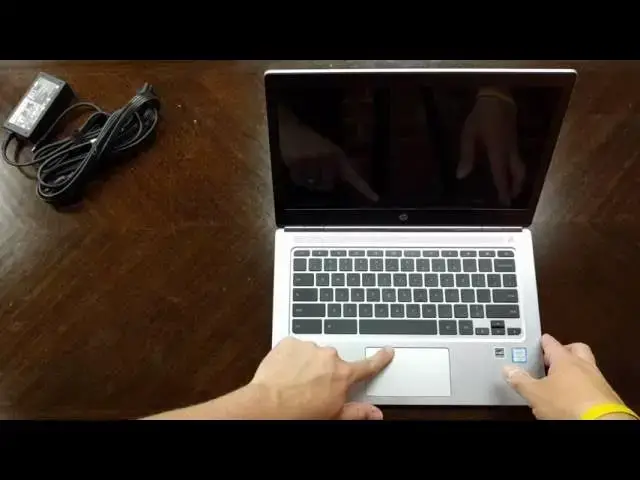
The highly-anticipated HP Chromebook 13 G1 is here and we take a first look at it in this video. From the aluminum body to the super high-res display, this Chromebook has a spec-sheet to die for. Get a close up look at it for yourself and enjoy our unboxing!
Follow us on our social channels for up-to-date info from Chrome Unboxed!
Facebook: https://www.facebook.com/Chromeunboxed/
Twitter: https://twitter.com/chromeunboxed
Google+: https://plus.google.com/111582298606053825151
More news and stories at chromeunboxed.com
Show More Show Less View Video Transcript
0:00
hey folks Robbie Payne with chrome unbox
0:02
coming at you today with an unboxing of
0:05
the much anticipated HP Chromebook 13 G1
0:09
now as many of you know this one comes
0:11
packing a ton of things that fill out
0:13
the spec sheet brand new processors in
0:16
the core M line this particular one is
0:18
the M5 8 gigs of RAM a 3200 by 1800
0:22
pixel display um super thin all aluminum
0:26
chassis back lit keyboard um all sorts
0:29
of things two USB type-c ports lots of
0:32
great stuff lots of great things to see
0:34
I'm excited I hope you're excited let's
0:36
get in here and unbox this
0:43
thing all right so let's get into this
0:45
thing pretty standard HP Fair as far as
0:48
the packaging goes uh nothing out of the
0:50
ordinary here it's a shame like you know
0:53
the Chromebook Pixel comes with a a
0:55
pretty premium uh boxing unboxing
0:58
experience this is pretty standard Fair
1:00
cardboard um it's a Chromebook so we're
1:03
not worried about too much uh we have
1:05
the uh USB type-c charger here but
1:08
basically a normal block nothing else in
1:11
there and out comes what you've all been
1:14
waiting for and what you came here to
1:15
see
1:18
anyway
1:20
um basically down in here we
1:23
have just your normal setup instructions
1:27
um and we've said it a 100 times before
1:29
it's a Chromebook open it up sign in
1:32
move on uh probably warranty all that
1:35
kind of stuff leave all that in the
1:38
Box Chuck that
1:40
aside
1:43
and let's get a look at this
1:48
guy and I will tell you folks that
1:52
strikes just a
1:56
gorgeous
1:58
gorgeous profile file uh the aluminum is
2:01
nice it does not feel cheap uh IA the
2:04
Acer Chromebook 14 I didn't care for the
2:06
way the aluminum actually kind of fell
2:08
plastic uh this definitely does not come
2:11
across that way at all I do wish they
2:12
would have put the new HP logo if you
2:14
haven't seen it check out the
2:15
Spectre um it it's actually just four
2:18
lines which is really neat um especially
2:21
for HP to have that cool of a logo um so
2:24
let's take a look around this guy man it
2:25
is light I've been carrying around the
2:27
pixel for a little while and wow it's
2:29
thin holy moly okay let's get focused in
2:32
here on some
2:36
ports there we go um so we got a USB uh
2:40
three two type- C's combo Jack there
2:45
nothing across the
2:47
front here we have a micro SD card
2:50
slot across the back you have that
2:52
really nice chrome
2:54
finish um and this this feels a little
2:57
bit reminiscent of the pixel across the
2:59
bot bottom I've smudged that one up
3:00
already so that's going to get some
3:02
smudges on it just uh just be worn there
3:07
um wide feet just like the pixel which
3:09
is pretty cool um nothing really else
3:12
some screws I guess you could open it up
3:14
but my guess is with something this thin
3:17
and let me uh I don't have anything
3:19
around me to give you any kind of idea
3:21
of how stinking thin this is other than
3:23
look at this think about a Micro SD card
3:27
um and think about how uh small that is
3:30
and how thin these pieces are now
3:32
granted it does uh bevel away a little
3:35
bit here at the edge turn into the
3:37
lights so you can kind of see yeah you
3:39
can see kind of how it bevels away at
3:40
the edge and so it technically isn't
3:43
that thin but the way it strikes the
3:45
side image because of the way it's
3:47
beveled that way man it just looks
3:49
really sharp uh and really light so
3:53
impressed already not sure what HP is
3:56
doing with this bar I think it's on the
3:58
Spectre as well and some other devic
4:00
that they're coming out with now um I
4:02
thought it was going to be a light bar I
4:03
think a lot of people did that would
4:05
have been really really sick to have a
4:06
light bar that large across this thing
4:09
but alas it does not it does have this
4:12
really really cool uh kind of like o
4:15
sorry kind of a matte finish Chrome logo
4:18
there which is really really nice
4:20
looking um normally I like to see all
4:22
the colors there but that is that is
4:24
pretty nice
4:27
looking all right let's open it up up
4:32
and man that's really close to a oneand
4:35
open maybe that hinge once it gets
4:36
worked in a little bit uh perhaps will
4:39
be a one-handed Affair not sure
4:43
yet and on the inside we have the
4:45
unfortunate stickers which they'll come
4:47
off gooone all that good stuff um you
4:50
can you can get rid of those things but
4:52
it's kind of a shame that they're there
4:55
um travel is actually really good
4:58
especially for a key uh a device this
5:00
thin uh the travel feels good they're
5:02
really clicky they're not mushy at all
5:04
uh this feels like it's going to be a
5:06
great typing experience you have the
5:08
bang and Olson uh speakers across here
5:10
I'll be really interested to check those
5:12
out um and we have a relatively good
5:15
size trackpad here um it's it reminds me
5:18
a lot of the Dell Chromebook 13 as far
5:20
as size so the depth of it actually
5:22
isn't uh very tall but you can see my
5:24
entire hand fits inside of that so
5:27
decently wide um hard telling I don't
5:31
think that's glass it's got a little bit
5:33
more texture on it feels really good
5:34
though feels really really good uh just
5:37
like with any other trackpad time will
5:39
tell how it's going to work out but it
5:42
doesn't feel like it's picking up oils
5:43
on my fingers a lot and so that's always
5:45
a a welcome surprise The Click it's nice
5:49
and quiet sturdy in all places not too
5:51
deep feels good let's see if it'll power
5:54
up as we all know most Chromebooks will
5:57
not do so without being powered up
6:00
first
6:02
nope before I do that though I just want
6:05
to give you an idea of how absurdly thin
6:08
this thing is I mean it is crazy thin
6:12
and light just so light I've come into
6:16
this thing pretty much sure that my
6:21
pixel will stay around um but man this
6:24
thing makes a really good first
6:25
impression I'm going to go and tell you
6:27
this screen looks awesome
6:30
and as I always
6:33
say feel free to steal my password if
6:36
you want to CU this is our public
6:41
Wi-Fi let's see if it's going to let me
6:43
crank the brightness up yeah there we go
6:46
nice and bright it's very unfortunate
6:48
the packaged background in here um is
6:52
not up to Snuff with the
6:54
display cuz all the text and stuff looks
6:57
super duper sharp um and we're just
7:00
going to browse as a guest for right
7:03
now and let's check out some viewing
7:06
angles um very good as you would expect
7:10
I mean I wasn't expecting anything less
7:12
here let's go side to side here we got
7:15
plenty of battery so move that
7:19
aside H yeah so great viewing angles it
7:22
looks like uh this is going to be the
7:24
type of ips yeah I don't yeah you can
7:26
kind of see that white wash um this
7:28
happens on IPS displays that aren't of
7:31
the highest caliber um off off angle so
7:34
like a 45° off angle um you lose a
7:38
little bit of color um not a huge deal
7:41
um you on a laptop especially you're not
7:43
really going to notice it one thing I
7:45
did notice on the uh Dell Chromebook 13
7:48
was there was some light bleed issues um
7:50
on the touchscreen version so the one
7:52
that had the glossy IPS display where
7:56
you got a little bit of darkening around
7:58
the edges some kind of just checking to
8:01
make sure that is not the case here and
8:02
I do not see that here which is nice I
8:05
do see it a little bit just a tiny bit
8:07
across the top um it's nowhere near as
8:10
noticeable as the Dell Chromebook 13 now
8:14
one thing I have not seen thus far um
8:17
and we're going to check it out right
8:19
now is what this thing scores on octane
8:21
cuz it's really hard to
8:24
figure exactly what these core
8:27
processors are going to do so here we go
8:29
let's check this out right now um like I
8:33
said I can tell you the text and
8:35
everything is so reminiscent of the
8:38
pixel um colors are bright and vibrant
8:40
the the darks are are great I think the
8:43
screen's probably a little um got a
8:48
little bit less contrast I would say
8:49
than the pixel and and in all of this
8:52
I'm going to do a side by side with the
8:53
pixel we're going to compare some stuff
8:55
um we'll take up some things on on go+
8:57
and get some questions and things you
8:59
guys want want to see side by side cuz
9:00
obviously that's that's kind of where
9:02
this guy's gunning wow that's really
9:05
really impressive uh wow I'm impressed
9:10
um I hope you guys are too as you're
9:12
watching this this is the core M5 guys
9:14
uh my Chromebook Pixel with
9:16
i7 uh fifth gen i7 processor that gets
9:20
around 29,000 so this processor is
9:23
booking it um wow that's impressive and
9:27
I'm going to go and take this update
9:28
real quick cuz who knows that might
9:30
actually make it faster and we'll try
9:32
one more going play a little bit of
9:33
music for you and then we'll kind of
9:34
wrap this guy up for now um see a
9:38
critical update see on this all white
9:40
screen it's probably impossible to see
9:43
it on the video there's a slight bit of
9:45
that light bleed and it's kind of like
9:46
reverse light bleed I don't really know
9:48
exactly what it is I know it is a
9:50
symptom of the slightly cheaper IPS
9:52
panels um and again it's nowhere near as
9:54
bad my the Dell that I had I sent back
9:56
immediately it uh it it looked like
9:59
there was vignetting all around the
10:01
screen and it's it's here it's slight
10:04
but it's here on this Chromebook as well
10:07
let's stick to being a
10:15
guest
10:17
and um let's do two
10:23
things hopefully M MKBHD will not mind
10:26
me playing one of his videos
10:31
if you don't subscribe to this guy
10:34
subscribe he
10:38
is among the best if not the
10:41
best uh In The Biz he's pretty awesome
10:44
so we're going to go aad and push this
10:45
thing do 4K why not and just see kind of
10:48
what this uh what this looks like and
10:50
how this see here my go-to wireless
10:52
earbuds for the past couple years have
10:54
been jbird blue buds these are problem
10:58
chewing up 4K like wer at C earlier that
11:01
score I'm not surprised bluetoo earbuds
11:04
and the pict
11:06
looks be so it's a new design new tech
11:09
essentially trying to make them the new
11:12
best wireless earbuds you can buy so the
11:14
jird x2s so we're get nice smooth
11:16
playback in 4k which is really awesome
11:19
much smaller think like the x10 sort of
11:22
design that yeah that looks really
11:24
really great and like I said it's
11:26
chewing through 4K like it's no one's
11:28
business so
11:29
that's pretty awesome
11:33
ISS let's run our octane one more
11:36
time cuz I've seen this asked tons of
11:39
times uh by the way chassis is super
11:42
firm uh keyboard is exactly as good as I
11:44
thought it was going to be uh feels
11:46
great track pad's tracking very nicely
11:51
um sorry I was doing the gesture
11:53
backwards cuz normally I turn mine
11:54
upside down uh yeah no problems there
11:58
let's do
12:01
yeah three fingers swipe back and forth
12:03
nice uh and the screen doesn't feel
12:05
cramped for some reason like a lot of
12:06
times 13.3 in displays feel a little
12:08
cramped here's why this feels better
12:11
because it's 8 or 3200 by 1800 the the
12:15
display resolution that Chrome OS is
12:17
actually giving you is as if it was 1600
12:20
by 900 and I have long said 1,600 by 900
12:23
is the right resolution for a 13.3 inch
12:26
screen 1080p makes everything a little
12:28
bit too small
12:29
um and so this is this feels good cuz
12:32
standing back here a lot of times like
12:34
for instance the Dell or the Toshiba uh
12:36
both of those um standing back as I'm
12:39
doing the review it was kind of hard to
12:41
retext I'm having no issues now and for
12:43
those of you keeping count I have 2020
12:45
Vision so um it wasn't my vision uh it's
12:49
just that 1080p is is really scrunching
12:52
stuff on a on a 13.3 in display uh hence
12:55
the reason that um you know a MacBook
12:58
Pro that's 13 in comes out of the box
13:01
it's rendering double this obviously
13:02
just like this is but it's doing 1280 by
13:05
800 um and and so same same kind of
13:08
tricks happen in here same thing with
13:09
the pixel pixel kind of comes out of the
13:11
box at 1280 by 850 um it is actually
13:14
running obviously 2560 by 1700 but the
13:17
way it's rendering objects on the page
13:19
is as if it's running um those those
13:22
smaller resolutions so um we didn't
13:24
really get much of a bump but man 29,000
13:27
pretty much I mean we're a few points
13:28
away from from 29,000 that that is
13:33
really impressive and I'm not surprised
13:35
cuz they're tatting this thing as being
13:36
able to push 4K like no big deal push
13:39
two extra monitors so I figured these
13:41
processors were going to have to be a
13:42
step up cuz the core M from last year
13:44
really was not good and so to see them
13:47
really bump up performance on the M3 M5
13:49
M7 and get this kind of battery life
13:51
which let's see what it's saying yeah
13:53
it's probably not accurate right now cuz
13:56
it's saying 70% is only 3 hours so that
13:58
way only put me at about 7 hours total
14:01
so we'll we'll obviously get a better Fe
14:03
feel for battery life um in the coming
14:08
days uh obviously I will be working once
14:11
I get this guy set up I'll be working
14:12
from this thing for a little while Let's
14:14
uh let's watch a movie trailer how about
14:16
that
14:19
um no not born identity I want Jason
14:22
born
14:24
yeah let's prank this volume
14:32
not the loudest thing I've ever heard uh
14:34
for sure I know who I
14:37
am when we finish with you you'll no
14:40
longer be
14:45
yourself nice clear highs
14:48
though good wide
14:51
sound I remember everything remembering
14:55
everything doesn't mean you know
14:57
everything
14:59
tell
15:01
me let's get to where this is probably
15:03
going to get more
15:04
excited there we
15:06
go this is Jason bour I need to talk 32
15:13
kills so let me say this um not loud
15:18
really at all um let's see what uh
15:34
track I've been listening to
15:36
[Applause]
15:42
lately okay um to have the whole bang
15:45
and aen audio thing
15:47
going it's okay um they're very clear U
15:51
they have a very good uh full sound uh
15:54
they're just it's just not loud at all
15:55
it's kind it's kind of quiet actually uh
15:57
so it'll be interesting to see how it
15:58
does and handles and hangouts and that
16:00
kind of stuff um other than that um you
16:04
can check us out on Twitter Google+ uh
16:08
Facebook the website all those kind of
16:10
things if you want to hit us up and ask
16:12
some questions about this thing so as
16:14
I'm fiddling with it over the next week
16:15
and preparing a review um I can kind of
16:18
try some of those things uh but overall
16:20
very impressed um the only Chromebook I
16:22
could say that strikes this kind of
16:24
first impression to me uh ever was the
16:27
Chromebook Pixel uh it's very nice that
16:30
clearly to me I'm I'm already telling uh
16:32
there's some things that it's not up to
16:34
Snuff with the pixel on and it shouldn't
16:35
be it's not quite as expensive as the
16:38
pixel um the high-end level is pushing
16:40
it but to me this is about
16:43
performance-wise probably going to match
16:44
the pixel step for step for the most
16:46
part and so um if I can get into this
16:49
guy for $800 versus $1,300 for a i7
16:52
pixel well hey that's $500 and so it'll
16:55
be interesting playing with this for the
16:57
next week or so and seeing how it works
16:59
I love the the form factor of it I love
17:01
the build uh I love the look initially
17:03
of this device and so uh keep it locked
17:05
to the channel the website Facebook
17:07
Twitter all that kind of stuff you can
17:08
find us we're at Chrome unboxed and
17:10
chrome unboxed on all those all those
17:12
multiple channels uh you check us out
17:14
you follow us there um I'm going to be
17:16
posting some stuff about this throughout
17:18
the week we'll get the review out we're
17:19
going to get a side by side with the
17:20
pixel all that kind of good stuff and
17:22
I'd like to answer your questions if you
17:23
have them so um until next time guys
17:26
thank you for watching we'll see you in
17:28
the next one bye
17:31
[Music]