Up next in 10



Sponsored by NordVPN. Try it out and get 75% off a three-year plan for a limited time! Click here: https://chromeunboxed.com/nordvpn
Shop Chromebooks: https://fave.co/2OuedYL
・・・・・・・
The HP Chromebook 13 G1 is a pretty sweet piece of kit. With a top-notch spec sheet and high quality, aluminum build, is this the next Chromebook to beat? Let's check it out!!
Read more: https://chromeunboxed.com/
Join our newsletter: http://bit.ly/2WjCDm7
・・・・・・・
Subscribe to the channel: http://bit.ly/2xFuj6L
Shop Chromebooks: https://fave.co/2OuedYL
The Music We Use - PERFECT for YouTube: http://bit.ly/31W6PYP
Become a member of Chrome Unboxed to help us make our channel even better, and for access to exclusive perks: http://bit.ly/CU-join
Show More Show Less View Video Transcript
0:01
hey folks Robbie Payne with chrome unbox
0:03
coming at you today with a full review
0:05
of the HP Chromebook 13 G1 now this
0:10
thing comes in packing the spec sheets
0:12
it's got an all aluminum or mostly
0:14
aluminum build a lot of things that seem
0:16
impressive on the outside and to be
0:18
honest it's impressive on the inside too
0:21
but it's not without its flaws so let's
0:23
get into this review and see how this
0:25
guy Stacks
0:28
up
0:31
so the HP Chromebook 13 does lots of
0:34
things right uh out of the gate the
0:36
aluminum build is is gorgeous uh the
0:38
overall design uh it feels inspired uh
0:42
and not a rehash of something we've seen
0:44
before uh the quality of the build the
0:47
way things are put together overall for
0:48
the most part feels really good the
0:50
screen is excellent typing is really
0:52
great on it so there's really not a lot
0:54
for me to fault in this device um and so
0:58
around the office here we've we've
1:00
really enjoyed having this thing around
1:02
um and so I just want to talk through uh
1:05
and kind of go around the device so that
1:07
you can kind of see um some of the
1:09
things that I can tell you about a few
1:10
of the quirks um that I see in the
1:13
device and we can all kind of uh make
1:16
our decisions based on those things and
1:17
hopefully this review helps you out um
1:19
if you're considering purchasing the HP
1:22
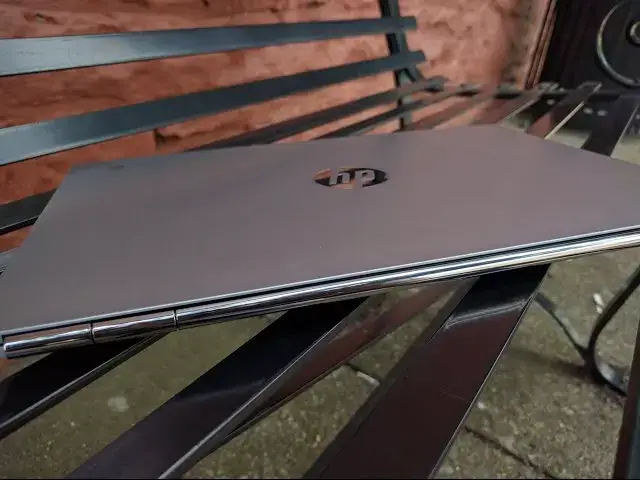
Chromebook 13 G1 around the top lid
1:26
we've got this nice brushed aluminum
1:27
does not feel cheap it feels really
1:29
really good actually around the back
1:31
side we have this beautiful chromed out
1:34
hinge uh it looks a little bit like the
1:36
pixels hinge um and and gives a
1:38
satisfying click kind of and I might be
1:40
able to get this on here whenever you
1:42
close
1:43
it um and it actually kind of feels like
1:46
it it solidly closes the device and so
1:48
you don't have the the lid flopping
1:49
around on you so that's a very nice
1:51
touch uh around the sides uh we see the
1:55
uh two USB type-c ports and then one USB
1:59
3.0 port Port combo headphone microphone
2:01
Jack nothing across the front save this
2:04
really cool bevel um uh that that's kind
2:07
of beveled inwards that way it just
2:09
gives it a nice neat look again little
2:12
things in this device that that kind of
2:13
set it apart uh we've got the SD card
2:16
slot over here uh that uh is micro so
2:19
keep that in mind if you have um storage
2:23
um you're going to have to switch to
2:24
micro SD if you are using a full size um
2:27
and that's pretty much it around the top
2:29
the bottom
2:30
um some people have commented about
2:31
having a plastic bottom this didn't
2:33
bother me at all um a because you don't
2:35
really see the bottom that often B
2:37
because the the soft touch plastic
2:39
actually gives it a little bit of grip
2:40
when you're holding it and because it is
2:41
so thin um and and comes in at such a
2:44
thin form factor it actually gives it a
2:46
nice bit of grip when you're carrying it
2:47
around and I will say this for the outer
2:49
build quality of the device and again
2:52
there's no fans uh just 2 feet across
2:54
the bottom there's no fans no vents no
2:56
porch none of that stuff so very clean
2:58
looking um but um the overall just build
3:02
of this device and the kind of the
3:04
inspired feel the design uh really just
3:06
makes you uh enjoy using the device and
3:09
so some of the flaws that we'll talk
3:10
about in a few minutes uh kind of get
3:12
overlooked a little bit because the
3:13
device just feels and looks so good once
3:16
we pop the lid open uh we're met with
3:19
this gorgeous display I want to say a
3:21
few notes on it really quickly it is a
3:24
3200 by 1800 display um so if you do
3:27
some quick math and divide those two in
3:29
half get 1600 by 900 that's exactly the
3:32
way this Chromebook actually renders uh
3:35
objects on the screen so text um icons
3:37
all that kind of stuff if you put it up
3:39
next to a 1600 by 1900 uh or, 1600 by
3:43
900 uh 16 by 9 aspect ratioed monitor
3:49
that the stuff on the screen would
3:50
actually look the same size now this is
3:52
going to be twice as sharp in both
3:54
directions so um the reason I point that
3:57
out is I've long said that probably
3:58
1,600 by 900 is a better optimal um uh
4:03
aspect ratio when it comes to a 13.3 in
4:06
device uh because 1080p makes everything
4:08
really tiny and then you try to do some
4:10
scaling and certain things work in
4:11
scaling and certain things don't so the
4:13
minute you take a 1080p 13.3in device
4:16
and set it on a stand or get it you know
4:18
away from you in your lap it it starts
4:20
to make you kind of squint and for those
4:22
that want to know I do have I have 2020
4:24
Vision um so I don't wear glasses or
4:27
anything like that so if I'm having the
4:28
squint that means that most people would
4:30
as well so um that that to me's always
4:33
been a little off-putting so600 by 900
4:35
just makes sense and it really does it
4:37
it makes the most of this display uh
4:39
Everything feels the right size
4:41
everything's in the right place uh it
4:42
just it just feels good at a little bit
4:44
of a distance or right up in your lap
4:46
Everything feels great um and so kudos
4:47
to HP for really nailing this uh this is
4:50
probably one of my favorite parts of
4:52
this it's the first 13in 16x9 uh device
4:56
cuz the pixel's close to 13in but it's a
4:58
3x2 and so you get more of a square
5:00
display and it doesn't feel as cramped
5:02
but uh the Dell Chromebook the Toshiba
5:04
all of those for some reason that that
5:06
13.3 in uh in that and in uh 1080p
5:10
display always just didn't work for me
5:13
and so this this is great you get these
5:15
beautiful viewing angles as you can see
5:17
as we move this thing on angle and off
5:20
angle both side to side uh wide viewing
5:24
angles really great colors uh just a
5:27
beautiful display crazy sharp just about
5:29
as bright as the Chromebook Pixel I want
5:31
to say the Chromebook Pixel comes at 400
5:33
nits this one's in the 360 or 350 range
5:35
which is plenty bright you're not going
5:37
to run into a situation where you can't
5:39
see the see the display so that's that's
5:41
very encouraging had some comments about
5:43
the plastic around the bezel um and and
5:46
honestly that's not been an issue um I I
5:48
know that glass all the way to the edges
5:51
uh gives a better premium feel I agree
5:53
with that completely but this plastic
5:55
for whatever reason didn't bother me
5:56
it's not that cheap plastic it actually
5:57
has a pretty decent feel to it same
5:59
stuff that's on the bottom um doesn't
6:01
attract too many fingerprints and um
6:05
really uh it just hasn't bothered me at
6:07
all with this device and so been really
6:09
pleased with the display there is like
6:11
if you come off angle and you're looking
6:13
from the top so the the angle I'm
6:15
looking at it right now and kind of you
6:17
guys would be looking at it you're going
6:18
to see a little bit of washed out uh
6:20
colors and that is just part of an IPS
6:22
display there's um a class of IPS
6:25
display that's a little better than this
6:26
so what you would see on an iPad or the
6:27
Chromebook Pixel or uh MacBook Retina uh
6:31
screens those don't have that issue so
6:34
HP had to cut some cost in some places
6:36
that's just kind of understandable
6:37
keyboard uh is fantastic uh for a for a
6:40
device this thin uh really impressed me
6:42
it's got six stages of backlight if you
6:44
count the off position um the the keys
6:47
have a slight texture to them I just I
6:49
really enjoy typing on this keyboard um
6:52
I like the travel the clickiness of the
6:53
keys everything felt great it was
6:55
responsive I was able to type fast on it
6:57
can't say enough I love this keyboard
6:59
and in this thin form factor that was
7:01
pretty impressive uh for them to get
7:02
that kind of travel built into here
7:05
right above the keyboard we have the
7:07
bang and alen audio uh branded cool
7:11
speaker Grill here so these are machined
7:13
holes up in the top and the these are
7:15
just really nice design aspects um it's
7:17
it's it's a really neat look it's really
7:19
interesting um and with the branding and
7:22
all the kind of talk about bang Aon
7:23
audio I was kind of expecting uh
7:26
something really amazing uh and got
7:28
something that sounds pretty average for
7:30
uh laptop speakers so don't go throwing
7:33
out your Bluetooth speakers or anything
7:35
like that this is not going to replace
7:36
them but it is very good the audio
7:38
sounds good and crisp the highs are
7:40
really nice and there's a it's a good
7:41
round sound it's just not very loud and
7:44
there's no uh base to be uh talked about
7:47
here but that's normal for laptop
7:49
speakers we're not dealing with a whole
7:50
lot of space here for anything to
7:51
resonate even if the speakers were that
7:53
good so uh don't set your expectations
7:55
out of the park I kind of did a little
7:57
bit cuz I saw all this that went into
7:59
putting these speakers in here and kind
8:01
of made some assumptions that hey
8:03
they're really going to push the audio
8:04
here and it's you know it's good it's
8:06
not amazing it's not going to change the
8:08
way you think about laptop speakers in
8:09
any way shape or form and then below
8:11
that we have a trackpad I don't believe
8:13
it's glass it's kind of hard to tell
8:14
sometimes but I don't think it is uh
8:16
more than likely some sort of aluminum
8:19
uh the the surface is really good it
8:20
Glides very nicely all the gestures work
8:23
just fine all that stuff's great um the
8:25
size of it's about the same size as the
8:27
Dell Chromebook 13 um so it's plenty
8:29
wide not real deep but plenty wide and
8:32
and it gets the job done however uh the
8:35
the the travel on the track pad um is a
8:38
little deep for my taste and if you put
8:40
light touches on there um you can kind
8:43
of feel it give just a little bit
8:44
underneath that before you actually get
8:46
to the click and so uh to me that's kind
8:48
of a knock cuz when we're talking about
8:50
premium builds you know the trackpad
8:52
being good is one of those things that's
8:53
pretty important and so everything about
8:56
the trackpad works just fine don't let
8:57
that be a a deterrent to say don't buy
9:00
this and it could have just been mine um
9:02
but that shows me that there's a little
9:05
room for improvement for kind of
9:06
cleaning that area of this device up but
9:09
overall it didn't impact or make uh the
9:12
overall experience worse in using this
9:14
device at all what's inside this guy um
9:16
it comes in multiple configurations
9:18
actually um there are uh four basic ones
9:22
and HP has a a site where you can
9:24
configure uh the device But ultimately
9:27
um it ends up being pretty much the same
9:29
for um all of them from what we can see
9:32
right now on hp's website even though
9:34
all of them other than the Pentium at
9:36
this point in time are sold out all of
9:38
them come with the 3200x 1800 IPS so the
9:40
display goes across the gamut um where
9:44
you start changing is the processor
9:45
obviously these are all Skylight
9:47
processors we have the pennium pennium
9:48
4405 y um the uh the M3 the M5 and the
9:53
M7 and a quick note about the core M
9:56
processors so last year core M came out
9:59
uh um and everybody thought hey this
10:00
this is going to be a pretty decent
10:02
processor it kind of only went in the
10:04
MacBook and a handful of other windows
10:05
PCS and didn't perform very well uh and
10:08
the selling point was hey it's got great
10:09
battery and it doesn't need fans but
10:11
without performance that was adequate
10:13
the Chip Price was pretty high and so it
10:15
kind of created this conundrum for
10:17
manufacturers fast forward to this year
10:19
the core mline has come out now and just
10:21
like the core I line we have the M3 the
10:23
M5 the M7 that each kind of get more
10:26
specked out as you move up the the
10:27
ladder there and so the pennium kind of
10:30
is in the same place with the core I
10:31
you've got the the Celeron uh U
10:34
processor so the pennium kind of fits in
10:36
that with the core M and so uh this year
10:39
I can't speak for Windows and I can't
10:41
speak for Mac OS uh I've seen some stuff
10:44
saying that the the performance has
10:46
improved um but let me tell you
10:48
something core m in Chromebooks is
10:51
legitimate um this device is the core M5
10:55
with 8 gigs of RAM and it's benchmarks
10:58
the octane benchmarks Mar s were off the
10:59
charts it was it would regularly get
11:02
29,000 sometimes 27 28,000 but somewhere
11:05
in that range and just for reference the
11:08
Chromebook Pixel that I have the ls the
11:10
i7 in it gets 27,000 on a good day and
11:13
so if I logged out and got everything
11:15
closed down and and ran it clean I was
11:17
getting 29,000 out of this thing and so
11:20
that is really really impressive um the
11:22
device never lagged it didn't have a
11:24
problem keeping up with anything I
11:25
normally do and my expectations are high
11:27
a lot of times you know I come going hey
11:29
I know what a pixel can do I know what
11:31
my my beefed out Chrome box can do and
11:33
so I want to see these devices kind of
11:34
live up to that and so I didn't know
11:36
what to expect with the corm because I
11:38
had we haven't seen them in a Chromebook
11:39
until this point and so um very very
11:42
impressed with the internals and so back
11:44
to um what's inside these guys so we
11:47
have the the pennium the M3 M5 M7 the
11:51
device we have here is the uh core or
11:53
the uh the core M5 with 8 gigs of RAM
11:57
the pennium and the M3 come with 4 gigs
11:59
of RAM this one comes with eight and at
12:02
least out of the gate um I'm not sure I
12:04
haven't seen a whole lot of the m7s out
12:06
there they were they were pairing it
12:07
with 16 gigs of RAM price point start at
12:09
$4.99 which is what they're advertising
12:11
saying hey you can get this awesome
12:13
build for $4.99 that is with 4 gigs of
12:16
RAM and the pennium um hopefully we'll
12:18
get that one in to kind of take a look
12:19
at it to see how it performs because if
12:21
it even performs decently and has this
12:23
kind of build quality then $4.99 is
12:25
going to be an amazing price for that
12:27
device um the new 599 for the M3 4 gigs
12:31
then you move to 819 for this device 5
12:33
gigs or five M5 sorry with 8 gigs of RAM
12:37
and then you move on to uh
12:39
$1,021 these are some random pricings
12:42
for the M7 with 16 gigs all of them come
12:44
equi equipped with 32 gig emmc storage
12:48
that is a little bit slower than SSD
12:50
storage but it it I didn't notice any of
12:53
it as I was working on this device I had
12:55
no issues with that and so uh able to
12:58
install
12:59
uh Crouton because these are Intel chips
13:02
right so Crouton everything worked the
13:03
only thing I saw was that running steam
13:06
um in in the uh Ubuntu environment um I
13:10
was running into some serious issues
13:12
with games um and my guess is that steam
13:15
or Ubuntu or something I don't know
13:17
isn't optimized yet to use the GPU and
13:19
CPU that is the core M line so uh
13:22
because it wasn't just a little bit less
13:24
or something like that it was oh man
13:25
this isn't optimal it was absolutely
13:27
terrible completely almost unusable so
13:30
opening Source games which can run on
13:32
almost anything they don't take a whole
13:34
lot of uh grit to run um I was getting
13:37
like two frames per second it was it was
13:40
really bad and so my guess is they'll
13:42
they'll fix that and uh eventually those
13:45
things will run just fine and obviously
13:47
Android apps are going to run like a
13:48
breeze on this thing so wrapping up uh
13:51
what are the good things build quality
13:54
speed very surprising speed um overall
13:58
look and feel
13:59
um this thing is going to be a head
14:00
turner you take it to the coffee shop or
14:02
whatever it just looks good it feels
14:03
good when you hold it it it just
14:05
inspires some confidence it's a great
14:07
device uh from that perspective what's
14:10
bad um the um soldon uh emmc storage um
14:17
there's not going to be any upgrading of
14:18
that the mouse or trackpad being a
14:20
little bit floppy is it was kind of a
14:22
bummer um but overall there's not a
14:25
whole lot of bad going on here um of
14:28
touchscreen I guess you could say would
14:30
be a negative but ultimately this device
14:32
is really good and HP I think has
14:34
delivered something pretty phenomenal at
14:36
the price points especially if that
14:38
pennium device can really deliver from a
14:40
a usage standpoint um as far as speeds
14:43
and usability and and from what I've
14:45
seen of the Celeron when it comes with
14:47
the core ey line I I would not be
14:49
surprised if this thing really does
14:51
deliver well uh in the Pentium layout
14:53
and hopefully like I said we'll get one
14:54
of those in if I do I'll do a quick uh
14:57
kind of follow-up review to this this
14:58
video to say hey yeah guys the penum is
15:01
pretty awesome and at $4.99 to get a
15:02
device with that kind of display
15:04
keyboard trackpad build just all those
15:07
things built in if if the pennium can
15:09
you know kind of just hold its own um
15:11
that will be absolutely the go-to
15:13
Chromebook if you've got around 500
15:15
bucks to spend on one but guys uh thanks
15:18
for watching um for you who are
15:20
subscribers thanks for sticking around
15:22
and and and watching the videos if
15:24
you're not a subscriber yet and you want
15:25
to kind of be alerted when we put a new
15:26
video up right beneath the video there's
15:28
subscribe button just click that you'll
15:30
get alerted to new videos when they come
15:32
out um and all the latest things you can
15:34
also go to chrom onbox outcom and we
15:36
have all these reviews posted there plus
15:38
all kinds of chrome news and and things
15:40
that are going on in the Chrome OS uh
15:42
community and additionally if you would
15:44
give the video a thumbs up that helps us
15:46
out a whole lot um to to keep getting
15:48
more viewers and more subscribers and
15:50
more community and comments and all that
15:51
stuff and speaking of comments leave
15:53
those in the in the comment section
15:54
below or at Chrome unboxed or on social
15:57
media we're on Twitter Facebook go+ uh
16:00
Chrome unboxed on all of those um find
16:02
us on there follow us on there let's
16:04
talk uh All Things Chrome OS and
16:06
Chromebooks and until then guys thanks
16:08
for watching again we'll see
16:16
you
#Laptops & Notebooks