Up next in 10



30-day trial to Audible + free audiobook - http://audibletrial.com/chromeunboxed
Google Pixel Slate: https://amzn.to/2F9DKlf
~~~
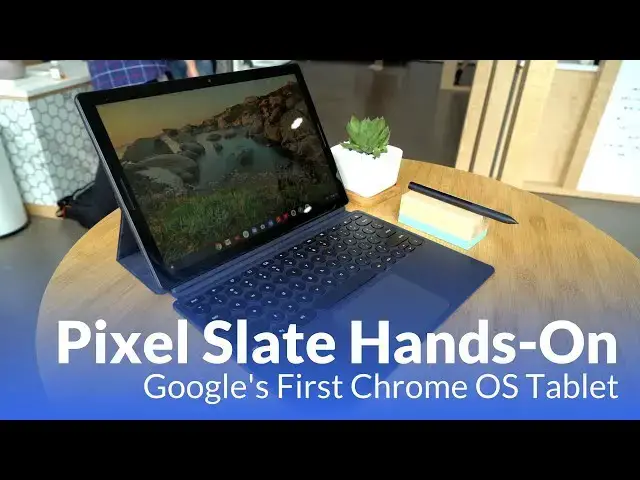
Google had a lot to show us all on Tuesday, but nothing was more interesting to us than the Pixel Slate. Sure, we've known quite a bit about it, but there were some surprises in there that even we didn't know about.
Subscribe to the channel: http://bit.ly/2xFuj6L
Shop Chromebooks: https://amzn.to/2NE2wKq
Read more: https://chromeunboxed.com/
Follow us: https://www.instagram.com/chromeunboxed
https://twitter.com/chromeunboxed
https://www.facebook.com/Chromeunboxed
https://plus.google.com/+Chromeunboxed
Show More Show Less View Video Transcript
0:00
[Music]
0:07
hi guys so we're here after the Google P
0:10
note and getting our hands on what we
0:12
really came here to look at the Google
0:14
pixels slate and there's a lot of things
0:16
we need to cover real quickly as we've
0:18
just kind of getting our initial hands
0:20
on with this thing so let's dive in
0:22
alright so what we're seeing here isn't
0:25
crazy surprising we saw the leaks we
0:27
kind of knew what to expect but I'm
0:28
going to tell you seeing this thing in
0:30
the flesh it is absolutely gorgeous and
0:32
so think about high-end phones think
0:34
about iPads that kind of stuff we've got
0:36
this nice curved glass perfectly
0:39
symmetrical bezels front firing speakers
0:41
it's just it's really really really well
0:43
put together this dark color just looks
0:46
incredible and it just kind of feels
0:49
like this new refreshing start to the
0:51
whole pixel book Chrome OS lineup and
0:54
and that's kind of the way Google
0:55
positioned it they're reimagining Chrome
0:58
OS they're reimagining the way that
0:59
we'll use this device moving forward and
1:01
just as we've talked on the channel
1:02
before now this thing is going to make a
1:05
perfect tablet aimed at perfect desktop
1:07
kind of all-in-one so let's let's look
1:09
at some of the things that we know about
1:11
this device already you got a
1:12
fingerprint scanner right up here on top
1:14
with the power button it behaves as
1:17
you'd expect but once you go to set it
1:18
up it's actually going to be able to log
1:19
you in just with your fingerprint right
1:21
on top front firing speakers that Google
1:23
says will provide good base response and
1:26
nice crisp eyes impossible in this
1:29
environment to test those but they're
1:31
there and it's cool that they've thought
1:32
through that so we're talking about
1:34
3,000 by 2,000 pixel display so very
1:37
very crisp it's exactly twelve point
1:39
three inches so the same size and layout
1:41
is the original pixel book but even a
1:44
higher pixel density and so Google's
1:47
also put a lot of tech behind the screen
1:50
and will unpack all that stuff as the
1:52
days go by after this but really
1:54
they're saying it's a weave we've put
1:55
together a display here that can have
1:57
really high refresh refresh rates it's
2:00
gonna look really great for video and
2:01
gaming and pretty much everything you're
2:03
gonna do on this thing and that's really
2:04
cool because this isn't just a desktop
2:06
or just a laptop it's it's gonna be a
2:08
device that can kind of perform in all
2:10
these different ways and so you see the
2:12
keyboard down here we're gonna get to
2:13
that in a second you also see the the
2:15
pen this is the exact same pin as we had
2:17
last year just a different color so it
2:18
kind of matches the color scheme going
2:20
on here we'll talk about the keyboard in
2:22
just a second but as you can see when
2:24
you pop this thing off there pogo pins
2:26
on the bottom that's what actually
2:28
connects it to the keyboard so that's
2:30
pretty cool
2:30
I don't have to worry about Bluetooth or
2:32
pairing or any of that stuff it's
2:33
magnetic so class right into place
2:35
without much work but then when you take
2:38
this thing off here I mean look at the
2:40
thinness we got here seven millimeters I
2:42
mean this thing is super super thin I
2:44
mean almost his thin is a USBC port and
2:47
it feels it it looks it the thing just
2:49
looks great it's very very light in the
2:51
hand the aspect ratio is great for
2:53
holding in either ports or landscape
2:55
mode the screen is nice just to look at
2:58
from any angle it's it's bright it's not
3:00
quite as bright as the pixel book but
3:02
it's pretty bright for and this is a lot
3:05
of stuff I know we're going through a
3:06
bunch of things here we have an 8
3:08
megapixel front-facing and rear-facing
3:10
camera we're talking about portrait mode
3:13
in this thing so it's going to be the
3:15
first Chromebook to actually have a
3:16
decent camera on it it seems the the
3:19
camera software here so far right now
3:21
it's a little sketchy but eventually
3:24
it's going to basically behave similar
3:25
to the Google camera on pixel phones but
3:29
overall this thing is just so well put
3:31
together nice clicky volume rocker on
3:33
the side and everything just feels great
3:35
when you're holding it like a tablet as
3:37
it should and so all the things that
3:39
we've talked about before all the all
3:41
the UI enhancements for tablets are all
3:43
here so when we're in here we swipe up
3:45
if we hide the shelf
3:50
we can swipe up right to our tray and so
3:52
I mean all these things that we've
3:53
already talked about before we're seeing
3:55
here and we're seeing why it is that
3:56
Google's put time into that additionally
3:59
this is a separate purchase you're
4:01
talking about a keyboard here that has
4:02
the same feel the same travel the same
4:04
goodness of the pixel book keyboard
4:07
which this with rounded keys it is
4:08
backlit you can't really see it in this
4:10
environment a nice glass trackpad and I
4:13
tell you from using it sitting on the
4:14
couch or whatever just messing with it
4:16
it feels very similar to using the pixel
4:17
book keyboard so that's a huge win for
4:19
something that's this thin this light
4:22
and really it's more of a folio case the
4:24
whole thing comes together begin with
4:27
pogo pins magnetically and then on the
4:29
back this piece can Mac magnetically
4:33
adhere at any point so that's how you
4:36
kind of achieve the different viewing
4:38
angles whenever you put it in your lap
4:40
and it's it's sturdy the thing's not
4:42
wobbling around if you use it so when
4:45
you're ready to close it up whole thing
4:47
closes down and you've got this nice
4:49
carrying case to kind of protect it as
4:51
you go so kind of wrapping this up we
4:54
didn't get to spend a ton of time with
4:56
this device and it's still in
4:57
pre-production software we're not gonna
5:00
actually see this thing till later in
5:01
the year so I don't know if sometime in
5:04
quarter four it'll actually come out you
5:05
can pre-order or get on a waitlist right
5:07
now on the Google store but it starts at
5:09
$599 and presumably that's gonna be for
5:12
a seller on model we're talking it's
5:14
gonna have an i3 and i5 and i7 variant
5:17
with different amounts of storage so it
5:19
could be a lots of different variations
5:20
in a wide variety of price points on
5:22
this thing as well but the keyboard is a
5:24
stable price point and it's offered from
5:26
Google as well at $199 and so you
5:29
talking about an entry-level version of
5:31
this device all said if you give the
5:32
keyboard in the device for about $800
5:34
that's a couple hundred dollars less
5:36
than the original pixel book so that's a
5:38
good move forward and hopefully people
5:40
will be able to get into this and get a
5:41
really really good piece of hardware
5:43
because nothing else changes in the base
5:45
model of this device around $600 if they
5:48
just want the tablet and bring your own
5:49
keyboard to the game and that's not to
5:52
mention the fact that you can dock this
5:53
thing with any other keyboard in any
5:55
other Mouse and as we've shown before
5:56
and get a pull
5:58
Desktop experience as well so this is
6:01
really a cool step forward I think for
6:03
Chrome OS in general and we're really
6:05
excited in the coming months whenever we
6:07
finally get our hands on to get a full
6:08
review but we wanted to give you a quick
6:09
hands-on right here at the Google event
6:11
and hope you liked it if you did give it
6:13
a thumbs up hit subscribe button and for
6:15
more we'll see you later
6:17
[Music]
#Consumer Electronics
#Gadgets & Portable Electronics
#Technology News