Up next in 10



Sponsored by NordVPN. Try it out and get 75% off a three-year plan for a limited time! Click here: https://chromeunboxed.com/nordvpn
ASUS Chromebook Flip C302: https://fave.co/2KgRB8r
Pixelbook: https://fave.co/2yvpL2W
・・・・・・・
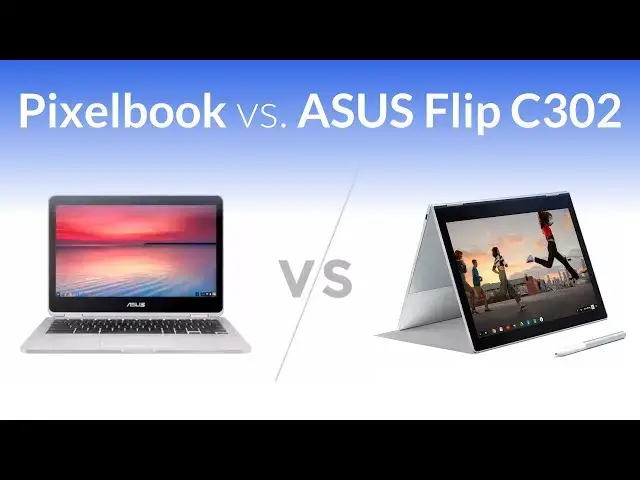
In a Chromebook landscape that now holds the Pixelbook, Samsung Chromebook Pro and the ASUS Flip C302, comparison videos are not only helpful, they are insanely intriguing.
Look, we get it! Devices that share the flagship-type status need to be measured, compared, and put against one another. With all the similarities between the Pixelbook and the ASUS Flip C302, consumers need to decide whether or not the Pixelbook is twice as good as the Flip C302 when making a purchasing decision.
The comparison between the Pixelbook and Samsung Chromebook Pro is just as interesting, and many of you have viewed that video and made purchases based on it.
In the time that that video has been in the wild, we've received a ton of interest in seeing the ASUS and Pixelbook stand toe-to-toe as well. I'll admit after our review unit was returned nearly a year ago, we haven't given a ton of attention to ASUS' excellent Chromebook offering.
That is about to change. With so much interest in this device still happening, we purchased the Core i3 version to have around for testing. We now have the Pixelbook, Samsung Chromebook Pro and ASUS Flip C302 as permanent dwellers in the office, so you can rest assured a 3-way comparison will come soon enough.
For today, we wanted to deliver a bit of a deeper look at the ASUS Flip C302 and Pixelbook to help any of you considering either of these excellent devices for the holiday season. Even if you are considering a purchase down the road, we hope this comparison helps you evaluate which device will be the best fit for you.
Show More Show Less View Video Transcript
0:00
[Music]
0:08
hey folks Robbie pay with chrome unboxed
0:10
and today we're going to be doing a side
0:12
by-side comparison of Google's pixelbook
0:14
and the Asus Chromebook flip c302 now
0:17
this is in response to some readers that
0:20
asked us some questions comparing these
0:22
two devices after we published the
0:24
comparison video between the pixelbook
0:26
and Samsung's Chromebook Pro you can
0:28
check that video out right up here if
0:30
you're interested in that one first up
0:32
let's talk about build quality and this
0:34
is one of the places where both devices
0:37
actually line up pretty well and it's
0:39
just this beautiful all aluminum design
0:42
that Asus has employed here fanless so
0:45
there's just feet on the bottom the
0:47
thing feels solid um it has really nice
0:49
squared off sides without being too boxy
0:51
or too sharp and overall it's just super
0:55
attractive again we haven't had one in
0:57
the office for months and I kind of
0:59
forgot how how attractive this device is
1:01
and how gorgeous it is it's just really
1:04
really well made it also has a really
1:06
good firm hinge so we're not getting a
1:08
lot of bouncing around on the Asus
1:10
whenever we put pressure on the hinge it
1:12
folds obviously into a 360° tablet and
1:16
this is probably one weak spot of the
1:18
Asus is it it's a 16x9 device this makes
1:21
for kind of an odd tablet um you can
1:23
kind of just tell it's real tall if you
1:26
hold it in portrait mode moving over to
1:27
the pixel book it is a little bit
1:29
thinner um hopefully you can kind of
1:31
catch that stuff on camera the pixel
1:33
book's uh a good chunk thinner uh than
1:36
the Asus Chromebook flip and um
1:39
interestingly enough whenever you
1:41
compare the two on paper it doesn't seem
1:43
like it's that big of a deal but really
1:44
in person when you're holding the two uh
1:47
the pixelbook just feels super duper
1:48
thin again we're dealing with on the
1:50
pixel book The dual hinge design and
1:53
things are firm enough so I mean you're
1:55
going to get a little bit of Wiggle on a
1:56
convertible that's just the way things
1:58
go but when you flip into tablet mode on
2:00
the pixel book uh you get a better 3x2
2:03
aspect ratio here that feels a lot
2:05
better when we go into portrait mode it
2:07
doesn't feel quite like the plank that a
2:10
16x9 uh tablet would feel like overall
2:13
it's really a push here when it comes to
2:15
build quality both of these devices are
2:16
built very well they feel very firm
2:18
they're built out of great materials
2:20
they look great they feel great when
2:22
you're using them so if you're looking
2:23
at one over the other when it comes to
2:25
build quality which one feels like it's
2:26
built better I don't know that you can
2:28
necessarily make an argument one over
2:30
the other all right so the next thing we
2:32
need to talk about is the screen so
2:34
there's multiple things that are
2:36
different about these two devices when
2:37
it comes to the screen so for all their
2:39
similarities this is one of the parts uh
2:42
of this comparison that's a little more
2:43
polarizing than the others so first over
2:46
on the Chromebook Pixel we're dealing
2:48
with a 3x2 aspect ratio it is a 2400
2:51
x600 panel so very high
2:55
definition things render really nicely
2:57
everything looks super duper crisp and
2:59
it's also extremely bright you can
3:01
probably tell right now on camera uh
3:03
exactly how much brighter this device is
3:05
than this one so we're looking at about
3:06
400 nits here we're looking at about 300
3:08
nits here over here on the Asus we're
3:10
dealing with a 16x9 aspect ratio and
3:14
while a lot of people like that for
3:16
productivity uh I tend to like the 3x2
3:18
cuz just from a sheer Square in uh
3:21
you're actually getting more uh for the
3:24
same basically same amount of diagonal
3:27
space so here your 12.3 in diagonal
3:29
isance 12. five close enough to call
3:31
them pretty much the same and you can
3:33
just tell looking at them you get more
3:35
screen over here than you get over here
3:37
but I can say after using multiple
3:38
devices with the 3x2 display uh I really
3:41
prefer the 3x2 display and then the
3:43
brightness winds over here as well the
3:46
colors are a little better and lastly
3:48
there's a little thing with the Asus and
3:49
I don't know if this picks up on camera
3:51
and I've seen this in Dell monitors and
3:53
a couple other ones where around the
3:55
edges especially when you see white um
3:57
you actually kind of see this like
3:58
ghosting it almost like a vignette
4:00
around the edges of the screen and my
4:03
guess is that's like the LED is not
4:04
quite getting to the edge uh there's no
4:06
sign of that here um and I've seen it on
4:09
on other cheaper panels uh cheaper
4:12
displays budget kind of Chrome or not
4:13
just Chromebooks but laptops in general
4:15
so um I'm not sure what's going on there
4:17
I I do remember that from the review
4:19
unit earlier on in the year after using
4:22
it for an extended period of time I
4:24
don't notice it that much but I did want
4:26
to point out that that's there so the
4:28
next thing we want to talk about now
4:29
that that we move kind of past the
4:30
screen are input methods and this is
4:33
another place where they're a little bit
4:34
different but most of these pieces are
4:37
actually very very similar on both of
4:39
these devices so let's talk about the
4:40
keyboard they are both backlit keyboards
4:43
uh they are both great keyboards they're
4:45
different and again we're this is
4:47
subjective stuff there's there's more
4:49
travel on the Asus than there is on the
4:52
pixelbook however I prefer the
4:54
clickiness of the pixelbooks uh keyboard
4:57
to the Asus both of these are great
4:59
keyboards so a lot of this is just so
5:01
subjective um but I have to give the win
5:04
and keyboards to the pixel book uh and
5:06
again that's just my preference I I
5:07
really really really enjoy the keyboard
5:09
on this thing let's move on to trackpads
5:12
um both of them have a really good click
5:14
to them um they're not loud and they
5:17
feel good they're not flopping around or
5:19
or or weird the surfaces on them are
5:22
both smooth but again the pixel book
5:24
kind of wins on this one because we've
5:25
got a glass and etched glass trackpad
5:27
and I what I want to say is probably
5:29
Flash over here and all that means is
5:31
over time I'm going to have to wipe this
5:33
one off more often so I I've been
5:35
working from this since we got it back
5:36
in the office uh just to kind of re
5:39
familiarize myself with it and I've had
5:41
to wipe the trackpad down a lot with the
5:42
pixel book I wipe it down when I think
5:44
about it because I'm just want to keep
5:46
my device clean not because it's
5:48
starting to catch my fingers all the
5:50
time on this one multiple times every
5:52
day I'm having to stop and you know wipe
5:53
it down and clean it up when it's clean
5:55
uh it Glides along just fine all your
5:57
gestures work just fine everything
5:59
everything feels good The Click
6:00
mechanism's good it's not a bad trackpad
6:02
it's it's pretty good it's one of the
6:04
best ones on a Chromebook it's just not
6:06
as good as the pixel book The pixelbook
6:07
has arguably the best trackpad I've ever
6:10
used hands down so um again the pixel
6:13
book kind of wins in in this category
6:15
but yeah there's no real comparison
6:17
between these two because this one
6:18
doesn't have pen input and you can use
6:20
the fat tip you know basic capactive
6:22
stylus if you want but it's a terrible
6:24
experience nobody really likes that and
6:26
even the active stylus we actually got
6:28
some of those in and tried those and
6:30
they're just they're just not good uh
6:32
versus on the pixel book you know you
6:35
can write notes and jot things down and
6:37
even though there's not a place to put
6:39
it which is still a bummer um obviously
6:42
the win for input methods goes to the
6:44
pixel book again because you got the
6:46
option here with Samsung at least you've
6:48
got the stowable stylus and you may not
6:49
like the way it lays out quite as nice
6:51
or you may not like the way it feels in
6:52
your hand quite as nice but at least
6:54
they both had a stylus uh in this case
6:57
if if you're looking for a stylus you
6:59
like the idea of having a pen or you
7:00
like the idea of sketching or writing
7:02
notes and that kind of stuff um if
7:04
you're looking at these two devices and
7:06
that's that's a selling point for you
7:07
obviously you probably need to stick
7:09
with the pixel book let's talk about
7:11
speakers I've seen a handful of comments
7:13
around about how the Asus has better
7:16
speakers than the pixelbook and I was
7:18
inclined to agree with that again not
7:20
having the device in my hands for a few
7:22
months in my head I remember the
7:24
speakers being uh pretty good and one
7:27
difference that you get on the Asus we
7:29
actually have side firing speakers so
7:31
you have a speaker over there speaker
7:33
over here so you're actually going to
7:35
get uh a better stereo separation for
7:37
sure I'm not going to be able to show
7:38
you that on camera uh there's no way for
7:40
me to pick that up necessarily however
7:43
um I do want you to hear the difference
7:45
in the sound that these two devices put
7:47
out because it's incredibly different
7:49
and again a lot of this comes down to
7:52
subjectivity uh but I tend to kind of
7:56
side with the pixel book if as an
7:58
overall thing I don't listen to music
7:59
much out of the speakers on laptops
8:03
so take it for what it's worth so I'm
8:05
going to play this sample this is a
8:07
couple notches Under full
8:12
[Music]
8:17
volume okay and here's the pixel book
8:24
[Music]
8:30
now one thing you have to remember with
8:32
these is so with sidef firing speakers
8:34
they're kind of kind of be based on
8:36
what's next to them and that kind of
8:38
stuff but you're going to get much more
8:39
stereo separation so Left Channel
8:41
stuff's going to go way over here and
8:42
sitting in front of it as this is firing
8:44
and there's stuff panning from left or
8:45
right I can hear that and I can pick up
8:47
on that so that's kind of a satisfying
8:49
thing about the Asus however we have
8:51
upward firing speakers on the pixel book
8:53
with very little stereo separation but
8:56
way more clarity um and and you can hear
8:59
that I mean just listen to the highs
9:01
[Music]
9:05
here compared to
9:11
here it almost sounds like the ASU is
9:13
muffled a little bit um you kind of get
9:16
the same same effect as when you cover
9:17
something over uh and I'm not really
9:19
sure why that is we have clear access to
9:22
the to the speaker ports so I'm not sure
9:24
why it kind of has that muddy sound so
9:26
you do get stereo separation you get
9:27
more low end out of the Asus
9:29
H but it feels like you get way more
9:31
mids and like no high-end uh over here
9:35
on the pixel book you get tons of
9:37
high-end plenty of mids and basically no
9:39
Bas at all so now that we've talked
9:41
about all the pieces on the outside
9:43
let's talk really quickly about the
9:45
inside bits now if you've come to this
9:47
video and you've kind of done some
9:48
research you know this one comes with a
9:50
core M3 a sixth generation core M3
9:53
processor this one comes with a seventh
9:54
generation core i5 processor soon to
9:57
have a core i7 variant but I don't know
10:00
exactly who's going to buy that
10:01
particular device this one comes with 4
10:04
gigs of RAM this one with 8 gigs of RAM
10:06
this one comes with 64 gigs of internal
10:08
storage this one comes with 128 gigs of
10:11
internal storage now there are some
10:13
variants out there in the wild there's a
10:14
core M5 version of this with the same
10:16
specs and then there's a core um I5 8
10:21
gig of RAM 256 gig of internal storage
10:23
but again we're comparing kind of the
10:25
Baseline of both of these devices so
10:26
this is the the uh Baseline pixel book
10:29
and this is you know the Baseline um
10:32
Chromebook flip that we're dealing with
10:33
here so again we're wanting to compare
10:35
apples to apples here and when it comes
10:37
to Performance I will say yes the pixel
10:40
book is faster um on day-to-day use when
10:43
I have it hooked up to an extended
10:45
monitor with multiple tabs and multiple
10:47
activities going at the same time yes
10:50
this device is faster I notice little if
10:53
any hiccups or lag ever because it just
10:55
chews through those things and there are
10:56
a couple reasons for that mainly it's
10:58
the process processor part of it is the
11:00
ram but the processor uh the Seventh
11:03
Generation Intel chips are actually far
11:06
more uh power efficient and and stronger
11:09
at performance especially in Chromebooks
11:11
than the sixth generation and there's
11:13
there's tons of stuff on the internet
11:14
about uh Sky Lake versus kbl Lake and
11:17
how much better KB like KB Lake was is
11:19
what Skylake should have been um you
11:22
know you can go read all that kind of
11:23
stuff and see but I can tell you just
11:25
from Real World performance this thing
11:27
feels way faster um and again you have 8
11:29
gigs of RAM over here so even when you
11:31
have multiple things open you you've
11:33
given Chrome OS plenty of overhead to
11:35
deal with all of that extra stuff all
11:37
that being said over here on the Asus
11:40
I've been able to work from it and not
11:43
really sweat it too much and some of
11:45
that is in part to the fact that we've
11:46
just got a 1080p screen here now you can
11:49
see from uh looking at both of them I
11:51
mean performance is is plenty fast on
11:54
both and so I I don't want to split
11:56
hairs here when we when we talk about
11:58
running a bunch of stuff like if you're
12:00
really a heavy user you got some Android
12:02
apps open you got 10 tabs you got music
12:05
playing you got all that kind of stuff
12:06
yeah with an extended screen hooked up
12:08
you're going to see some issues over
12:09
here but it does get along really really
12:12
nicely and it actually bests the
12:14
Chromebook Pro that is a similar setup
12:16
because of that 1080p screen it's a lot
12:18
less pixels to push around than this
12:20
one's got if you do the math I mean it's
12:22
a fraction of the number of pixels when
12:24
you multiply 2 2400 by 1600 and compare
12:27
that to 1920 by 1080 it's a lot less
12:30
pixels and every time you got to think
12:32
about it every time a frame goes you got
12:33
to redraw every one of those pixels and
12:35
so it's way less stress on the processor
12:38
as a whole now that doesn't make up for
12:40
everything it doesn't mean that they
12:41
feel the same they don't um I don't want
12:43
to tell you that they do however for
12:46
most users the pixel book's a little bit
12:49
of Overkill and I'm okay with saying
12:51
that and I'm okay with owning one and
12:53
knowing that that's the case I I I like
12:55
to have the Headroom to know that I
12:56
don't have to worry about what I'm going
12:57
to do or what I'm going to open or oh I
12:59
should close my tabs and I like to just
13:02
work and work and work until I feel like
13:03
cleaning up my workspace uh this device
13:06
isn't quite as good at that as the pixel
13:08
book is but for day-to-day stuff when
13:10
we're talking about running some Android
13:12
apps and browsing the web and firing
13:14
back an email and opening up some docs
13:16
and those General things it performs
13:18
better than most Chromebooks so where
13:20
does that leave
13:22
us well in general the two devices are
13:25
very different in their pricing so we've
13:27
talked about a lot of stuff where
13:28
they're really similar and there's some
13:29
stuff that is polarizing in here and
13:31
it's there's a handful of things that
13:32
maybe it's very simple for you to make a
13:34
decision that one of these two isn't for
13:36
you but one of those things we've got to
13:38
talk about when we talk about these two
13:39
devices specifically and you know I'll
13:41
throw the Samsung Chromebook Pro in
13:43
there as well is price the pro and the
13:47
flip have both come down in price a
13:49
little bit uh around the holidays and
13:52
they might just stay at that price point
13:54
it doesn't seem like they're going back
13:55
up yet so the pros at 450 you can have
13:58
the as Chromebook flip c302 for uh just
14:02
depending on the day anywhere between
14:04
$430 and $460 so that's knocking at
14:07
least $40 to $70 off what it's been for
14:10
almost a year so it's been $500 pretty
14:12
much all year long and so we're finally
14:13
starting to see it come down in price a
14:15
little bit and what becomes really
14:17
interesting is the pixel book you're
14:19
going to find maybe 50 bucks off here
14:21
there or something like that on it in
14:23
general $999 plus tax so you're looking
14:26
at $1,000 for the pixel book you're
14:28
looking at $450 to $500 for the Asus
14:32
Chromebook flip c302 so quite literally
14:36
you could buy two of these and have1
14:39
hundred to $150 to just go buy other
14:42
things two of them two Chromebooks uh so
14:46
you could have one for you and give one
14:47
to somebody else and maybe buy a mouse
14:49
or uh a plant or some shirts or food or
14:55
whatever it is you want to use that
14:56
extra money on you've got to think about
14:58
those things and that's not to say that
15:00
if you choose to buy the pixel book that
15:02
it's not worth it or it's not to say
15:04
that if you choose to buy the pixel book
15:06
that uh you're making a foolish decision
15:08
or any of those things you just have to
15:10
think about that so for me when I
15:12
thought about this purchasing decision
15:14
and the devices that were out there
15:16
obviously if I want to buy a Chromebook
15:17
I'm going to use every day it was
15:19
between this the the pixel book the flip
15:23
c302 and then the Samsung Chromebook Pro
15:26
I chose the pixel book I like the fact
15:29
that I've got extra Headroom I like the
15:30
fact that this has got top-notch
15:32
performance I like that it has the best
15:34
keyboard the best trackpad the best
15:36
screen it's a push with the pro right
15:39
but the best of pretty much everything
15:41
the best build quality it's thinner than
15:43
all the other ones it's got crazy
15:44
battery life you know all those things
15:46
to me line up add the pen in there uh
15:49
the looks the aesthetic appeal of it all
15:51
those pieces come together for me to say
15:54
you know what it's worth spending this
15:56
money on this device over here sure I
15:58
could bought two of these for the same
16:00
price correct but if I put these two
16:03
together and I said this in the Samsung
16:05
video if I stack two of these together
16:07
it doesn't make either one of them any
16:09
faster it doesn't make either one of
16:10
them have a better screen or a trackpad
16:11
or a keyboard or any of those things it
16:14
just means I've got two of the same
16:15
thing and two medium or slightly good
16:19
things does not always combine to make
16:21
one really really really great thing and
16:24
I'm a huge fan of the pixel book I love
16:25
it I think it's a really really
16:27
spectacular device so for me it was
16:29
pixelbook but maybe not for you you have
16:32
to make that decision on how you want to
16:34
spend your money and what's more
16:35
important and whether having some extra
16:38
money in the bank is more important or
16:40
having the best of all these categories
16:41
is more important I can't make that
16:44
decision for you and I've never
16:45
pretended that I could what I wanted to
16:47
do was lay this stuff out so that if
16:49
you're going well I really like the
16:50
pixel book but I'm I don't know if I'm
16:52
going to feel sad if I get the Asus or
16:54
I'm going to feel disappointed I can
16:55
tell you either one of these devices
16:57
they're both great and if You' looked at
16:59
the Asus and you feel pretty good about
17:00
it I'm going to tell you you're probably
17:01
going to be pretty happy with it but if
17:03
you're not happy unless you have the
17:04
best of everything go with the pixelbook
17:07
if you want to ask me which one is a
17:09
better device overall you can probably
17:11
tell the pixel book is better at most
17:14
things than the Asus Chromebook flip
17:17
c302 but it's twice the price so the
17:20
decision's on you I hope we've helped
17:22
you make a good purchasing decision here
17:24
I hope we've helped you decide which one
17:26
is going to work best for you if we have
17:29
give us a thumbs up you can check out
17:31
the description down below for links to
17:32
where you can purchase either one of
17:34
these subscribe to the channel if you
17:36
want to see more stuff like this in the
17:38
future guys and until next time we'll
17:40
see you
17:42
[Music]
#Consumer Electronics
#Consumer Resources