Up next in 10



Sponsored by NordVPN. For a limited time, grab the 3-year plan with 70% off! Click here: Click here: https://chromeunboxed.com/nordvpn
・・・・・・・
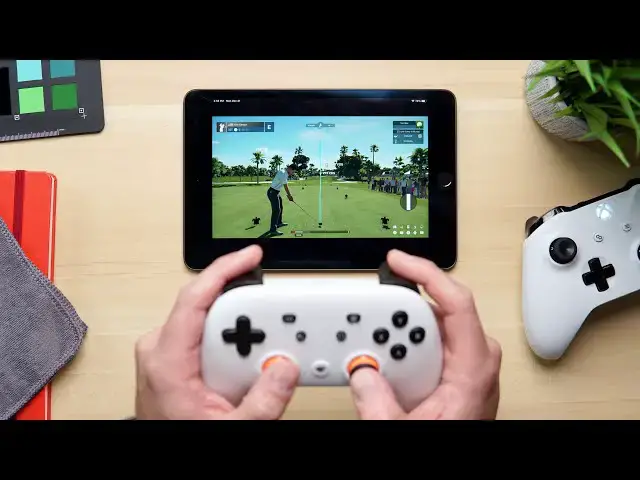
Here is a quick setup guide on getting Stadia running on your iPhone or iPad. It is simple, works well, and delivers the entire Stadia experience right in a browser.
Read more: https://chromeunboxed.com/stadia-iphone-ipad-pwa-powerful-example
Join our newsletter: http://bit.ly/2WjCDm7
・・・・・・・
Join our Patreon community for exclusive extras, an ad-free website experience, access to our private Discord server, and more: https://www.patreon.com/chromeunboxed
Shop Chromebooks on CHROME SHOP: https://chrmshop.com/
Subscribe to the channel: http://bit.ly/2xFuj6L
The Music We Use - PERFECT for YouTube: http://bit.ly/31W6PYP
Follow us:
Show More Show Less View Video Transcript
0:00
one of the biggest draws since stadia
0:02
came out is the fact that you can play
0:03
it on just about any screen
0:04
from chrome on a mac or on windows or on
0:08
a chromebook to your phone to
0:10
tablets to all sorts of devices it's
0:12
been really cool to be able to bounce
0:14
back and forth between all of them
0:15
in order to play your favorite games but
0:18
there are a couple devices that have
0:19
been left out of that phrase since the
0:21
beginning and those include
0:22
very popular devices like this the apple
0:25
ipad
0:26
and iphones but google has done what
0:29
google does
0:30
best and look to the web to find a
0:32
workaround to get stadia working
0:34
on ipad and iphone and we want to show
0:36
you how to get it set up for yourself
0:44
video is brought to you by nordvpn
0:45
they're the vpn of choice for millions
0:47
of consumers because
0:48
frankly they're awesome at what they do
0:50
and that's keeping your browsing safe
0:51
and secure
0:52
whether you're at home or out and about
0:54
if you'd like to learn more about them
0:55
and their services
0:56
head over to chromeunbox.com forward
0:58
slash nordvpn where you can learn more
1:00
and get started today
1:01
before we hop into all the bits and
1:02
pieces about how to get this up and
1:04
running
1:05
a quick note about apple and their app
1:07
store and compliance issues
1:09
honestly i don't know enough about all
1:11
of that to tell you detailed information
1:13
about why it is the stadia app just
1:15
can't work from the app store but
1:18
i know enough to tell you that xcloud
1:20
geforce now stadia these game streaming
1:22
services
1:23
just aren't compliant with apple's app
1:25
store policies and so because of that
1:27
you can't just go and download them and
1:29
play them
1:30
but again google is created this way
1:32
around it so let's jump in and start
1:34
working on it
1:35
all right so first step i would tell you
1:37
to go and install the actual stadia app
1:39
from the app store this isn't going to
1:41
help you play games necessarily but it
1:43
will help you get your controller paired
1:45
up if you've never set up stadia or
1:47
played stadia before
1:48
a lot of you trying this have probably
1:50
played stadia on a chromecast or
1:52
something like that so your stadia
1:53
controller is already hooked up to your
1:55
wi-fi
1:55
so you won't need to do this but for
1:57
those of you who have a new stadia
1:58
controller and have never set it up
2:00
you do need the stadia app in order to
2:03
go through that controller setup process
2:05
and once your stadia controller is set
2:07
up and on your wi-fi
2:09
the other step could be if you have
2:10
something like an xbox controller
2:12
or something like that you can actually
2:14
get it paired up go to your bluetooth
2:16
settings and your ipad
2:17
and actually pair your controller up
2:18
again i'm kind of assuming that if
2:20
you're
2:20
playing games on your ipad you've
2:22
probably done a lot of these things but
2:23
i wanted to say that up front so that
2:25
you know
2:25
you got to get your controller set up
2:27
before you can play stadia now on to the
2:29
good parts
2:30
you're going to need to open safari and
2:31
you're going to need to be on at least
2:33
ios or ipad os 14 and this is already on
2:36
that i'm actually one update behind so
2:38
there's a small update i haven't taken
2:40
on here yet
2:40
but everything works just fine once you
2:43
open up safari
2:44
you're going to go to stadia.com
2:52
and once you're there you're going to
2:54
actually see the entire interface that
2:55
you would see
2:56
on a chromecast or on an android phone
2:58
or on a desktop or whatever
3:00
it's fully navigable with sorry fully
3:02
navigable with you know
3:04
your touch gestures and all that kind of
3:05
stuff so there's nothing to be worried
3:07
about there you don't need a controller
3:08
to get around this kind of stuff but
3:09
you're going to see all the stuff here
3:10
that you would expect to see
3:12
in a normal stadium setup and that's
3:14
because
3:15
this is all you really need to start
3:17
playing stadia on your ipad or your
3:19
iphone there's another step you can take
3:21
from here if you like if you want to
3:23
have a quick way to access this
3:24
just hit that share button up top and
3:27
you're going to hit add to home screen
3:29
it's going to ask you if you like the
3:31
icon in the name say sure
3:32
we hit add and now we have a new stadia
3:35
icon
3:36
that you can click and it'll launch this
3:38
whole interface in full screen mode from
3:40
this point obviously you're going to
3:41
need to log into your stadia account
3:44
i'm going to do that real quick oh wait
3:46
there we go and once you've done that
3:48
you're in and you'll get this nice
3:49
little welcome screen here that says you
3:51
know hey we're still in development but
3:52
let me tell you
3:53
we've already tested this and it works
3:56
absolutely perfectly we've not run into
3:58
any issues whatsoever
4:00
with this setup and from here everything
4:02
is
4:03
pretty straightforward even down to
4:05
controller pairing for your gaming
4:07
session
4:07
so if i go up here to my controller
4:09
settings up here you're going to get the
4:10
same thing that you would get on a
4:11
chromecast
4:12
and if i were to take my stadia
4:14
controller and hit the command code
4:16
sorry you gotta turn it on and hit the
4:18
command code that's there
4:22
and give it just a second
4:26
you'll get that nice little rumble and
4:28
then boom your stadia controller is
4:30
linked
4:30
and you're ready to go and you can now
4:31
actually control this the interface
4:33
right here
4:34
so we'll launch into uh let's go into
4:37
super hot why don't we
4:38
all right once the game loads up you can
4:40
see
4:41
pretty quickly as soon as i touch
4:43
anything it's very
4:45
very responsive let me jump into this
4:47
guy's body here
4:48
there we go that way i don't die
4:51
immediately here
4:52
and i mean you can hopefully tell the
4:55
second i
4:56
touch this controller things move now
4:58
i'm probably going to die here in just a
5:00
second because i'm trying to talk and
5:01
play
5:02
a late level in super hot and this game
5:04
gets pretty complex at this point
5:06
but hopefully you can tell everything's
5:09
working exactly like you would expect at
5:11
this point
5:12
additionally things like in-game menus
5:14
chat all that kind of stuff it's all
5:16
here
5:17
and so if you need to you know jump in
5:19
and add another controller go to your
5:21
stadia options for instance
5:23
all of those things are here it's all
5:25
working and again
5:26
super impressive considering this is all
5:29
technically happening
5:30
inside of a safari tab one other thing i
5:33
do want to show you real quickly
5:35
is the fact that you don't have to have
5:36
a stadia controller so say you have an
5:38
xbox controller laying around
5:40
let me turn this thing on
5:43
and i've already connected it to
5:44
bluetooth again you click the button on
5:46
the top and go to your bluetooth
5:47
settings and pair it up
5:48
but the minute stadia recognized that
5:50
this controller is now turned on
5:52
it noticed that there's a controller i
5:54
can actually start my game right here
5:56
and honestly i can't tell any lag the
5:59
stadia controller
6:00
is hooked up to the same server that
6:02
your stadia instances
6:03
hook to so you would think it would have
6:05
a little bit less lag
6:07
i can't really tell the difference they
6:08
both seem just about
6:10
perfect honestly and so again
6:13
you can tell here i can hit certain
6:16
buttons let's see oh that was my
6:18
oh i died um i don't know what this
6:21
yeah so the xbox button acts as your
6:23
stadia button basically
6:25
so we can long press that guy and we can
6:27
go and exit the game
6:29
it was excellent thank you and again
6:32
you can just see the entire stadia
6:34
experience is here literally the only
6:36
thing
6:36
you can't do with a controller and
6:39
an ipad and the open web at this point
6:43
with this whole experience is is set up
6:45
a stadia controller to be on your local
6:47
wi-fi that can be handled with the
6:48
stadia app on ios i did it with this
6:51
controller
6:52
so honestly the entire thing is here if
6:54
you want to play stadia if you want to
6:55
leverage these games if you want to take
6:57
advantage
6:58
of game streaming at least from stadia
7:00
from google's solution to this
7:02
it's all here for you it's right there
7:04
on the web nothing to install
7:06
stadia.google.com
7:07
and you're up and going it's super
7:08
impressive and as we noted over on the
7:10
website
7:11
it's just a really really awesome
7:13
example of what is possible with the
7:15
open web
7:16
when you don't have to worry about app
7:18
stores and all that kind of stuff and
7:19
developers can just
7:20
write code that works across all sorts
7:22
of platforms but guys
7:23
that's it for this one if you like this
7:25
video give us a thumbs up go down there
7:26
and hit that subscribe button as well
7:28
and make sure and hit the notification
7:29
icon if you'd like to be alerted when we
7:31
make future videos just like this one
7:33
until next time we'll see you
7:48
you
#Computer & Video Games