0:00
it's hard to believe but it's already
0:01
been six months since nvidia launched
0:03
their game streaming platform geforce
0:05
now and we covered it quite a bit
0:07
whenever it first launched back in
0:08
february because honestly we were still
0:11
buzzing about stadia and game streaming
0:13
and hopefully a way that we would see a
0:15
lot of games come to chromebooks and
0:17
well we know what's happened with stadia
0:19
in the past seven eight months and it's
0:22
not delivered all the titles that a lot
0:23
of people want and there's not a ton of
0:25
people playing there and while geforce
0:27
now launched and was really cool on
0:28
android and windows and mac os it wasn't
0:31
really great on chromebooks because
0:33
there was no way to get us into the
0:35
games that we wanted to play
0:36
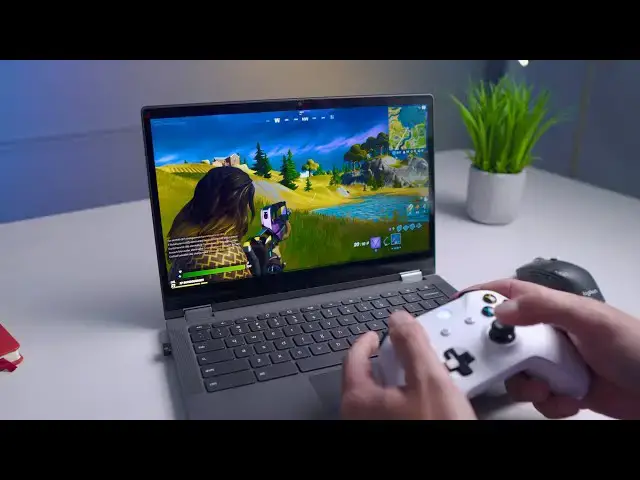
but as of today geforce now is available
0:40
in the chrome browser on chromebook
0:42
specifically so we want to go in go
0:44
hands-on and show you how it all works
0:51
before we hop into a game this video is
0:53
brought to you by nordvpn they're the
0:54
vpn of choice for millions of consumers
0:56
because they're awesome at what they do
0:58
and that is keeping your browsing safe
0:59
and secure whether you're at home or out
1:01
and about if you'd like to learn more
1:03
about them and their services head over
1:04
to chromeunbox.com forward slash nordvpn
1:07
you can learn more and get started today
1:09
alright so all you have to do in order
1:11
to play this is hey you need a geforce
1:13
now account so if you don't have that
1:16
play.geforcenow.com that's actually the
1:18
web portal where you're going to go to
1:20
play your games but there's also a
1:21
special offer up here and you can get a
1:23
discounted rate on the founders package
1:26
that they have you don't have to pay for
1:28
that but if you don't i think you're
1:29
really limited on the time that you can
1:31
place it's like an hour at a time or
1:34
i don't know all the specifics of all
1:35
that kind of stuff and i think they've
1:36
changed it possibly in the last few
1:38
months i stayed on the founders it's
1:40
five bucks a month uh since it launched
1:42
and so i just came here logged in up
1:44
here in the corner once you're logged in
1:46
just like on the application in android
1:49
or if you've used the application on
1:50
windows all your stuff's right here and
1:52
the interface is really nice you click
1:54
into a game it expands and tells you a
1:55
little bit about the game and obviously
1:57
if it's ready you can go and hit play
1:59
you can go up here and search for games
2:02
for instance portal uh yeah i know got
2:05
so for instance portal if i can type
2:09
see portal portal 2. i don't have either
2:11
one of those games in my library but
2:12
they're available via steam it shows you
2:14
right there if you have a steam account
2:15
it'll prompt you to log in whenever you
2:17
go to add that to your library it's no
2:19
different than the geforce now that has
2:21
been there none of this has changed from
2:22
what's been occurring for the last six
2:24
months so if you're not familiar with
2:26
that we have other videos about that
2:27
there's plenty on the internet about how
2:29
geforce now works and what's available
2:30
and what's not available and all that
2:32
kind of stuff that's not what we're here
2:33
to talk about what we want to show you
2:35
is how well the web player works right
2:37
from the web so zero downloads no setup
2:40
nothing needed here you just log in with
2:42
your chromebook and i'm going to click
2:45
and it's going to begin the launcher
2:46
just like again like it would have done
2:48
in the android app or anything else and
2:50
when this is done and up and running we
2:54
okay so after it gets through all the
2:55
loading i mean after all fortnight and a
2:57
lot of these games because these are all
2:59
running basically on a pc in the cloud
3:02
they're going to take a few minutes to
3:03
load in but once you're loaded in you
3:05
can already see from the get go if you
3:07
can pick up on that mouse tracking the
3:10
almost perfect i mean everything just
3:12
moves exactly in sync with it makes you
3:15
feel like you're just running this
3:17
locally which clearly you're not but it
3:20
doesn't feel any different than if you
3:21
were running it locally so just going to
3:24
solo match here and again
3:27
i'm not a professional fortnite player
3:30
if i'm anything i'm a pub g player but
3:32
i'm a pub g mobile player so i'm a
3:34
little rusty with the whole uh keyboard
3:36
trackpad thing uh keyboard mouse
3:39
controls uh so don't judge me for that
3:41
however i would like to now that this is
3:44
available and i can play fortnite this
3:45
way i play fortnite on my ipad from time
3:50
you know i'd like to get better at it
3:52
with a mouse and keyboard now that i
3:55
a setup that i can kind of rely on to to
3:57
have it all the time i can flip this
3:59
open and jump into a match with my kids
4:01
but you can already see lighting effects
4:03
you can see if you can see my hand down
4:06
it's super responsive i mean it
4:09
it doesn't hesitate whatsoever again
4:11
it really gives off the feeling that
4:13
you're running this thing locally and
4:15
it's really impressive to be honest with
4:17
you how smooth this all works in a
4:20
browser because i'll be honest there's a
4:22
lot of times i want to play stuff in
4:23
stadia and i want to play it in the
4:25
browser with the mouse and keyboard and
4:28
the gameplay just lags and there are
4:30
issues and there's artifacting on the
4:31
screen and for whatever reason i don't i
4:34
don't really know what's going on
4:35
but nvidia seems to have figured this
4:39
really work things out in their favor to
4:41
make this a great experience i mean as
4:43
you can see it's just it's smooth frame
4:45
rates are nice and high there's no
4:47
issues with input lag
4:50
and again the overall experience just
4:52
feels incredibly native for what's
4:54
actually going on here i will say we
4:56
have fast internet here so
4:59
your mileage may vary when it comes to
5:01
actually trying to run something like
5:03
this on a lower connection speed um so
5:06
keep that in mind if you're getting into
5:08
streaming gaming i'm assuming that you
5:09
kind of know that to begin with we're
5:11
going to run some more tests as time
5:12
goes by to figure out like what can we
5:14
get away with on this can we can we use
5:16
an lte connection is it is it going to
5:18
work over over those types of
5:19
connections and stuff but ultimately
5:21
it's about over a good connection how
5:24
native does this whole thing feel and i
5:26
can tell you right now
5:28
very very native i mean this this is
5:30
just great and uh i do wish pubg would
5:35
nvidia's game servers and maybe one day
5:38
they'll come back but for right now uh
5:40
it's gonna be fortnite for me uh and i'm
5:42
not gonna embarrass myself by going
5:44
hunting out a bunch of people i just we
5:45
just wanted to show you how smooth and
5:47
how responsive like look at the frame
5:49
rates if you can pick those up on video
5:51
i'm easily getting 60 frames here again
5:53
i think we're filming in 30 frames but
5:55
it should look nice and smooth you saw
5:57
just a tad bit of hiccup right there
5:59
that's about as bad as i've seen so far
6:01
and it usually lasts for maybe a second
6:03
a second and a half something like that
6:05
at most but ultimately everything stays
6:07
smooth it's very playable i've gotten
6:09
into some pretty hairy gun fights
6:10
already so even when there's multiple
6:12
people on screen people shooting and
6:14
stuff blowing up and going crazy no real
6:16
hiccups no real issues with performance
6:18
whatsoever what i also want to show you
6:21
is if you like gaming with a controller
6:24
instead something like this or a
6:26
playstation controller we would assume
6:27
even the stadia controller would work if
6:29
you've got a controller paired up
6:31
we're going to turn this xbox on
6:35
and i believe i'm paired up already
6:41
all of these work menus work exactly
6:46
left and right triggers all that stuff
6:48
works just like you'd expect and if
6:50
you're like man you know what i'm tired
6:51
with that i'd like like to go back here
6:53
this is still working as well so
6:55
kudos to nvidia i think they probably
6:58
pulled a lot of this stuff off of the
6:59
work that has gone into making stadia
7:03
and for what it's worth it feels
7:06
it feels a little bit like they
7:08
look at me i got an elimination
7:11
it feels a little bit like they might
7:13
taken that work and improved on it
7:15
possibly because this is
7:17
just super impressive uh to be running
7:20
on a 400 chromebook that i have sitting
7:21
in front of me and ultimately when i
7:23
tried this out to begin with this
7:24
morning when it first launched i was
7:26
doing it on a sub 300 chromebook with a
7:28
very entry-level small core intel
7:31
processor in it so what nvidia is doing
7:33
here is very very impressive it's
7:36
awesome that i can jump to a bluetooth
7:38
controller if i want to i can use mouse
7:40
and keyboard if i want to i could plug
7:41
in a keyboard and mouse if i wanted to
7:43
extend the screen i was doing it earlier
7:45
on a larger display it's very very
7:48
flexible it's very very smooth and very
7:50
very responsive and something i would
7:52
say for five bucks a month if you
7:54
already own some games or you want to
7:55
play games like fortnite that are free
7:57
to play this is an awesome solution for
7:59
a lot of people that have chromebooks
8:01
and want to play some games but that's
8:03
really all we wanted to show you we're
8:05
going to spend a lot more time with this
8:06
get some better reviews and see what we
8:08
can get away with basically on what
8:10
low-end chromebooks and how low the
8:12
latency can be on bad connections and
8:14
all that kind of stuff and some other
8:15
peripherals that would work with all
8:16
this stuff see if voice chat works those
8:18
kind of things but right now we just
8:20
wanted to show you how cool this already
8:22
is in its infancy it's still technically
8:24
in beta and just launched today and it
8:26
is super super impressive well done
8:28
nvidia i think this is going to be
8:29
something a lot of you out there are
8:31
going to like to take advantage of and
8:33
enjoy a whole lot but guys that's it for
8:34
this one if you like this video give us
8:36
a thumbs up go down there hit that
8:37
subscribe button and make sure also hit
8:39
the notification bell if you'd like to
8:40
be alerted when we make future videos
8:42
just like this one until next time we'll