Up next in 10



Finally got my hands on the Dell Chromebook 13! Check out what's in the box along with my initial impressions!
Show More Show Less View Video Transcript
0:17
hey folks are we paying with chromevox
0:19
coming at you today with an unboxing of
0:21
the brand-new Dell Chromebook 13 a lot
0:25
of people haven't gotten their hands on
0:26
this guy yet it is a little bit
0:28
difficult to get a hold of I found a
0:30
handful of places on Amazon that are
0:32
reselling it and it's only the seller on
0:34
version I put in a pre-order for the i3
0:38
8 gig version and it's been over a month
0:41
now and it's still in quote
0:42
pre-production so I think I'm gonna go
0:45
and cancel that one I just want to get
0:46
my hands on this get enough idea and a
0:48
feel for the build quality I'll let you
0:50
guys kind of know initial impressions on
0:52
this as always review will be coming as
0:56
I said before this is the I don't know
0:59
if it has anything on the outside here
1:01
doesn't look like it yeah there we go
1:03
Celeron 3 2005 you so that's the 5th gen
1:08
or Celeron that's been popping up in a
1:10
lot of Chromebooks quite powerful able
1:13
to do most things the pacer c910 a 15
1:18
inch Acer that I'm using right now at
1:20
this exact same setup so 4 gigs of RAM
1:22
you can't update to our upgrade to 8
1:25
gigs of ram unless you go with the i3
1:27
processor or above and so that gets into
1:30
some money I think from Dell the i3 with
1:33
eight gigs ram 650 this device comes in
1:35
at 429 starting from Dell which I don't
1:39
know how long the process would be to
1:40
get this one but from Amazon I ordered
1:44
it from I don't remember what the
1:46
company was ordered it and it was sent
1:48
within within the day so that was pretty
1:52
quick we're gonna set this guy down here
1:54
for right now and rest of the box is
1:58
pretty standard fare nothing fancy at
2:01
all here normal warranty stuff go ahead
2:05
and get the power brick out because we
2:06
know how these things tend to work
2:10
way of course as normal a full-on review
2:14
will be happening within a week or so of
2:19
using this device I have high hopes that
2:21
a co-worker of mine is actually he's in
2:24
the process of switching to Chrome OS
2:26
and has been rocking a chrome box we
2:27
have around the office this may be end
2:30
up being his computer so that would be
2:31
pretty cool if that ends up being the
2:33
case so while I'm getting this plug
2:36
pulled out we'll talk about the device
2:40
just a little bit it is a 13.3 inch
2:42
device 1080p IPS display on this one the
2:46
non touch versions i've not seen anybody
2:48
with a touch version yet I don't even
2:49
know if they're shipping yet it has a
2:52
matte finish on the display as I said
2:56
thirteen point three inches 1080p so I
2:59
should have some pretty nice anti glare
3:05
on the outside we got a carbon fiber
3:07
we've get it up closer here so you guys
3:10
can see if you can see that it's a
3:12
really soft touch I'm think I think like
3:17
Nexus 5 a nexus 7 2013 edition that kind
3:20
of feel real real soft like Swedish kind
3:23
of feeling which is kind of neat very
3:25
attractive
3:25
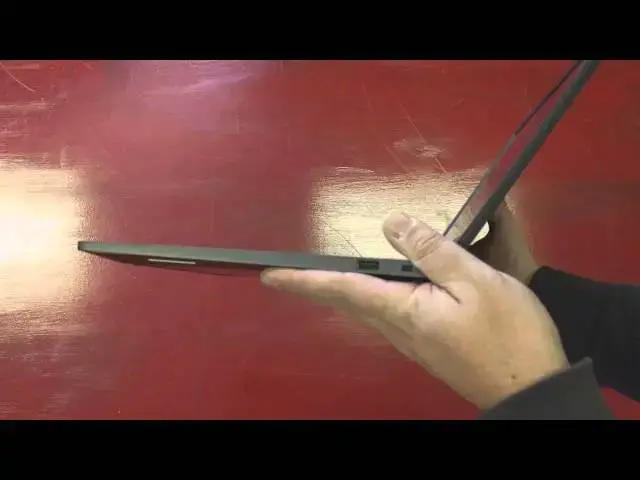
it's very understated not the finished
3:29
thing in the world but not thick either
3:30
definitely just manageable it just looks
3:33
pro we got that magnesium Halloway body
3:35
nice and firm looks good again it's just
3:39
just really attractive nice nice lines
3:42
on the device
3:43
nothing really across the front say the
3:45
light for when were charging on the side
3:47
it looks like we have a USB 2.0
3:50
Kensington over on the other side we've
3:52
got full size HDMI 3.0 USB here fro
3:58
microphone jack micro SD card slot and
4:01
your charger that is an interesting
4:03
thing when we have full sized ports here
4:05
it's interesting that they we're gonna
4:07
focus here it's interesting that they
4:09
went with the micro SD card slot but
4:13
hopefully you have one of those laying
4:14
around if you do need to increase the
4:16
storage this device probably is not
4:18
going to stay in my hand so I'm not
4:19
gonna go cracking it open but it looks
4:21
like we could probably remove some
4:22
pop the top off and really highly likely
4:24
we could expand the storage if need be
4:28
ram likely it's not gonna be expandable
4:31
so let's open the guy up very tough
4:34
hinge so there's no one one-handed open
4:36
but it feels nice and firm I mean
4:38
there's not a lot of wiggle there at all
4:39
I'm cracking the thing open again that
4:42
same magnesium alloy continues on the
4:44
inside got a decent texture on the keys
4:47
really good travel those feel really
4:49
really good so a lot of times a low
4:51
travel Keys end up feeling a little bit
4:52
mushy these have a nice clique to them
4:54
they're not loud but that feels very
4:57
precise that's gonna be a really good
4:59
typing experience really significantly
5:01
wide trackpad not really deep though so
5:04
hopefully that's not going to be an
5:06
annoyance it probably won't but plenty
5:08
of room whole hand fits across it and
5:10
the best part about it is its glass so
5:13
it has just an awesome feel to it I
5:15
think MacBook Chromebook pixel that
5:18
thing feels great I'm very small clique
5:22
very nice so we got power on Oh
5:33
powering up real fast
5:40
this one might actually be dead usually
5:42
the ship and they won't turn on until
5:43
and we might be dead so let me get some
5:46
more room on this
5:48
that's cable normally we just have to we
5:53
just have to plug it in and unplug it
5:55
we're good to go
5:56
we'll see what happens once it boots up
5:59
so the matte finish displaying already
6:01
tail and here we're not seeing much
6:03
glare and at all really and I think you
6:05
can probably see that on there
6:06
everything's there's some glare but it's
6:08
totally muted ooh that's a fun
6:10
background let's get on this I don't
6:17
care if you guys see our office Wi-Fi
6:21
password that's completely okay that
6:23
carbon-fibre looks awesome this
6:25
background the the pixels are really
6:28
really sharp reeled in since you would
6:30
expect from 1080p on a 13.3 inch display
6:35
and you tell as I get closer and closer
6:37
there's just not much room for pixels in
6:41
there it's just clean looking it looks
6:43
really really nice pretty bright and
6:45
again because of the anti glare no
6:47
matter which way I bend it we're not
6:48
seeing what to junk glaring all over the
6:50
place so really good screen well done
6:51
Dell for those of you who saw the Dell
6:55
Chromebook 11 review that I did back
6:58
Gee's since probably been over a year
6:59
ago the screen on it was abysmal it was
7:03
just a terrible terrible screen you know
7:05
we do have plenty of batteries so I'm
7:06
gonna put this it was a it was a
7:08
terrible screen I'll pull this off and
7:10
sign in real fast so kudos to Dell for
7:18
getting that fixed
7:28
load up settings here and performance
7:31
wise we're not probably gonna run into
7:32
any surprises here at all really we're
7:36
looking at a lot of the same internals
7:40
with some other Chromebooks I'm gonna
7:41
get my sync password in there
7:47
so very capable Celeron processor
7:50
matched up with four gigs of ram which
7:53
for most people in most situations even
7:56
for me in most situations is plenty man
7:58
that trackpad feels good gosh that feels
8:00
great
8:01
what is this it's interesting so of
8:09
course all gestures work really nicely
8:10
on it and honestly guys let's be honest
8:12
though for the most part gestures and
8:14
and tracking long track pats has been
8:16
great for a while with most Chromebooks
8:18
even on cheep cheep track pads what
8:21
feels great under this is just the way
8:23
the thing feels and moves underneath
8:24
your finger the whole thing just comes
8:26
off looking very premium it feels very
8:28
good give you kind of a side view here
8:31
it's just uh it's a really handsome
8:34
machine it's a it's a good looking
8:35
device and does take some of its keys
8:37
from the Chromebook 11 it does kind of
8:39
feel like a blown-up version of that a
8:40
little bit you got a nice none
8:43
non-glossy panel around here since this
8:46
one isn't covering Gorilla Glass 4 since
8:48
it's not touch you don't have to worry
8:51
about fingerprints collecting here
8:52
and out here it looks like it hangs on
8:56
them a little bit a little bit of
8:58
fingerprint magnet but not much at all
9:00
magnesium alloy doesn't collect
9:02
fingerprints almost at all so this thing
9:04
should stay really clean looking which
9:06
is nice one more time we want to run a
9:10
quick benchmark for you maybe play a
9:15
song or to see how the speakers fire and
9:17
then what kind of call it a day on this
9:18
one can't state enough how real nice how
9:24
nice that track that feels it's that's
9:27
kind of a treat and I have a feeling
9:29
that typing on those things gonna be
9:31
really really nice as well
9:33
yah-tchi finger scrolling is great yeah
9:38
that track that's nice the only track
9:39
pads I've felt that good Chromebook
9:41
pixel and mighty 6:50 trackpad and or a
9:44
MacBook that's really nice that for me
9:49
input devices matter like that's what
9:51
you interact with a lot and so having a
9:53
nice mouse or a nice trackpad
9:56
is a really really huge factor one other
9:58
thing I think it's alt yep so if we tilt
10:03
it back you can see the backlit keyboard
10:05
they're always a nice touch you don't
10:08
need it all the time but it's a nice
10:11
touch now this octane scores probably be
10:13
a little low because everything's
10:14
installing in the background I'm messing
10:15
around with it all that kind of stuff
10:16
but you'll get the idea
10:19
the Celeron I found this fifth
10:22
generation seller on just really
10:23
performs well no problems at all I do
10:25
wish you could outfit it with eight gigs
10:27
of ram and I've said that a hundred
10:28
times before but for right now that's
10:31
just not an option at this point and
10:35
will run all run octane living signed
10:37
out when we do the review and for most
10:43
people the Optima things here as long as
10:45
this is a lap computer right on the desk
10:47
the stuff everything on the screen isn't
10:49
gonna be too small but keep in mind with
10:51
a 13.3 inch device that 1080p does tend
10:54
to push everything to be a little bit
10:56
smaller than than normal so we'll do a
11:02
little bit of this teeny speakers I
11:08
expect they're pretty loud
11:13
their rear for our bottom firing so it's
11:18
in your lap it's probably gonna be
11:19
muffled you know they don't really hold
11:22
a candle to the Toshiba speakers or
11:25
pixel Wow
11:27
yeah so that's not accurate at all again
11:32
we were doing a bunch of stuff I think
11:33
we're almost done installing things so
11:38
let's run that one more time we'll call
11:40
it a day here actually I guess we're
11:45
gonna do this let's uh go ahead and
11:49
restart to update so while this is
11:51
restarting overall really really pleased
11:54
with the packaging here the screen looks
11:57
awesome keyboard feels great trackpad
11:58
really really feels great I'm not seeing
12:02
any weird spots on the screen light
12:04
bleed the matte finish is always welcome
12:07
especially when it doesn't cause
12:08
graininess overall build quality feels
12:11
really sturdy really firm no creaking no
12:15
give whatsoever in that thing that
12:17
magnesium alloy is the real deal and so
12:21
I'm actually going to browse as a guest
12:25
and we'll run octane in here
12:47
so I'm thinking for a co-worker of mine
12:49
who is in the process of kind of moving
12:51
over to Chrome OS I think this is gonna
12:54
be a great device for him he really like
12:56
the size of the Toshiba but there's some
12:58
build quality issues there he just
13:00
wasn't real satisfied with the feel of
13:01
it I mean that's understanding what he's
13:03
coming from a MacBook Pro so he's just
13:06
used to having that kind of premium
13:08
build and I think you get this in the
13:10
Dell
13:11
so I mean you're talking $100 difference
13:13
between this and the Toshiba really
13:15
there's not a lot of physical
13:18
differences 13.3 inch 1080p Celeron 4
13:21
gigs 16 bit 16 gigs of internal storage
13:25
which it looks like can be replaced on
13:27
both of them if you want to upgrade the
13:29
big win here is that you get an
13:30
anti-glare screen you get a glass
13:32
trackpad those are the big ups here the
13:35
Toshiba wins and the speaker Department
13:37
if that's important so 13-3 I bet if
13:40
again if run in different circumstances
13:43
we could probably push 14 or above that
13:46
so we'll I'll try a few more of those
13:49
before before we do the review either
13:55
way
13:55
it's plenty fast and no problems there
13:57
and so so far so good with the Dell
14:00
Chromebook 13 stick around guys week we
14:04
can have hopefully we'll have the review
14:05
posted give you some further further
14:09
insight on this device but already I can
14:10
tell you it's it looks really nice and
14:12
for 4:29 it's it's a great great
14:15
computer great buy it already seems like
14:17
just from initial impressions
14:20
who knows when you find some other
14:21
things out but it's a Chromebook so more
14:23
than likely now we're not gonna run into
14:24
any surprises in the full review so
14:27
that's gonna be it for today thanks for
14:28
watching if you like this video give it
14:30
a thumbs up and subscribe down below
14:32
share it with your friends share it on
14:34
Google+ share on Facebook all that good
14:36
stuff
14:36
we'll keep more reviews coming we'll
14:38
keep more unboxings coming thanks for
14:39
thanks for tuning in thanks for sticking
14:41
around thanks for watching we'll see you
14:42
in the next one bye
#Consumer Electronics
#Gadgets & Portable Electronics