0:00
if there's one thing we've learned about
0:01
chrome users and that's not just chrome
0:03
os users but chrome users across the
0:05
it's that you guys like to have lots of
0:07
tabs open all at one time
0:09
and once you have a ton of those like
0:11
dozens of tabs open across the top of
0:13
the browser it can kind of get difficult
0:15
to figure out where your stuff is
0:17
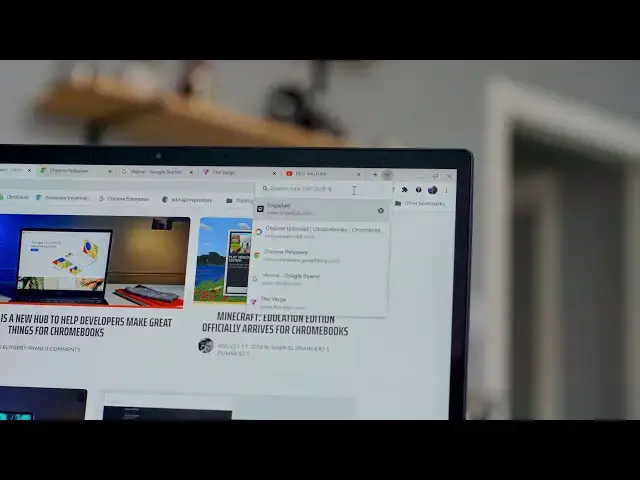
so google is rolling out a new feature
0:19
that we want to show you today that's
0:20
available in the canary channel right
0:22
now but will be available in the stable
0:23
channel in the coming weeks
0:25
that will allow you to actually search
0:26
through those tabs quickly and find
0:28
exactly what you need so let's take a
0:35
okay so let's take a look at this and
0:37
this is a feature that is actually
0:38
available in the canary channel right
0:40
now so at this point right now i would
0:42
recommend that you go and try to make
0:44
this work for yourself
0:45
but once it rolls down to like the dev
0:47
and the beta channels we're going to
0:48
start seeing it in the
0:49
flag section of the experiments in
0:51
chrome and i would say yeah go give it a
0:53
try once it rolls into those different
0:55
channels and those more stable channels
0:57
we'll probably see in the stable channel
0:58
of chrome in the next update or two so
1:00
it won't be that long before we'll
1:01
actually see this as a feature
1:03
but once it is in the flags if you go to
1:04
chrome ford colon forward slash forward
1:07
you can actually go down here hit enable
1:09
tab search you can search that right
1:10
there in that search bar
1:12
and set it to enabled reset chrome and
1:14
you'll be able to do something similar
1:16
once that's done click this little
1:18
carrot that is now here next to your new
1:20
opening and you will see there are five
1:23
options those are the first five tabs i
1:24
have open that's all it's going to show
1:26
but say i want to find that verge tab
1:28
that's there so i'm going to type verge
1:30
verge pops up click verge go to the
1:32
verge and then i want to go uh
1:34
i can't remember what that one website
1:36
was but it had something to do with news
1:38
about chromebooks oh there it is chrome
1:42
chrome unboxed has some of that stuff in
1:43
the metadata up there in the top
1:45
you can just pick chrome unboxed and
1:47
boom move right to it
1:49
and the same thing with you know android
1:50
central it was android something or
1:53
oh yeah android central that's what i
1:54
need to go boom you're right to that tab
1:56
again for me i i don't know how much i
2:00
on a day-to-day basis but i know there
2:02
are so many of you out there that all
2:04
these things like tab groups and stuff
2:06
it has been really beneficial to help
2:08
users just be more productive and be
2:10
quicker moving through these tabs
2:12
and i think this tab search is going to
2:13
be a really awesome tool for a lot of
2:15
to be able to move from one tab to the
2:17
next much faster without having to
2:19
wrangle them and group them and all that
2:21
kind of stuff and ultimately
2:22
google is a company that is based around
2:24
search they love search
2:25
this makes a ton of sense for chrome to
2:27
do and for chrome to leverage for its
2:30
users but guys that's it for this one
2:31
hope you enjoyed this and hope you enjoy
2:33
these videos we're doing like this we're
2:34
showing you these upcoming features
2:37
so that you can get excited about them
2:38
and be ready for them as they roll into
2:40
the more stable channels of chrome
2:42
but that's it for this one if you liked
2:44
it give it a thumbs up go down there and
2:45
hit that subscribe button make sure and
2:47
hit the notification bell as well if
2:48
you'd like to be alerted when we make
2:49
future videos just like this one
2:51
and don't forget to hit that join button
2:52
too to see all the cool stuff our
2:55
behind the scenes footage and custom
2:56
emoji until next time we'll see