Up next in 10



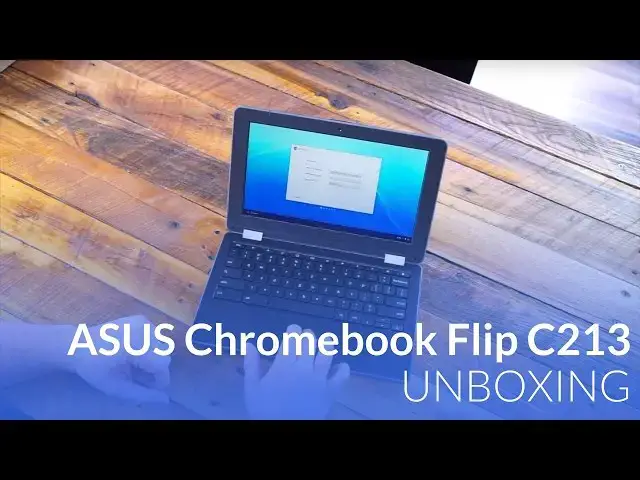
Today, we are getting a very exclusive look at the ASUS Chromebook Flip C213. Clearly aimed at the education sector, this device comes with some pretty stellar features for an EDU model.
Sleek, sturdy, and packing the latest Intel silicon in the Apollo Lake chipset, this device has quite a bit going for it and we're taking a look!
================================================
We want to give a special shout out to Troxell Communications for hooking us up with this device as an exclusive.
Troxell is a Platinum Google Partner and Premier Intel Partner selling over 200,000 devices into the K-12 space over the last year alone. Troxell has a mission statement within the company that addresses the emphasis we place on value added services. That statement is to “accelerate learning through the application and use of technology”. Simply put, Troxell is focused to make sure that anything purchased from Troxell gets used effectively in the classroom.
Learn more at trox.com
Show More Show Less View Video Transcript
0:01
[Music]
0:09
hey folks Robbie pay with chrome unboxed
0:11
and today we're going to be unboxing the
0:13
Asus Chromebook flip c213 now this is a
0:16
device that is aimed squarely at the
0:18
education sector but it has a couple
0:20
unique features as well 360° hinge a 12
0:24
plus hour battery life but most
0:26
importantly it's the first device that
0:27
we're going to be looking at with the
0:28
Apollo Lake chipset we want to give a
0:30
special shout out to tral Communications
0:32
for providing this device for us to take
0:34
a look at it's about a month before this
0:36
device comes out so they've helped us
0:38
out by getting one here in the office
0:39
for us and trox will you can learn more
0:41
about them if you look in the
0:42
description below but for now we're
0:44
going to get
0:45
started all right guys so let's get into
0:47
this thing there's not much on the
0:48
outside this is a pre-production unit uh
0:51
this device will ship uh late may
0:53
there's not really much on the outside
0:55
to Define anything but it looks like
0:57
General Asus uh boxing
1:00
we've got part of the power core
1:04
here I'll set this to the side for
1:09
now oh there's the rest of it okay so we
1:12
have a um USBC block and then uh this
1:17
isn't an optional power extender so like
1:19
with the pixel C or the pixel I'm sorry
1:21
for instance um this this has kind of
1:23
the duckhead plugs this does not have
1:25
that you have to use this part as well
1:27
looks like
1:27
so um
1:30
SL that to the side and get to the goods
1:38
here so yeah it's a good looking device
1:41
if you've seen a
1:42
c202 I think is what the model is the
1:45
other education model that came out last
1:46
year um it's got that same kind of
1:48
textured um obviously plastic design
1:51
we've got the bumpers um around the
1:54
edges um but ultimately for a for an edu
1:58
device uh this thing is is rather Sleek
2:01
uh you have reinforced metal hinges here
2:03
so no plastic going on there again the
2:05
bumper goes all the way around the edges
2:07
it's military spec it can handle lots of
2:09
drops Falls dust and Spills uh I would
2:13
not put it underwater but it's going to
2:14
handle spills across the keyboard well
2:17
interestingly enough too across the back
2:18
you have a field serviceable battery and
2:21
it's not just swappable uh because that
2:23
would mean you pop it out there is a
2:25
screw there so there will require a
2:27
little bit of effort to get the battery
2:28
out but you can pop that battery out pop
2:30
a new one in boot right back up and keep
2:31
going um they are promising 12 hours of
2:34
battery on this thing so I don't know
2:36
how big of a deal that is but uh still
2:40
kind of cool that it's there nice easy
2:42
hinge to
2:45
lift and it looks like those keys are
2:47
nice and Tall they tout I think a 2 mm
2:50
travel and I would say that's probably
2:52
accurate those that's that's a lot of
2:54
travel for a relatively thin device not
2:57
a lot of flex in the keyboard
3:01
trackpad feels really good nice and
3:04
clicky yeah so I a lot of you who have
3:07
watched videos you've seen where
3:08
trackpads come in and they kind of have
3:10
a little bit of an indentation before
3:11
they actually hit the click mechanism
3:13
it's really really frustrating to have
3:15
that uh no such thing here this thing
3:17
sounds great feels really good so I'm
3:19
I'm excited to kind of mess with that as
3:21
well um obviously this is all plastic
3:24
around the edges we got some pretty big
3:25
bezels here again this is an education
3:27
device so um some of these things are
3:30
not going to be the sleekest nicest
3:31
looking things in the world they're not
3:33
really meant to be they're meant to be
3:34
rugged and deal with uh people pounding
3:36
on them and dropping them and all that
3:38
kind of stuff let's talk real quick
3:40
about ports uh we have USBC over here
3:43
power USB 3.0 usba a and u micro SD card
3:49
slot headphone microphone Jack nothing
3:51
across the front and on the side over
3:54
here we have the volume rocker another
3:56
USB a 3.0 another us USBC and a
4:01
Kensington lock so that's actually
4:02
really encouraging to see USBC on both
4:05
sides usba on both sides U so if you're
4:08
uh charging on one side you can put your
4:11
um um monitor output on the other side
4:14
or you can choose which side you want to
4:16
charge from whichever one makes sense at
4:17
that time so that's that's always a nice
4:19
feature rather than them cramming
4:21
everything on one side so that's pretty
4:23
cool um yeah the hinge lifts really well
4:27
uh but is actually pretty firm um so
4:30
yeah well done there sorry our table's
4:32
not level at all yeah that thing's not
4:34
moving much at all which is really nice
4:36
especially considering how easy it is to
4:37
actually open um it is a 360 device and
4:41
you can see I mean relatively thin this
4:42
thing is uh again for an education
4:45
device when you think rugged and all
4:46
that kind of stuff you usually think
4:48
ugly honestly and this is not that this
4:51
is actually really attractive so you can
4:52
do all the different modes um and all
4:54
that kind of stuff here so we have the
4:56
tablet mode and at I think 2 and 1/2 2.3
4:59
something like that lb this thing isn't
5:01
crazy heavy uh which is nice this also
5:04
comes with a really unique feature the
5:05
world facing camera so whenever you're
5:07
in tablet mode and you flip this thing
5:10
around you actually have a uh camera
5:12
pointed out this way so for different
5:14
interactive uh types of things um
5:17
students will be able to use those
5:19
cameras probably pretty effectively I
5:21
would think we have an anti- glare
5:23
screen an anti- glare touchcreen which
5:25
is interesting on this there's two
5:26
models so there's this one and there's
5:28
another one that will be a little bit
5:29
more more expensive I think 50 bucks
5:30
more um pricing hasn't quite been set um
5:34
but it will be uh stylus equipped and
5:38
have a wcom digitizer built into the
5:39
screen it will be glass covered which
5:41
this one is plastic and anti- glare so
5:44
so now that we're all logged in you can
5:46
kind of see um probably one of the uh
5:50
first things I'm seeing that might be a
5:51
little bit of a shortcoming the display
5:53
is not that bright uh the viewing angles
5:56
aren't bad so it it is some sort of u i
5:59
PS type display so I can get left and
6:02
right either way you lose a little bit
6:04
of brightness but ultimately the the uh
6:06
viewing angles are are pretty decent
6:08
here and and it's interesting because we
6:11
have a a matte finish display here
6:14
that's uh touch enabled it's honestly
6:16
the first one I've ever used that that
6:18
usually the touch usually means glass
6:19
over top so um it's an interesting
6:21
surface to interact with on touch but
6:24
it's nice and smooth and anti-glare with
6:26
a a display that's not quite as bright
6:29
helps uh mitigate a little bit of the
6:31
sunlight coming and so I mean we're
6:32
under a lot of lights here and I can
6:34
still use it so I it's not the worst
6:36
display ever seen or anything like that
6:38
but it is not the brightest thing in the
6:40
world so keep that in mind um depending
6:43
on your use cases I'm going to do a
6:45
couple things here because this device
6:47
has um a chipset in it that we have not
6:50
tested yet and it is the Apollo lake so
6:53
it's the successor to the Braswell line
6:56
that was in quite a few Chromebooks last
6:57
year so we're going to run a couple
6:59
tests on
7:00
this and see how it fares keep in mind
7:03
Bradwell chips usually scored somewhere
7:06
between 7 and 8,000 and you could you
7:08
could Crest into the mid 8000 sometimes
7:11
on them depending there were a lot of
7:12
different models this one is uh the
7:14
lower model uh in
7:16
3550 or 3450 I'm sorry so we're seeing a
7:21
10,736 score here so that usually those
7:24
scores can range a few hundred points
7:26
either way so it's uh reasonable to
7:28
think that we could approach 11,000 in
7:30
octane here which is uh a nice bump up
7:33
uh this is the
7:35
n3350 uh there's a 3450 I believe is
7:39
with the model number on it that bumps
7:41
up to a quad core so we probably see a
7:43
little bit better performance out of it
7:45
um but it looks like Apollo Lake in
7:47
general is going to be a really really
7:49
nice upgrade from Braswell um and and it
7:51
needed it uh Braswell devices always
7:54
were a little bit slow and so it's nice
7:56
to see uh See Something jump up a little
7:58
bit higher um for the review we'll run
8:02
the speedometer it takes a little bit
8:03
longer so I'm not going to do that right
8:04
now um but I would expect to see 30s
8:09
somewhere in there I would I would hope
8:11
basing on you know some of the other
8:13
other ones we've seen um let's do some
8:16
real world things real
8:20
quick so loading up the Verge which
8:22
again is always really content
8:25
heavy um everything's scrolling nice and
8:28
smooth
8:30
that's tracking nice and
8:32
smooth pinch to zoom works really well
8:35
so um additionally this thing will come
8:37
with Android apps out of the box so um
8:40
teachers will be able to deploy Android
8:42
apps to U these devices from the
8:44
Management console and choose which
8:46
which apps you do and don't want them to
8:48
have along with their Chrome apps so
8:50
overall guys first blush I it it looks
8:53
really good uh we'll see how the battery
8:55
life does cuz that's an important thing
8:57
um this keyboard seems like it's going
8:58
to feel really good the travel is really
9:00
good clicks good trackpad is great so
9:01
when you nail this everything seems to
9:03
kind of flow out from that um I can
9:06
forgive the the display not being the
9:07
best in the world because it's they need
9:09
to keep price down and they need to keep
9:10
performance up so as long as it's
9:12
viewable indoors you're usually pretty
9:14
good here overall it's it's slick it's
9:16
nice it looks good um we're off to a
9:19
great start with this one so uh make
9:21
sure and check back for the full review
9:23
uh coming soon and until then guys give
9:25
a thumbs up if you like it hit the
9:27
Subscribe button down below and don't
9:28
forget there's some about Troxel Who
9:30
provided this device for us down there
9:32
in the description as well and until
9:33
next time guys we'll see
9:37
[Music]
9:43
you
#Consumer Electronics
#Primary & Secondary Schooling (K-12)
#Gadgets & Portable Electronics