Up next in 10



This video is brought to you in part by NordVPN. Try it out and get 75% off a three-year plan for a limited time! Click here: https://chromeunboxed.com/nordvpn
ASUS C201 - https://fave.co/2Mwig3X
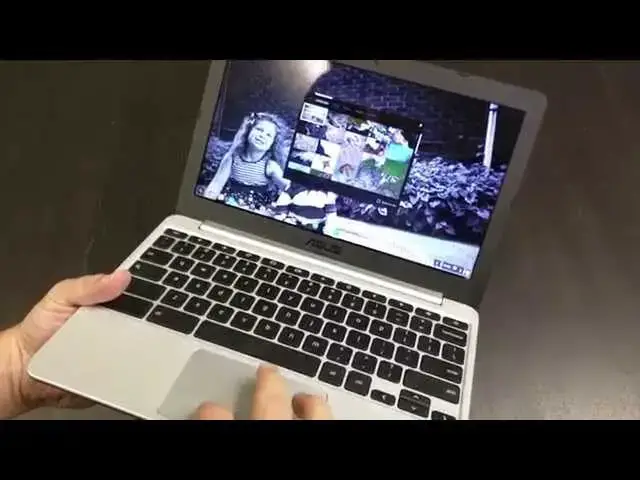
In this video, I give my full impressions of the ASUS C201. A very capable, extremely affordable little machine!
Read more: https://chromeunboxed.com/
Join our newsletter: http://bit.ly/2WjCDm7
・・・・・・・
Subscribe to the channel: http://bit.ly/2xFuj6L
Shop Chromebooks: https://fave.co/2OuedYL
The Music We Use - PERFECT for YouTube: http://bit.ly/31W6PYP
Become a member of Chrome Unboxed to help us make our channel even better, and for access to exclusive perks: http://bit.ly/CU-join
Follow us:
Show More Show Less View Video Transcript
0:17
hey folks Robbie Payne here with Carolyn
0:19
box coming at you today with a review of
0:22
the Asus C 201 now I will say if some of
0:28
you have watched the unboxing and
0:29
hands-on video of this I think I slipped
0:32
maybe twice in that video for some
0:34
reason and said Acer c720 maybe because
0:37
I reviewed so many of those things we've
0:40
had one in our house for who knows how
0:41
long now for some reason I just couldn't
0:44
get that out of my mind so if I do slip
0:45
up and say that and I miss it I'm so
0:47
sorry I really am referring to the Asus
0:49
C 201 cool background just changed its
0:53
my daughter and my son real quick around
0:58
the hardware give you a tour pretty
1:01
small
1:01
light thin I'm going to go through some
1:04
of the things that we talked about in
1:05
the unboxing Kensington lock micro SD
1:09
card slot I will show you something real
1:11
quick had a question whether or not all
1:16
I moved it sorry
1:17
whether or not the SD card would fit
1:19
flush it does it snaps actually clicks
1:22
right in there and fits completely flush
1:24
so if you have a micro SD card it will
1:26
fit no issues there micro HDMI you can
1:29
get a micro HDMI to full size female
1:32
HDMI adapter so that you can use that it
1:35
fits in there nice and snug I've used
1:36
some of these in the past that have been
1:38
kind of wobbly it is very good combo
1:40
headphone microphone jack nothing across
1:42
the front and two USB 2.0 ports there
1:47
and depending on your use case that may
1:50
be a bummer for you hopefully it's not a
1:54
end game kind of thing that you can't
1:56
actually use the device because of that
1:58
everything still works all your
1:59
peripherals so it would still work there
2:01
it's not going to get the ultra-fast
2:02
transfer speeds and you're not going to
2:04
get the faster charging nothing across
2:06
the back save this hinge and it's a good
2:08
looking device you see very clearly on
2:10
the video here picks up fingerprints
2:12
like a beast just part of it it's kind
2:16
of cheap plastic but it doesn't
2:17
feel cheap in it it's a decent build it
2:20
really is I've enjoyed my time using
2:22
this machine across the bottom you can
2:24
see the two speaker ports there and
2:25
that's about it kind of rounds out the
2:27
outside of the device here so we're
2:29
going to open this guy back up and one
2:32
thing you're going to notice real quick
2:33
the first time you lay eyes on this
2:35
thing is that when you're on angle with
2:37
this display let me sign in real quick
2:39
and it will actually change the
2:40
background of something with some color
2:41
to it so we can see
2:50
in one of these backgrounds here that's
2:52
nice and colorful
2:57
that one's pretty
3:01
and so means see let's get it right on
3:04
angle here for you colors pop the images
3:07
look sharp it's not anti-glare display
3:10
so it's actually glossy and kind of see
3:12
some reflections there which doesn't
3:15
bother me some people really like
3:16
antique like screens this is not one of
3:18
them but it gives it this really crisp
3:20
really sharp look as long as you're on
3:22
angle and let me see if I couldn't find
3:25
your spot okay so so take a look right
3:27
up in here okay you see the proper kind
3:30
of contrast as soon as we bend it back
3:31
here you're getting that kind of
3:32
negative effect going on obviously that
3:35
happens as we tilt it back you see how
3:36
the dark image is kind of negative
3:38
themselves out see when we go forward
3:40
they go the opposite direction we get
3:41
really light blown out images the the
3:45
viewing angle on this thing is so narrow
3:46
then it almost is impossible to get the
3:50
screen tilted in such a way where you
3:51
don't get any polarization from top to
3:53
bottom which is kind of a bummer
3:56
it's not a huge deal but don't expect to
3:57
go sharing your screen with a bunch of
4:00
people at a party or something like that
4:02
and it'd be a good experience because
4:03
it's really difficult you can already
4:05
see polarizing polarizing we're kind of
4:08
on there but it's still not consistent
4:13
across and so there's a little bummer
4:16
but again let's consider some things
4:18
we're paying we're talking about paying
4:19
160 dollars for a laptop here granite
4:23
mines 189 I think this one is with 4
4:26
gigs of RAM and honestly with the rock
4:30
chip processor for those of you again
4:32
here watch the unbox the unboxing sorry
4:34
about that you know it comes rocking the
4:36
the rock chip processor that the ACS
4:40
Chromebook flip also has the Hisense
4:43
Chromebook at Walmart and the higher
4:44
higher one that is exclusively at Amazon
4:47
they're all in that 150 160 range for 2
4:50
px 16 gigs of internal storage 2 gigs of
4:53
RAM setup and it's at rock Schiff 3820
4:57
excuse me there
5:00
so keeping the idea that we're in that
5:03
price range this is a really a steal of
5:05
a device the the keyboard has great
5:08
travel it's very very good very clicky
5:10
very well spaced barely any give
5:13
whatsoever there so it feels really firm
5:15
none of this is metal it's all plastic
5:16
but I do appreciate the matte edges
5:19
around the sides that don't pick up
5:20
fingerprints which is very cool the
5:24
device didn't have any problem pairing
5:26
connecting with things Bluetooth Wi-Fi
5:28
any of those types of things it actually
5:31
loads things up relatively quickly I
5:33
mean we're going to go I use this all
5:37
the time when we go to the verge and I
5:41
don't have any adblock things going on
5:42
here I'm using just loading it up as it
5:45
is and so you're talking about like tons
5:47
of ads tons of pictures tons of stuff
5:51
going on and we'll let it get loaded it
5:53
completely here before I move on it does
5:55
take a minute to load in the entire site
5:58
so we're proved on slowed again okay
6:01
pretty close and you can see once we get
6:03
things loaded in scrolling is actually
6:05
pretty decent again we're talking about
6:07
a bargain-basement the whole laptop here
6:12
this is as cheap as it gets I mean this
6:16
is just about disposable one hundred and
6:18
fifty hundred sixty dollars and so very
6:20
impressed with with its performance
6:22
given that I'm not going to run another
6:24
octane here you know it's it's scoring
6:27
close to seven thousand which on paper
6:30
puts it right around the other arm
6:33
Chromebooks like Samsung's had even the
6:36
series three gets almost that much but
6:38
let me tell you performance it's really
6:40
a non-issue it's it's not close to the
6:43
old arm Chromebooks and maybe that's the
6:45
quad-core thing happening it is a 30 era
6:47
I'm sorry it's not hardcore
6:50
yes it is quad-core but it's 32-bit and
6:54
64-bit so I don't know if that has
6:56
something to do with it
6:58
I'll show you I've got
7:06
I do have a boon to 1404 with xfce
7:12
running on here and I have ze extension
7:17
our target and so it's running in a
7:20
window and no issues doing so some
7:23
Inkscape which is a decently heavy
7:26
graphics editing program no problem
7:28
there I can't upgrade to the latest
7:29
version of xscape because they have not
7:31
compiled that for an ARM chip just yet
7:33
so but the older version runs just fine
7:35
on it you can see there's a little bit
7:37
of lag but I'll be honest if you even on
7:39
my eye three chromebox there's a little
7:43
bit of lag with Inkscape when it loads
7:44
up so let me see if I have any
7:54
if I have any images stored here
7:58
that's a nice huge image right there so
8:00
it's a 10 10 Meg image we'll see how it
8:05
handles that
8:14
Granta this is pushing the limits of
8:16
what you would really want to be doing
8:17
on this for me this is on the couch kind
8:20
of machine and do some work on it if I'm
8:22
in a pinch but you see it actually pull
8:26
it up once I got it loaded in moves it
8:28
around just fine so I mean there's so
8:29
there's a lot to be said about how well
8:33
this thing performs given what you're
8:36
talking again we're talking about an ARM
8:37
processor we're talking about $160 price
8:42
range so I've been very very impressed
8:44
with this device you can see the battery
8:47
right now is at 20% shown in an hour and
8:51
33 minutes left
8:52
I think they list this thing at 12 to 13
8:54
hours of battery I wasn't getting quite
8:56
that but it's easily getting 9 to 10
8:58
hours of use and because the display is
9:01
not great it's even right now got it
9:04
just about cranked full make sure it
9:07
didn't blow anything out there not the
9:09
brightest display in the world again you
9:11
got to cut corners in places whenever
9:13
you're talking about selling a
9:13
Chromebook for $160 and so I think they
9:16
did so with the display probably the
9:18
speakers we talked about this in the
9:21
unboxing speakers are decently loud they
9:25
got some volume to them they're on the
9:27
underside of the laptop subs in your lap
9:29
it gets muffled that's just kind of way
9:31
it is
9:34
remember I've been happy like I took
9:36
this thing home on a Friday I didn't
9:39
take a charger with me just took it home
9:40
used it around the house did a little
9:42
bit of work with it and it is Tuesday
9:49
now and we're at 20% so it's done it's
9:53
done pretty good fourth battery goes
9:56
you're not going to be upset there I
9:57
don't believe it all hear it skinny it's
10:00
pretty loud I mean it's I have to raise
10:02
my voice pretty high to get over it
10:04
so no bottom end which is not surprising
10:08
it's a Chromebook or it's a laptop any
10:11
laptop even the original pixel was
10:15
decent but it still wasn't great and
10:17
again I look at you know we're not
10:19
getting a bunch of checkerboarding you
10:22
know those images don't load in on
10:23
anything it's just the way web browsers
10:26
work and so again I've been really
10:28
really really pleasantly surprised
10:30
trackpad is really good nice and smooth
10:32
doesn't pick up a lot of junk
10:34
fingerprints and moves along just fine I
10:37
even took a day almost entire day and
10:40
worked from this device by itself I
10:42
hooked it into a secondary display so it
10:44
was pushing a 1080p monitor its own
10:46
monitor as the secondary and I did
10:49
everything I normally do with work so I
10:50
mean you're talking 1012 tabs open music
10:53
player you know Inkscape running in
10:55
ubuntu thor crouton multiple tabs open
11:00
google hangouts open dummy just lots of
11:03
stuff going on it's just the you know
11:05
the nature of the beast and I work but I
11:06
wanted to do that and force myself to to
11:09
see what it would do it hung with it
11:11
there were a couple of times my tabs
11:13
crashed on me but I think that was more
11:16
due to RAM than anything else and
11:18
honestly as long as I'm just kind of
11:20
managing that
11:20
leaving a bunch of crap open I really
11:23
had no problems with it and that's
11:24
saying a lot for $160 laptop to say that
11:28
it can hang with me working that's
11:30
that's really impressive so overall I
11:32
have to say if you're on the fence or
11:34
you're thinking about buying one of
11:35
these $150 Rockchip Chromebooks this is
11:40
the one especially if you're wanting to
11:41
stay in that price range this is the one
11:42
to get I haven't even touched the the
11:45
high sense of higher one but I don't
11:48
know that I have to I've looked at some
11:50
reviews online about them and most of
11:53
review say hey it feels pretty cheap but
11:55
you know it's 150 bucks well this one
11:57
doesn't really feel that cheap this one
11:59
actually feels better than most of a
12:00
sirs devices any of them including the
12:04
c910 the the Chromebook 11 all of them I
12:08
really have to hand it to Asus they
12:11
they've been a really good job with
12:12
taking the minimal build elements they
12:16
can work with and making something
12:18
really nice really a pleasure to use
12:20
I've really enjoyed it again apart from
12:22
the narrow viewing angles of the screen
12:24
I don't have much to nag on this device
12:28
we either be selling it or handing this
12:32
off to someone else could stay in the
12:34
house I'm not sure but I won't be using
12:36
it probably as much anymore because this
12:38
guy's come along the Asus Chromebook
12:41
flip just so you guys can see it the
12:44
size of these guys together so it's that
12:48
and then from the front so most of you
12:52
know the flip is pretty darn thin and
12:55
the SI 201 doesn't give up too much in
12:58
that way so we'll be talking more about
13:02
the flip later so I'm not going to let
13:04
it kind of steal a show here just
13:05
wanting to show you how thin and light
13:07
and and really well-built this guy is if
13:10
you're wanting to stay in that hundred
13:12
fifty dollar category of Chromebook this
13:14
is well worth the extra ten fifteen
13:16
bucks over the other brands and it is
13:19
well made it gives definitely give this
13:21
guy a thumbs up hope if you do buy it
13:24
you enjoy it as much as I have
13:26
other than that guys hope you enjoyed
13:28
the review if you haven't checked out
13:29
the unboxing there's some other things I
13:31
did in that as well check that one out
13:32
give it a thumbs up subscribe to the
13:35
channel for more stuff we've got the
13:37
Chromebook flip unboxing coming the
13:40
review coming all that kind of stuff so
13:41
keep it locked here until next time
13:44
we'll see you later
#Consumer Electronics