Up next in 10



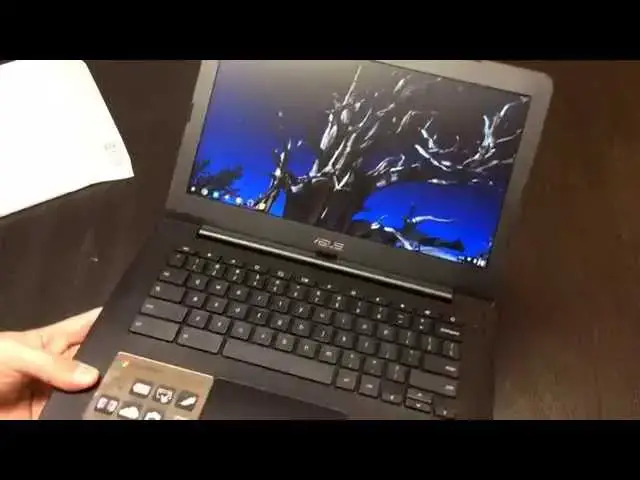
In this video, I finally get my hands on the ASUS C300. As my first Bay Trail Chromebook (and first from ASUS as well) I'm excited to see how it works out!
Show More Show Less View Video Transcript
0:01
hey folks Robbie pay with chrome unboxed
0:03
here coming at you today with an
0:04
unboxing of the Asus C300 Chromebook uh
0:08
there are the the Asus c 200 and 300
0:11
this is the 300 variety with the 13.3 in
0:14
screen the 200 is rocking the 11.6 in
0:17
screen uh this device comes with the bay
0:20
tril processor so this is the first time
0:22
I'll have my hands on a device with B
0:24
Trail um it uh from what I've seen
0:27
online usually fares somewhere between
0:29
the has processor in the uh exos
0:32
octacore in the Samsung uh Chromebook 2
0:35
so we will have uh some side by side
0:38
comparisons for sure uh as I will have
0:40
this device the new Acer I3 uh C720 and
0:45
my trusty hp14 which is rock and the
0:48
Haswell uh Celeron Processor so we'll
0:50
have a side by side by side comparison
0:53
to those coming up in the next week or
0:54
so after I have some time with this
0:57
guy I do plan on using this
1:00
uh if I can as a daily driver for at
1:03
least a few days but for today we're
1:05
just going to open the box
1:08
up that's supposed to happen I guess so
1:11
that's interesting um definitely one of
1:13
the nicer boxed Chromebooks that I've
1:17
seen get this out of the way we'll come
1:19
back to
1:20
that um yeah so
1:24
plug some stuff about being in search of
1:28
incredible um and again not a lot of
1:30
paperwork there never is in these
1:32
because it's a Chromebook so turn it on
1:35
sign in all you mean and here we have
1:38
before us I will say It's relatively
1:40
light uh right out of the
1:43
box very nice looking uh if you've had
1:46
an Asus PC in the last few years you're
1:48
probably used to this kind of brushed
1:50
aluminum esque um try to get in the
1:54
light here so you can kind of see
1:56
it uh obviously it's not brushed
1:58
aluminum it's very plastic sck uh but it
2:00
feels good uh it's got a nice texture
2:02
and it's not picking up fingerprints
2:04
which is kind of cool interestingly they
2:06
have their Chrome sticker covered and a
2:08
piece of plastic cuz I don't want that
2:09
Chrome sticker to get messed up I
2:13
guess around the back uh nothing that's
2:15
the beauty of bay tril no fan vents
2:18
needed so you get these nice solid very
2:20
thin devices uh it's very thin it's very
2:23
light which is very nice Kensington lock
2:26
uh USB 2.0 from the looks of it here uh
2:30
um and USB 3.0 you see super speed there
2:32
on the side full sizee SD card slot
2:35
combo microphone headphone jack and
2:37
fulls sizee HDMI thank you for that and
2:40
charging port speaker grills on the
2:42
bottom so we'll see what kind of volume
2:44
we get out of this nothing across the
2:45
back uh really nice clean uh very Sleek
2:48
design um what I would expect from Asus
2:51
they make uh pretty good looking
2:53
computers we'll see if it passes the one
2:55
finger test I'm not expecting much here
2:58
nope they never seem to apart from the
3:01
pixel it did that uh on the inside
3:05
actually quite nice looking I'm probably
3:06
going to have to take a break uh
3:08
seemingly always have to plug it in make
3:11
sure it turns on but that's not really
3:12
what we're here for anyway is it h nice
3:15
wide trackpad all five fingers can fit
3:18
on it uh nice smooth surface nice quiet
3:21
click so that's very nice uh the inside
3:24
is actually made of the same material as
3:25
the outside so this kind of faux metal
3:27
looking stuff it's got a slight texture
3:29
and it's pretty fingerprint resistance
3:31
uh pretty full siiz keyboard here Keys
3:34
feel nice have a decent travel and the
3:36
keyboard has very minimal Flex so very
3:39
firm we'll give it the oneand test and
3:41
see we're not getting a lot of flex uh
3:44
pretty sturdily built so from the
3:46
outside thing looks very nice
3:48
front-facing camera as always uh it's a
3:50
Chromebook so we're not that surprised
3:52
about it give me a moment I'm going to
3:53
plug it in uh and just see what the
3:56
screen looks like on first blush and
3:58
we'll be done with this uh unbox in for
4:00
now all right guys so got logged in um
4:04
and the device seems just as quick as
4:06
any other Chromebook granted the series
4:08
3 Chromebook even with a 2-year-old Tech
4:11
in it um actually boots up quite quickly
4:15
so um that really doesn't show us
4:17
anything I will say uh for those of you
4:21
who will probably ask me the screen is a
4:23
matte finish which is nice um so it's
4:25
it's reducing glare so that's a great
4:27
thing but we're still looking at a a
4:31
crappy TN panel that's just the way it
4:33
is for right now so eventually hopefully
4:35
we'll start seeing some IPS panels as
4:37
normal things one of the neat features
4:39
of it is in holding it and just getting
4:41
signed in not hearing any fans were um
4:44
the lightness of the device those things
4:46
are nice and and perhaps I don't know
4:49
perhaps it it'll have me coming around a
4:51
little bit as far as Bay tril is
4:53
concerned um we'll see how how the
4:55
performance fares um hoping that in
4:57
day-to-day kind of things that most
4:59
people use these for that ba Trail is
5:01
going to be a a worthwhile chips set um
5:04
for me I'm already pushing the limits of
5:07
the Haswell and I'm looking very forward
5:09
to the Acer I3 to see how that works uh
5:12
I think it I think it's going to blow
5:13
Haswell out of the water but uh we'll
5:16
see how this thing fares uh kind of in
5:18
dayto day but you can see uh with the TN
5:20
panel uh tilt it forward we get
5:22
polarization tilted back we get
5:24
polarization side by side viewing angles
5:26
are not terrible not great and the
5:29
device I can already tell uh this is at
5:31
Max brightness I think yeah and that's
5:34
not that that good either which is a
5:37
shame because the keyboard feels good
5:39
the device feels good it's quiet the
5:41
touchpad is very responsive uh the
5:44
click's very nice feedbacks great on
5:46
everything and yet we're stuck with a
5:49
mediocre Pano again and so hopefully
5:52
people who make Chromebooks are
5:53
listening as people more and more people
5:54
claimer for a nice display it doesn't
5:57
have to be the best thing in the world
5:58
but at least IPS so that we have decent
6:00
viewing angles and some decent
6:01
brightness would be nice so anyway guys
6:04
that's it for this unboxing keep it
6:06
locked to the channel um we'll we'll
6:09
have the full review of this unboxing of
6:11
the C720 with the I3 and a full review
6:13
of it as well and then a head to
6:15
head-to-head competition so you guys can
6:17
see some benchmarks you can see some
6:19
different games running and see if Bay
6:21
Trail may be something that works for
6:22
you or if it's something you need to
6:23
pass on um you can decide those things
6:25
for yourself but uh we'll be bringing
6:27
all that stuff to you shortly uh other
6:30
than that have a great uh a great day
6:33
thanks for watching uh if you like this
6:35
video please uh give it a thumbs up and
6:37
subscribe to the channel talk to you
6:40
later
#Computer Hardware
#Laptops & Notebooks
#Consumer Electronics