Up next in 10



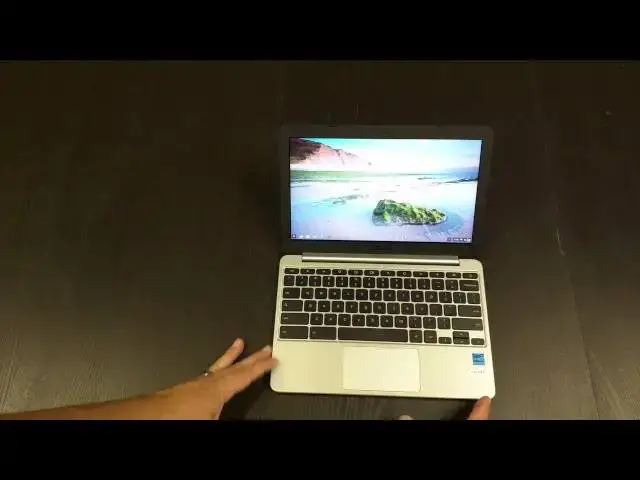
In this video, I get my hands on the ASUS C201 and give my initial impressions.
Show More Show Less View Video Transcript
0:02
[Music]
0:19
hey folks Robbie pay with chrome unbox
0:21
coming at you today with a review of the
0:23
Asus C
0:26
2011 uh for those of you who have done
0:28
your research prior to this video this
0:30
is asus's first Venture into the Rock
0:33
Chip uh processor category so we're
0:35
seeing an 11.6 in
0:38
device um rocking a 1366 X 768 panel
0:42
probably nothing really that impressive
0:44
there nothing crazy going on on the
0:46
exterior uh and on the interior I did
0:48
get the 4 Gig version see if we got any
0:52
stats around here anywhere here we go
0:56
c720p um yeah it's the rock chip rk3 288
1:01
uh so that is a an arm processor come on
1:05
Focus there we go that is a rock proc or
1:08
rock chip arm
1:10
processor um USBS are only 2.0 which is
1:13
kind of a bummer
1:14
um and does it say there's the yeah 4
1:18
gigs of RAM there so I did up that I
1:21
think the 2 gig ram version you can get
1:22
somewhere around 150 to 160 this one was
1:25
180 uh plus tax so still not bad at all
1:29
for a Chromebook so so I did go ahead
1:31
and slip the the plastic here or the
1:33
tape here so we wouldn't fumble with
1:34
that on screen decent boxing and and
1:37
actually kind of does this neat little
1:39
uh extra piece in here that keeps it
1:41
from unhinging all the way and you know
1:44
that kind of stuff it's it's decent for
1:46
all cardboard boxing not too shabby uh
1:49
we got a one piece charger here let see
1:51
what kind of connector we got on this
1:54
guy
1:57
there uh nice and small I wish that fold
1:59
it down that would be a nice tiny little
2:02
uh charging unit um it's a bummer that
2:05
doesn't fold but not a huge
2:08
deal yeah that's some sort of
2:10
proprietary thing um a little bit
2:13
thicker than micro
2:14
USB uh my guess is it's it's very close
2:18
though to micro USB my guess would be
2:21
that this
2:22
uh this proprietary thing can probably
2:24
push a little bit more power than
2:27
USB um all of that will be fixed
2:29
hopefully 12 months from now we'll just
2:31
have USB type-c and everything and call
2:33
it a day uh we'll set that to the side
2:37
and you got a couple piece of paper and
2:39
that's it it's Chromebook after
2:43
all get to what we're here to see
2:48
and it's actually uh pretty
2:53
attractive and I say that with a little
2:55
surprise I mean because it's a it's a
2:57
cheap uh device all navy blue
3:00
but all the same color um already
3:02
picking up fingerprints from where I was
3:04
holding it like this you can see so it
3:06
is going to be a bit of a fingerprint
3:07
magnet looks like um but again let's
3:12
consider the price point with every
3:13
critique that is made nice kind of
3:15
silver hinge here I mean it's just
3:16
aesthetically pleasing really thin uh
3:19
really really thin as you can see I mean
3:21
there's your USB ports 2.0 unfortunately
3:23
no 3.0 here um and the body is barely
3:27
any thicker than those USB ports and the
3:28
lid is incredible thin let's go to the
3:31
other side micro SD card slots keep that
3:34
in mind if you're going to get this and
3:36
you have a big fat SD card you're going
3:38
to need to get a micro one also uh I
3:41
think that's micro HDMI uh mini is the
3:44
small flatter one so another thought um
3:47
you'd have to have a cable or something
3:49
uh if you're going to push this to the
3:50
second screen likely with this device
3:52
it's not going to be bought for high
3:54
productivity I wouldn't think this is
3:56
going to be an on the couch on thee-o
3:58
kind of machine um this is that
4:01
proprietary Port again so close to micro
4:03
USB it's kind of weird um yeah and then
4:07
your combo headphone microphone slot
4:10
speaker grills on the bottom um pretty
4:12
standard Fair like I said it's picking
4:15
up quite a few
4:18
fingerprints peel that guy off
4:21
there let's go ahead and open it
4:27
up and honestly I mean I I got to say
4:29
it's it's a really good looking device
4:31
it gives me a lot of Hope For What the
4:34
uh uh Chromebook Flip's going to look
4:36
like I've got that one on order should
4:38
have it I don't know within um within a
4:41
few weeks hopefully they're just up for
4:43
pre-order right now so no release date
4:45
you have a matte finish around the edges
4:46
which is nice I like that uh cuz that's
4:48
where you're going to grab the lid all
4:49
the time so you don't have to worry
4:50
about that marking up and honestly it
4:52
it's just not it's not a poor looking
4:55
fit and finish um tiny bit of flex to
4:58
the keyboard really not much I'm pushing
5:00
real hard there
5:03
um very nice understated click on the
5:08
keyboard not a ton of travel on keys but
5:10
they are very clicky they're not mushy
5:12
which is nice uh Acer on their cheaper
5:15
ones tends to have low travel and mushy
5:18
all right let's get on some Wi-Fi
5:37
and this is office public Wi-Fi so if
5:39
you magically saw that password don't
5:42
bother commenting on the on the comment
5:44
thread I don't care if you have our
5:46
password if you want to come by the
5:47
office come on
5:53
by I will however hide this password
5:56
from you
6:06
and I'll say like I mean there's it's a
6:08
tad bit flimsy you can see I'm kind of
6:10
getting a little bit there Tad I mean a
6:12
tad when you hold it by you know the
6:14
corner test hold it by its corner it's
6:17
not not bending like crazy um there's no
6:21
creaking going on which is kind of nice
6:23
again I'm I really wasn't expecting too
6:25
much out of a $150
6:27
Chromebook uh let's crank the screen
6:29
brush up decently bright um pretty
6:32
washed out
6:33
looking set a different wallpaper here
6:36
some with some color in it it's better
6:46
colors well all in all not terrible it
6:48
is washed out I mean I can just see that
6:50
already
6:52
um does get better as you lean it back
6:54
just a smidge and viewing angles it's a
6:57
TN panel you know you're seeing it
6:59
completely ghost out at that
7:02
point uh side to
7:04
side as long as you're on angle it's not
7:06
terrible move this back a little bit you
7:08
can kind of
7:10
see not bad that way so um again I keep
7:14
saying this I'm probably going to keep
7:15
saying it for uh 150 bucks what do you
7:19
got to
7:24
say and I'm going to have to update my
7:26
sink
7:27
likely not yet
7:33
go and do
7:40
that excuse me
7:51
again we'll do a couple things on this
7:53
and what I'm actually thinking about
7:55
doing
7:57
um likely is signing out cuz it's going
8:00
to be trying to install all my stuff
8:01
here in just a
8:03
minute
8:05
um but ultimately the trackpad feels
8:08
pretty good um I want to say
8:12
that it's relatively responsive there's
8:15
a little bit lag but again it's we're in
8:18
the process of installing all my stuff
8:19
and sinking everything up here for the
8:21
next few minutes so until that's done I
8:24
kind of give it a
8:27
pass just so you all know we have 100
8:30
megabit internet here at the office so
8:33
um anything loading slowly likely is you
8:35
know the the processor trying to deal
8:38
with it I'm going to let it load in
8:41
before I go scrolling and again for
8:44
those of you who know the verage is
8:46
heavy content I mean we're talking tons
8:47
of pictures tons and tons of pictures
8:50
um so that's why I go here all the time
8:52
to check it um decent uh scrolling I
8:56
mean all in all it's not that bad
9:01
um it's not the smoothest I've ever seen
9:04
um you know if I pulled my I5 um Acer
9:08
c910 out here it would blow this thing
9:11
out of the water
9:13
but just getting around it's not that
9:15
bad we got videos rolling in the
9:17
background I mean there's a lot going on
9:19
on the site and it's handling it without
9:21
um without any uh tiing at all which is
9:25
pretty nice so let's go to something
9:27
that's not nearly as terrible um
9:29
[Music]
9:34
um in gadgets it's closer to a just more
9:37
standard blog less stuff going
9:39
on they're getting heavier
9:46
though you can see as the page is
9:48
loading in it does it struggles a little
9:50
bit I
9:53
mean that's a lot of load and I haven't
9:55
been on in gadget's actual site in
9:57
Forever they've changed it quite a bit
9:58
so let me think of something different
10:04
um here we go I roast my own coffee and
10:07
this is a a site where you get coffee
10:09
roasting materials it's a very simple
10:11
site so we'll go to
10:13
it we'll let it get loaded in and we'll
10:15
see how how smooth the scrolling and
10:17
stuff is
10:19
here very nice and smooth um no issues
10:23
there so you know standard websites
10:25
probably going to have any problem
10:26
whatsoever um one that this is is going
10:29
to be used on probably all the time
10:31
would be
10:32
Facebook so let's go there get logged
10:42
in I don't get on Facebook a lot so I
10:44
probably have a 28 notifications sitting
10:46
up there cool um why am I in
10:55
this there we go okay so it's all loaded
10:59
in I actually loaded in pretty
11:01
quickly
11:04
um there's a lot of stop and go going on
11:08
here it's kind of speeding up
11:12
now Facebook honestly has a lot of junk
11:15
going on in it
11:18
too yeah you see it's
11:26
stuttering and again part of this some
11:29
of my extensions are installing in the
11:31
background right now so
11:34
I here we
11:41
go so now those quit this is a little
11:44
better but we
11:47
still a little bit janky um but not
11:51
terrible um it's
11:54
usable so that's it guys for right now
11:56
oh uh let's let's do two other things
11:58
sorry
11:59
um we'll run
12:10
octane interesting there's actually an
12:12
update here
12:15
so in the review I'll have done that
12:17
update and we'll we'll kind of
12:20
compare see how octane does and then I
12:22
want to test the speakers out for you
12:31
like the track pad so far though um it's
12:34
one of my small issues after been after
12:37
having used the uh c910 for a little
12:40
while I'm not a real fan of the the
12:42
trackpad responds fine but it just picks
12:44
up oils from your finger so quickly that
12:46
it's it it's not smooth after 5 or 10
12:48
minutes after cleaning it off so that's
12:49
kind of a bummer um this one feels like
12:52
it's pretty repellent to all that uh
12:54
pretty good
13:23
6549 again that may not be completely
13:25
Fair um there's probably some things
13:28
still going on in the background right
13:30
now there's an update that needs to be
13:31
done so I'll run this again in the uh in
13:34
the uh well we'll do it again here in
13:36
just a second actually I'll log
13:38
out I'll do that update and then log in
13:41
as a as a guest
13:43
and and run that we'll let that be the
13:45
last thing for this unboxing
14:07
here's Max volume on the speakers
14:09
granted this isn't a hard surface they
14:10
are up underneath here
14:12
[Music]
14:22
[Applause]
14:26
so loud
14:33
[Music]
14:34
I mean I'm a terrible judge of computer
14:35
speakers cuz I've yet to find any that I
14:37
would say would replace you know a a
14:40
dedicated
14:41
speaker
14:44
um I use U the Bose sound link mini all
14:48
the time I just have it hooked up with
14:49
Bluetooth and and so I just computer
14:52
speakers just all sound like crap to me
14:54
so uh I'm unsure of what computer anyone
14:57
would buy that would change that um even
15:01
the original pixel which had much better
15:02
speakers than the new one I mean they
15:04
were okay but they weren't they weren't
15:07
great oh I'm just going to do browse as
15:11
guest so we're not loading in any of
15:13
that stuff
15:18
and we go to Google
15:24
octane we'll let this run and then we'll
15:26
call this done
15:38
and we'll see what the difference is
15:39
there my guess is I bet you we'll get
15:41
close to 7500 or something like that
15:44
without all that stuff happening in the
15:47
background and um I didn't say anything
15:51
but I actually went and clicked the
15:52
update um so it's it's updated to the
15:54
latest version now too so it was in the
15:57
process of downloading the the upate
15:59
while we were doing that as well so I
16:00
mean there was a lot going on um
16:02
probably was not a fair octane
16:26
test and survey says and just for uh
16:30
kicks I was the Best Buy yesterday
16:32
actually ran some octane tests on the
16:34
Acer Chromebook 11 still 6 6900
16:38
basically uh Acer Chromebook 11 and the
16:42
HP the newer hp1 14 the Chromebook 11
16:46
and Samsung Chromebook 2 both were
16:48
running the uh betrail processor in them
16:52
and they both got
16:55
7800 or 7600 if I remember correctly and
16:59
the hp14 with the Nvidia uh chipset it
17:03
actually got like
17:04
84 8,500 I was pretty impressed by that
17:08
um and it it was pretty Speedy um so
17:11
hopefully things are coming along in the
17:12
arm chip Department 7,000 is not
17:15
terrible uh it's not great just it's
17:18
just not great so um you're going to see
17:20
something along the lines those exos
17:22
Samsung uh devices however the price is
17:26
cheap so that's something and again real
17:29
day day-to-day usage doesn't always get
17:31
reflected in octane so I'm going to
17:33
spend some time on this I'm going to
17:34
attempt at least for a couple hours next
17:36
week to actually work from this thing go
17:38
sit somewhere else and you know get away
17:40
from my from my Acer and uh see if I can
17:43
work on this I'm going to have I'm going
17:44
to get Linux installed on it all that
17:46
kind of stuff so answer some of those
17:47
questions um I'm going to dig up a Micro
17:50
SD card to put in there just to make
17:51
sure it sits flush and all those kind of
17:53
things so we'll have that off for the
17:54
review if you have any particular
17:56
questions You' like me to answer in the
17:57
next week or so with the device
17:59
uh hit me up on Google+ or leave a
18:02
comment underneath here I'm also
18:03
considering doing a periscope after the
18:06
review um just sit here just kind of
18:08
answer questions that I didn't hit in a
18:10
review things that you'd like me to try
18:12
on the device so um if that's of any
18:14
interest to you uh please hit me up on
18:16
Google+ on that uh tell me hey I'd like
18:18
to see you do a periscope and a question
18:20
answer kind of session uh would be kind
18:22
of neat because so far I haven't gotten
18:23
any response on that so uh that's it for
18:26
this one guys uh until next time talk to
18:29
you later
#Consumer Electronics