Up next in 10



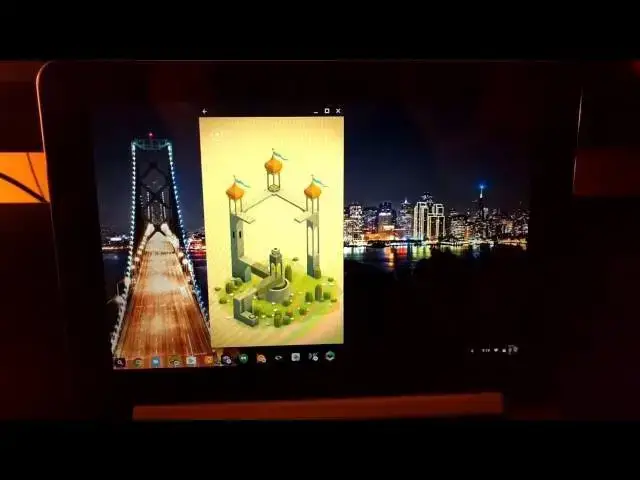
Here's some great news! Not only do Android apps technically function on Chromebooks (a few so far, many more in September), they run very, very well! And they run very well on hardware as lowly as the ASUS Chromebook Flip. With the Rockchip processor from over a year ago, I wasn't expecting too much.
I was wrong! Apps run smoothly and without much issue at all. There's still work to be done here, but this newest development is really coming along nicely!
Have a watch and then check out more at chromeunboxed.com
Show More Show Less View Video Transcript
0:00
hey folks Robbie playing with chrome
0:02
unbox coming at you today with a quick
0:04
look at some Android apps running on the
0:06
Asus Chromebook flip for those of you
0:08
unaware the flip is one of a few devices
0:10
that has Chrome OS 53 already running
0:12
and it's actually been updated a couple
0:14
of times these apps are starting to
0:15
really smooth out and work really well
0:17
and so we wanted to Showcase some of the
0:19
more graphically intensive ones and some
0:21
of the day-to-day ones that you might be
0:23
interested in and show you how smooth
0:25
and how well they actually work on
0:27
Hardware as simple as the Asus
0:29
Chromebook flip the flip actually has
0:31
last year's Rock Chip processor usually
0:34
scores an octane score around 7000 in
0:36
the low seven thousands and as we all
0:38
know that's not really that great and it
0:40
gets around okay for most things but you
0:43
would think that Android apps on it
0:44
would be a bit slow it's actually
0:46
completely the opposite and I'm going to
0:47
show you here in just a second how well
0:49
these apps actually run
0:55
all right so first up
0:58
we have Instagram
1:00
works as you'd expect it to granted it's
1:02
small over on the side but we don't
1:05
really see Instagram on any other kind
1:06
of form factors but it works exactly as
1:08
you expect it to and we can double tap
1:12
for likes
1:15
click in the comment
1:17
keyboard works just fine all that good
1:19
stuff
1:20
next we'll open up Flipboard
1:23
and some of these you would use in a
1:24
tablet format you know fold the thing
1:26
back and read
1:28
let's go to cover stories
1:31
so again Flipboard works exactly as
1:33
you'd expect it to
1:35
nice and smooth no issues here
1:47
so let's see
1:50
share options here what about
1:52
so I can flip this into a magazine just
1:54
like you would in the app I mean there
1:56
everything works exactly as you'd expect
1:58
it to
2:00
which is kind of the point isn't it
2:04
next we have
2:06
Microsoft Word now for a lot of us we've
2:10
made the migration over to Google Docs
2:11
and have no need for word but there are
2:14
a lot of people who do have need for
2:15
word
2:16
some new stuff here I don't use
2:19
Microsoft Word so I have no doc files
2:21
really to work with but I'm going to
2:23
open up
2:24
a template that actually has some
2:28
a lot of formatting in it and show you
2:31
no issue so I'm clicking here and
2:38
let's see
2:41
templates are a little different
2:44
but oops I can't type
2:47
works just as you'd expect
2:50
so let's check out Adobe Lightroom
2:55
we see it resized there
2:58
we'll go full screen with this one
3:02
all right so
3:10
cool so there's a landing curve with all
3:11
these let's try a mouse works just fine
3:14
there too pretty cool do some rotation
3:18
so that'll be a fun app to do some basic
3:20
cropping that kind of stuff again I
3:22
haven't used this app so I'm just trying
3:25
to show that things are working smoothly
3:27
so here's Monument Valley
3:31
which is a really awesome game if you've
3:32
never played it
3:42
it utilizes some really cool 3D elements
3:45
and again as you'd expect
3:47
sound works just fine
3:50
volumes all the way up so that's
3:53
[Music]
3:55
the second level here
4:01
it's a very Zen kind of game it allows
4:05
you to
4:06
it's kind of an MC Escher type thing so
4:09
things that look like they're in one
4:11
setting in 3D aren't necessarily in that
4:14
setting and you tap to move her around
4:15
because you can see everything smooth no
4:17
frame rate drops or anything which is
4:19
awesome
4:20
let's load up alto's Adventure
4:26
so we're all loaded up here we'll tap it
4:28
to start
4:30
and this is similar to Ski Safari if you
4:33
never played it but it has the graphics
4:34
of the game we just looked at which is
4:38
Monument Valley
4:40
but as you can see guys this is running
4:42
perfectly smooth
4:44
there's no lag when I touch stuff
4:47
um
4:51
there's no lag in the in animation and I
4:53
know we're not dealing with anything
4:54
crazy here
4:56
oh boy oh I missed so as you can see
5:00
works very well let's do Netflix real
5:03
quick because a lot of people have asked
5:05
about Netflix as well and Grant you can
5:07
go to the website and watch Netflix but
5:09
hey since we have the app now
5:12
um
5:14
I can't show much of anything on here so
5:16
I don't want to get in trouble
5:18
um this looks like a really old Batman
5:20
cartoon so let's click it
5:23
might not be no it's 2007 not old at all
5:25
but
5:26
hopefully I won't get in trouble here
5:30
and you can see it loaded right up we're
5:32
still waiting for the Netflix takes a
5:34
minute to buffer usually to get full and
5:37
we're getting there
5:40
but I mean
5:42
all this works and additionally casting
5:45
works from all of these apps as well and
5:47
the last one I want to show you is
5:49
easily the most graphic intensive
5:51
Shadowgun dead zone
5:54
and the reason I want to show this to
5:55
you is because I've got it cranked up on
5:57
full settings so it's running
5:59
um
6:00
at the uh
6:02
the full uh full graphic capacity that
6:04
it can
6:06
and it runs really really well
6:13
and you can do all this stuff let's just
6:15
do
6:21
to a game real quick you can see moving
6:23
around the menus and stuff works
6:25
perfectly fine
6:27
um no hiccups or anything like that
6:29
again to me if a game of of this quality
6:32
with this amount of graphics with 10 12
6:35
players in a room so I mean we're
6:37
playing Real Time with people all that
6:38
kind of stuff if all that works so we
6:41
can see even like the little sand stuff
6:43
running across lightning effects and
6:45
particles in the air so we have
6:46
everything running here let's put it
6:49
right in here that wasn't very fair
6:52
hoping I can get it dropped in where
6:54
what you can see right here as we're
6:56
flying through smooth I mean no frame
6:59
rate drops everything is just buttery
7:00
smooth and it's actually pretty fun to
7:03
play on the screen this size now right
7:05
now they don't have uh the controller
7:08
won't it won't recognize the keyboard as
7:10
your controller which is kind of a
7:12
bummer because it would be awesome to be
7:13
able to play with a trackpad and
7:15
keyboard
7:17
it's a little difficult sometimes with
7:19
the on-screen buttons especially looking
7:21
through a camera but as you can see I'm
7:23
not really worried about how well I'm
7:24
playing I wanted to show you in a
7:26
multiplayer environment where we have
7:28
multiple people on the server we have
7:30
all kinds of things going on beautiful
7:31
3D Graphics smooth as can be and
7:35
remember this is on the Rock Chip device
7:37
last year's Rock Chip device which
7:39
scores an octane of around seven
7:41
thousand so its ability to render
7:44
graphics and run Android apps no problem
7:47
whatsoever and
7:49
the reason that's so encouraging
7:52
in general is that
7:55
we know that a lot of these two in one
7:57
apps
7:58
our two-in-one Chromebooks aren't going
8:00
to have you know core i7s in them or
8:03
anything like that and the Beautiful
8:05
part is you don't need it as I've
8:07
clearly showed in this video anything
8:10
that you want to run
8:11
is going to run just fine when Android
8:13
apps hit so don't fear oh I've got to
8:16
make sure and get XYZ processor because
8:19
right now this the processor in this
8:21
device is one of the slowest that you
8:23
can get and it is running Android apps
8:26
without any issue whatsoever one quick
8:29
note with this Mega N64 I did pair a
8:33
moga controller in hid mode it was able
8:36
to use it and I was able to play like
8:38
Mario Brothers or something with it just
8:40
fine so
8:42
it's getting there
8:44
um I think as as full support comes for
8:46
controllers and stuff like that gaming
8:47
is going to be pretty cool on here
8:49
that's about it for this one guys if you
8:51
liked it give it a thumbs up subscribe
8:53
down below uh keep an eye out on the
8:55
channel we've got lots more stuff coming
8:57
uh lots more reviews coming lots more
8:59
quick videos like this and how to's and
9:01
how to navigate this brand new world
9:04
that is Android apps and Chromebooks
9:06
together guys until the next one thanks
9:08
for watching we'll see you next time
9:11
foreign
#Computer & Video Games