Up next in 10

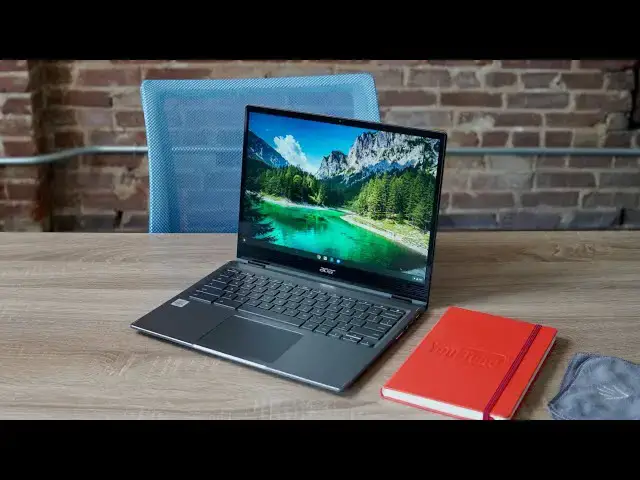
Acer Chromebook Spin 713 Review: The Affordable Flagship
Jul 20, 2020


Sponsored by NordVPN. For a limited time, grab the 3-year plan with 70% off! Click here: Click here: https://chromeunboxed.com/nordvpn
Shop Acer Chromebook Spin 713 at Chrome Shop: https://chrmshop.com/acer-chromebook-spin-713/
・・・・・・・
The minute I begin to talk about Chromebooks with things like bright high-res displays, 3:2 aspect ratios, glass trackpads, Core i5 processors, 8GB of RAM, NVMe storage, aluminum build and convertible form factors, I’m sure your mind starts tallying up the price tag of those nicer elements. I know mine does. When Chromebooks have nearly all the best pieces available, I freely assume the price will be extremely high like what we see in devices like Google’s own Chromebooks, the Samsung Galaxy Chromebook or ASUS Chromebook Flip C436. When talking about those higher-end devices, you may even be conjuring up images of the prior version of the Chromebook we are reviewing today: the high-priced Acer Chromebook Spin 13 that started around $900 about 18 months ago.
The new Acer Chromebook Spin 713 bucks this trend in all the right ways, however, as it refines what we had in the very-good Spin 13, removes a few things from the equation, and produces what I would consider to be my favorite Chromebook of 2020 so far. Let’s dive in and see what Acer has put together and why it is worth your attention.
Read more: https://chromeunboxed.com/acer-chromebook-spin-713-review-flagship-affordable/
Join our newsletter: http://bit.ly/2WjCDm7
・・・・・・・
Shop Chromebooks on CHROME SHOP: https://chrmshop.com/
Subscribe to the channel: http://bit.ly/2xFuj6L
The Music We Use - PERFECT for YouTube: http://bit.ly/31W6PYP
Show More Show Less View Video Transcript
0:00
for the past few years things like a
0:02
high-res scream 3x2 aspect ratio backlit
0:05
keys glass trackpad the latest Intel
0:08
processors eight gigs of ram and vme
0:11
storage all that kind of stuff when I
0:13
would say those types of things you
0:15
would assume I was talking about a
0:16
high-end very pricy Chromebook but the
0:19
Acer Chromebook spin 713 kind of changes
0:22
this up and it's starting to follow what
0:24
we're seeing is a trend in 2020 of
0:26
giving all the best specs for a much
0:29
lower price let's check it out today's
0:35
video is brought to you by Nord VP and
0:37
they're the VP and a choice for millions
0:38
of users including Chromebook users
0:40
because they're awesome at what they do
0:42
and that is keeping your browsing safe
0:44
and secure whether you're at home or out
0:46
and about if you'd like to learn more
0:47
about them and their services head over
0:49
to chrome unbox comm forward slash Nord
0:51
VPN and you can learn more and get
0:53
started today so let's start off with
0:55
Bill quality here and this is this weird
0:57
mixed bag and I had the same hang-up
0:59
with its predecessor in the spin 13
1:02
about a year and a half ago that device
1:04
felt like it was almost just thrown
1:05
together with like leftover parts which
1:07
was weird for a device that was at least
1:09
nine hundred to a thousand dollars this
1:11
device is more refined the 7:13 feels
1:14
like it was more thoughtfully put
1:16
together but still not quite on the
1:18
level of something like a pixel would go
1:20
or a pixel book it doesn't feel that
1:22
carefully crafted but the pieces it's
1:25
made of are good so you have an aluminum
1:27
lid on top you have an aluminum bottom
1:29
and then you have good plastic that
1:31
surrounds the keyboard so it doesn't
1:33
feel flimsy
1:34
it doesn't feel cheap at all it just
1:36
doesn't feel as thoughtfully put
1:38
together as something like those other
1:39
devices that I mentioned so it's not to
1:41
say it's a knock here it's it's not a
1:43
poorly built Chromebook I don't want to
1:45
come across that way but you're gonna
1:47
notice when you pick it up there's some
1:48
rough edges here and there some parts
1:50
where things just don't quite come
1:51
together and that takes away from the
1:53
overall premium experience with this
1:56
type of Chromebook that being said
1:57
though this device may not come together
1:59
perfectly it does come with
2:01
military-grade durability and so it can
2:03
survive downward force of a hundred and
2:05
thirty pounds on it and drops of up to
2:07
four feet so while it may not be the
2:10
most pristinely put together Chromebook
2:11
this thing is going to be able to
2:13
survive
2:13
beating a couple more specifics on the
2:15
build quality here you're looking at a
2:17
laptop that's not the thinnest thing in
2:19
the world
2:19
sixteen to seventeen millimeters at its
2:21
thickest point 3.2 pounds which honestly
2:24
doesn't feel that heavy for a laptop
2:25
this big it's a 13.5 inch three by two
2:28
screen so it's a bigger Chromebook and
2:30
the hinges work really well too you get
2:32
a whole 360-degree you know rotation
2:35
thing going on here it's a convertible
2:36
laptop but you also get a one finger
2:39
lift and I always love that makers are
2:42
starting to figure out how to how to get
2:44
this working so you can get a one finger
2:46
lift and still have a hinge that does
2:47
all the fun stuff that we want our
2:49
convertible devices to do let's move on
2:51
to the screen and this is easily one of
2:53
the biggest highlights of this device as
2:55
I mentioned before it's a 13.5 inch 3 by
2:59
2 aspect ratio screen so if you've used
3:01
a pixel slate or the original pixel book
3:03
or the HP Chromebook X 2 you understand
3:06
kind of what that 3 by 2 ratio gives you
3:09
it's a lot more vertical space and the
3:11
way that this one slots itself with this
3:13
diagonal measure if you set it next to a
3:15
15.6 inch 16 by 9 screen it's actually
3:18
just as tall as one of those so you
3:20
almost feel like you're working on a
3:22
15.6 inch laptop but in more of a 14 or
3:25
13 inch form factor it's a really cool
3:27
trick it's been a great screen
3:29
experience and it's high-res it's super
3:31
bright we've measuring it around 450
3:34
nits or so of brightness it may actually
3:36
get a little bit brighter than that
3:37
measuring screen brightness is kind of
3:39
difficult and the resolution on it I'm
3:41
looking at my screen because it's so
3:43
bizarro 22:56 by 1504 I literally I
3:47
can't remember that long enough to take
3:49
my eyes away from it and tell you but
3:51
what I can't tell you is that that is a
3:52
very high resolution it's not quite quad
3:55
HD fully across the board it's not 4k
3:59
but it's much higher than standard 1080p
4:01
and you notice it everything is pin
4:03
sharp on the screen it's super bright
4:05
it's gorgeous to look at the bezels are
4:07
nice and small it is by far my favorite
4:10
feature of this device and it was my
4:12
favorite feature of the spin 13 before
4:13
it it is a great thing to have this much
4:16
screen real estate in this kind of
4:18
package and again it is something that
4:19
has brought me back to this Chromebook
4:21
and made me as I've tested other devices
4:23
while I've had this around want to come
4:25
back to this curl
4:26
look over and over again it's a great
4:28
productivity tool it's gorgeous to look
4:30
at
4:30
acer is absolutely knocked it out of the
4:33
park with this screen on this Chromebook
4:34
moving down from that screen we get to
4:36
the keyboard and trackpad and there's no
4:38
real surprises here well I will say this
4:41
I don't like
4:41
Acer's keyboards a lot of times and I
4:43
harp on them for either being too mushy
4:45
or not clicky enough
4:46
I've really enjoyed this keyboard the
4:48
click mechanism on it is really good the
4:50
key travel is very nice there's
4:52
backlighting to the keys
4:53
I have nothing whatsoever to complain
4:55
about with this keyboard is it my
4:57
absolute favorite keyboard no I won't
4:59
say that but it's very good and very
5:01
usable I don't make a lot of mistakes
5:03
with it and I don't think most of you
5:05
are gonna have any issue with it
5:06
whatsoever beneath that is a massive all
5:09
gorilla glass trackpad that has been
5:11
wonderful to use I mean the ability of
5:14
it to reject oils and all the swiping
5:17
gestures and the click mechanism has
5:18
been great I mean it's just a fantastic
5:20
trackpad so you combine that trackpad
5:23
with this keyboard and that screen you
5:25
have all the makings of what is a
5:28
fantastic a Chrome OS experience usually
5:31
we get to this point in the review and I
5:32
just kind of regurgitate some stuff
5:33
about the ports on the device because it
5:36
feels like most Chromebooks have the
5:37
same ports but this one is surprisingly
5:40
different and it brings back one port
5:42
that we haven't seen in quite some time
5:44
so first up you get USB type-c on both
5:46
sides of charge and display data all
5:48
that stuff it does what you expect it to
5:50
do you have a micro SD card slot again
5:52
it does what you expect headphone
5:53
microphone Jack great does what you
5:55
expect in a USB type-a we won't get into
5:58
all that but it's nice not to have to
5:59
carry it don't go around for all of
6:01
those legacy peripherals but we also get
6:03
a full size HDMI slot on this one and we
6:06
haven't seen one of those in quite some
6:07
time and USB C can still handle all of
6:10
your display stuff so the dock that I
6:12
normally use I still use with this I
6:13
don't go and use the HDMI slot but if
6:16
you need to if you're in a meeting and
6:17
you have to present something and you
6:19
just have an HDMI cable that the guy
6:21
handed you to go on that TV
6:23
you've now have a Chromebook that you
6:24
don't have to go dig out a dongle and
6:26
find some sort of adapter you can just
6:27
plug it right in and it works the exact
6:29
way you would expect it to so
6:30
technically you could sit down with this
6:32
at your desk you don't need any kind of
6:33
docking solution because this has all of
6:35
the i/o that you need to hook up any
6:37
kind of peripheral that you could
6:39
and that's kind of a breath of fresh air
6:41
one not so great thing when we talk
6:43
about the external ports here are the
6:45
speakers and I'm not talking about the
6:46
speaker ports themselves I'm talking
6:48
about the speakers they're kind of quiet
6:50
really tinny
6:51
have no base response and even though my
6:54
bar is super low for laptop speakers
6:56
this one somehow kind of comes in a
6:58
little bit below that they're almost
6:59
unusable in most circumstances so I
7:02
would definitely recommend having a set
7:04
of headphones or a set of wireless
7:06
earbuds or something like that around
7:08
with you if you're going to be consuming
7:09
media on this one now all the screen and
7:12
keyboard and trackpad and i/o benefits
7:16
you get with this device wouldn't really
7:18
be any good if the internals of it
7:20
weren't also good thankfully that is the
7:23
case with the spin 7 13 as the only
7:26
model that is currently available that
7:27
you can buy at Best Buy right now comes
7:29
equipped with the 10th gen Core i5
7:31
processor from Intel 8 gigs of ram 128
7:36
gigs of SSD nvme storage and if you're
7:40
not familiar nvme is just much faster
7:42
read/write capable storage so you really
7:45
get the best of all worlds here you're
7:47
getting an insanely fast processor
7:49
you're getting 8 gigs of ram which is
7:51
going to be plenty for just about any
7:53
user across the board and you're getting
7:54
plenty of internal storage that because
7:57
it's nvme SSD if you want to you can
7:59
crack this thing open and go through
8:01
some steps and actually pop in a larger
8:03
SSD if you wanted to so internally this
8:06
thing is an absolute monster I mean it
8:08
has not had any issues whatsoever
8:10
dealing with my monitor the internal
8:13
monitor at the same time all sorts of
8:15
apps all sorts of tabs open all sorts of
8:17
graphic work it doesn't matter this
8:19
thing chews through everything it is
8:20
insanely fast and I've absolutely loved
8:23
working from it additionally along with
8:25
that 10th gen Intel chip better
8:27
connectivity options too so Bluetooth 5
8:29
is on board here Wi-Fi 6 is also there
8:32
so anything you're needing to connect to
8:34
so the latest routers or your latest
8:36
Bluetooth peripherals are going to
8:37
connect up way better than Chromebooks
8:39
of the past and you're getting all of
8:41
this with stellar battery life I was
8:43
easily getting 10 hours of battery and I
8:45
would say if you keep the brightness
8:46
down and don't go crazy with all the
8:48
power that's under the hood here you're
8:50
going to get 11 12
8:52
if you don't really try that hard
8:54
finally if you've noticed in some of the
8:55
b-roll there are fans here there are fan
8:58
ports but for me there hasn't been a
9:00
single time I've even heard them kick on
9:02
now when you power it up you'll hear
9:04
them were one time usually but apart
9:06
from that I've not even heard them kick
9:08
on they're there if you need them and
9:10
you're not gonna have to worry about
9:11
overheating issues but if fans bother
9:13
you I don't think these fans are really
9:15
gonna cause you that much problem
9:16
finally before we wrap up it is worth
9:18
noting that this device does come
9:20
equipped with usi stylus compatibility
9:23
the predecessor of it had a garage DMR
9:26
stylist and I like garage stylist
9:28
because they're there when you need them
9:29
so I was a little sad to see that this
9:30
one does not have that but given the
9:33
number of people that use pins and don't
9:34
use pins it's probably better for them
9:36
to have USI stylus support built in here
9:38
for when those pins start to arrive
9:40
they're not arriving yet we have one
9:42
here in the office and HP is the only
9:44
one that shipping one so as those start
9:46
rolling out obviously we're going to do
9:48
more testing on that and comment more on
9:50
how USI stylus has work with these
9:53
devices but for right now just know that
9:55
it's there and eventually it's going to
9:57
be something you'll be able to take
9:58
advantage of
9:58
[Music]
10:10
so as we wrap up I need to talk about
10:13
one other thing here and that's the
10:15
price I didn't say anything about it as
10:17
we move through this because if you
10:19
didn't know it already you might be
10:21
going well you know if the price is
10:22
right this might be the Chromebook for
10:24
me let me tell you the price is kind of
10:26
insane for this because if I took all of
10:28
these specs and all of this stuff and
10:30
said hey bright screen three by two
10:32
aspect ratio high-res backlit keys glass
10:34
trackpad 360 foldable hinge usi stylus
10:37
all of that stuff and put it all
10:39
together and said how much do you think
10:40
a Chromebook like this should cost I
10:43
guarantee you would be higher than what
10:44
the cost is because you can buy this
10:46
right now over at HP for six hundred and
10:48
twenty nine dollars and honestly
10:50
compared to just the last couple years
10:52
of Chromebooks that have come out and
10:54
the the things that are included in
10:55
those Chromebooks this thing at that
10:58
kind of price is a little insane just
11:01
like we've seen with the Lenovo flex
11:03
five bringing great features to a $400
11:06
device and the lenovo duet bringing
11:08
crazy features to a $250 device i think
11:12
Acer's done kind of the same thing here
11:13
they've packed in all the specs you
11:15
could want like just all sorts of things
11:17
that drive you to want to come back to
11:19
this Chromebook and drop the price way
11:21
lower than what most of us would have
11:23
expected to be honest we were so unsure
11:25
when we first got this Chromebook in we
11:27
were emailing back and forth just to
11:28
make sure that this is the configuration
11:30
that was going to start at 629 dollars
11:33
and that is the case Core i5 eight gigs
11:36
of RAM and 128 gigs of nvme storage is
11:39
the one that is six hundred and twenty
11:40
nine dollars and I can tell you this
11:42
thing feels looks and performs like a
11:44
thousand dollar Chromebook it runs
11:46
circles around other things that are
11:48
four and five hundred dollars and for
11:50
the money at this point if you're
11:52
looking for that kind of flagship
11:53
experience that high-end Chromebook with
11:55
all the stuff and all the specs and all
11:57
the toys and you want to not have to
12:00
spend a thousand dollars it is so easy
12:02
to recommend the Acer Chromebook spin
12:04
713 I love this device it has become my
12:07
daily driver device for right now I
12:09
think it is easily one of the best buys
12:12
and one of the best things that you
12:13
could spend your money on right now in
12:15
the Chrome OS ecosystem but guys that's
12:17
been it for this one if you like this
12:18
video give it a thumbs up go down there
12:20
and hit that subscribe button make sure
12:22
and hit the notification bell as well if
12:23
you
12:23
like to be alerted when we make future
12:25
videos just like this one and don't
12:26
forget to hit the join button to see all
12:28
the stuff that our members get like
12:29
behind-the-scenes footage and custom
12:31
emoji until next time we'll see you
12:34
[Music]
#Consumer Electronics
#Product Reviews & Price Comparisons