Up next in 10



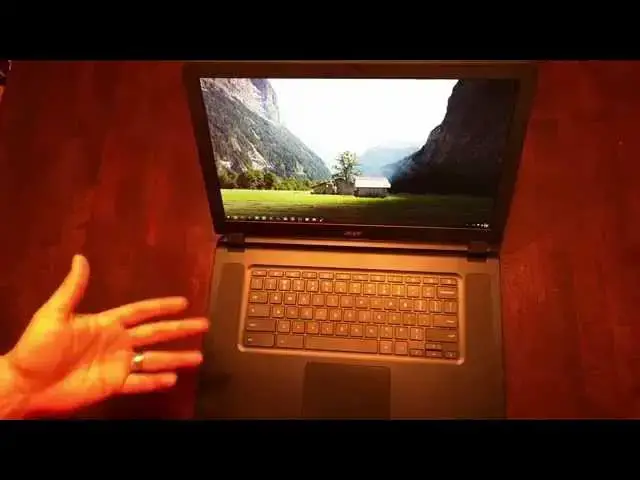
The full review of the Acer Chromebook 15 (C910) with 4GB RAM and 32GB SSD.
Show More Show Less View Video Transcript
0:01
[Music]
0:16
hey folks Robbie Payne here with Chrome
0:18
Unboxed coming at you today with a full
0:21
review of the Acer C910 otherwise known
0:24
as the Acer Chromebook 15
0:28
and so those of you who are part of the
0:30
channel here have seen the unboxing and
0:32
the kind of quick u little review I did
0:35
when this thing came in uh as there are
0:38
a lot of people asking questions about
0:39
this particular device and and its
0:41
availability still is not the greatest
0:44
right now there's a handful of retailers
0:46
and over the next few weeks I would say
0:48
that that would expand completely out
0:50
you'll probably see Amazon Best Buy and
0:52
those kind of people carrying it uh in
0:54
the up and cominging time but there were
0:55
some questions lingering as to what
0:58
device was what um whether this
1:01
particular one had a full HD IPS like
1:05
screen or if it was the lower uh 768 the
1:10
1366 x 768 education model um and so
1:13
we're going to clear some of those
1:14
things up today and so the the official
1:17
u uh model of this device is the Acer
1:21
C910-37P
1:24
C30 I'm sorry C37P so um if you run
1:28
across it somewhere as you're watching
1:31
this review and before we kind of get
1:33
into uh the full roll out of this device
1:35
you can kind of rest assured even if
1:37
they don't have it listed right it's
1:38
probably the one with full uh full HD
1:41
IPS display um I took a stab got it in
1:45
hoping um that it would be the right
1:47
thing and knew that if I got it and
1:48
looked on the outside of the box and it
1:49
said "Hey features a stunning 1366 x 768
1:53
display," I'd immediately put it back in
1:55
the mail and send it back to them but
1:57
ultimately I wanted this device to be
1:58
kind of my go-to um uh my go-to device
2:02
and and rid myself of being attached to
2:06
my existing Chrome box that I have um
2:09
and and granted my Chrome box has a
2:11
fourth gen i3 8 gigs of RAM and 128 gig
2:14
solid state but honestly I felt like I
2:17
could probably do with the 4 gigs of RAM
2:18
that come in this device and I was
2:20
hoping that the Broadwell processor
2:22
would make up for any uh lack that that
2:24
the Celeron would bring to the table and
2:27
so the questions remain did it do it do
2:30
what it needed to do did it live up to
2:32
the hype did it did it make it um the
2:36
truth is for me personally no however
2:40
there is a huge caveat to that and I
2:42
want to make sure that that is made very
2:43
clear in this um and for this review I I
2:46
I really want to spend most of the time
2:48
talking about the things that this this
2:50
device does well and does right uh and
2:53
there are a lot of them and I will say
2:55
this at the beginning of it anything
2:56
that I say that's negative that's that's
2:58
taking into account the fact that I work
3:00
solely from a Chromebook at this point
3:03
um I have uh crouton running in a window
3:06
i have um probably eight to 10 tabs open
3:10
at any given time pixel uh pixel and or
3:14
uh the pixel or photo editor open so
3:16
I've got some pretty intense things
3:18
going on for a Chromebook my use case
3:20
scenario does not match what most
3:21
people's are so usually if a if a device
3:24
uh sails through what I do in a day it's
3:27
doing really well and you will have no
3:28
problem for most users who are using it
3:31
so like the the Chrome box I was
3:33
referring to the way I have it speced
3:35
out at this point in time I would say
3:38
there's no way 99% of people that use
3:41
Chrome boxes or Chromebooks would ever
3:43
have an issue at all with the way that
3:45
thing performs this device for me 90% of
3:48
the time is fine what I found is and you
3:52
can get this app it's a really neat
3:53
little app called System um you can
3:56
download it in the app store it shows
3:58
you uh exactly what's going on so right
4:00
now with nothing open nothing going on
4:03
I've got uh 2.64 gigs of available space
4:07
uh when it comes to memory it's a 4 gig
4:09
machine that seems pretty good no
4:12
problems there but what I found happened
4:15
um pretty quickly um and I'll I'll show
4:18
this to you real quick we'll open that
4:20
up we'll do um
4:23
I want to open up my Gmail stuff let's
4:26
open up Drive
4:29
and then let's do an instance of YouTube
4:35
and
4:37
I'll open my IDE up i don't want to
4:40
completely overload this because like I
4:41
said I my use cases aren't exactly
4:43
everybody else's so I want to be fair
4:46
here so but this is a normal setup for
4:49
me um very very normal adding some more
4:52
things into the mix here um but I'm
4:55
gonna open up a stylesheet here that I'm
4:57
working in a site I'm working on and so
4:59
we'll have that pulled up
5:02
um
5:04
let's just get a video queued up real
5:06
quick we'll pause it
5:09
um let's do
5:14
quick spreadsheet it's a very small
5:16
spreadsheet but it's spreadsheet
5:19
and um
5:22
let's go to a site here so there's a
5:25
handful of things pulled up that's not
5:27
much of anything there uh let's go to
5:29
this one
5:32
okay so there's four tabs technically
5:34
six because I've got um ID running here
5:38
and I've got that system going now let's
5:39
check the system i've already dropped to
5:41
1.2 gigs of available space now it's one
5:45
uh if I were to open up say a music
5:47
player Spotify or Google Play Music um
5:50
we'll see that jump down again and this
5:53
isn't that abnormal of use case uh you
5:56
know this is starting to push pretty
5:57
hard um but it's not going to be long
6:00
i'm going to start having um I'm going
6:02
to start having some issues here so
6:05
let's go let's just play this and see
6:07
how our system does so now we're now
6:09
we're sub one gig we're down to It's
6:12
bouncing back and forth between 850 and
6:14
950 uh megs of free RAM space and so you
6:18
can see how uh getting an instance of of
6:21
Crouton uh running in the background
6:24
here would pretty much tank me out so
6:26
this is what I found in working with
6:28
this device if I keep things tight and
6:30
concise and I'm not doing a ton of
6:32
things at one time no problems and I'm
6:34
not saying that it's it's struggling
6:36
here i mean everything's still smooth so
6:38
as long as that that's there um I just
6:40
ended up peeking it out at multiple
6:42
times and like I said there are times um
6:45
and what I do you know I'm I'm also
6:47
using you know inspection elements and
6:49
stuff like that so I've got uh the
6:51
element inspector over here you know and
6:53
sometimes I'll end up with two or three
6:54
of these open because I'm inspecting
6:55
multiple different sites and so between
6:58
those my normal tabs and other apps I
7:01
have running it's no big deal to have 12
7:03
to 15 things going on at the same time
7:05
and so again I want to emphasize my use
7:09
cases aren't normal u for most people
7:12
more than likely what most people are
7:14
going to do is have a handful of tabs
7:15
running and they're searching some stuff
7:16
and they move on and and basic website
7:19
tabs don't have nearly as much impact on
7:22
the RAM as packaged apps and things like
7:24
that do um and so I'm going to keep this
7:26
up just as we go along and are messing
7:28
with some things just to show you um
7:31
I'll run a quick Octane here for you
7:33
real quick
7:35
uh the the octane that score that I got
7:38
most frequently is about 13 and a half
7:40
thousand so somewhere between 134 136 in
7:43
there um and I did that uh while logged
7:47
out so everything closed did a fresh
7:49
restart uh did not log in as myself
7:51
logged in instead under the guest so
7:53
there's nothing running no extensions
7:55
nothing so it was a clean run we'll see
7:57
what we get here with I got a bunch of
7:59
stuff open but I just want I just want
8:00
you to all to see that that's uh that
8:02
that's roughly the score you're going to
8:03
look at let me talk about some of the
8:06
other things on this device uh while
8:08
that Octane's running keyboard feels
8:10
really good if not a little bit mushy um
8:13
travel is is is nice on it um it's very
8:17
quiet you can kind of hear there's not a
8:20
lot of sound that emits from there which
8:21
is very nice i could deal with a little
8:23
bit more click to the keys they feel
8:25
like I said a little mushy but no
8:27
problems i didn't have really any
8:28
problems and I'm not a hard critic on
8:30
keyboards to be honest with you so um
8:32
you can take that with a bit of a grain
8:34
of salt you can see we got a little shy
8:35
of 13,000 there again I've got a bunch
8:37
of stuff running we are running between
8:39
uh 13 and a half in that uh realm there
8:43
uh for reference uh normally your HP14
8:47
or your Acer C720 last generation
8:49
Celeron processor got somewhere between
8:51
10 and 11,000 so it's a it's a decent
8:54
bump in speed and um you can feel it
8:57
most times the only hiccups I really had
8:59
with this device is when I was pegging
9:01
the RAM that really is all that there is
9:03
to it um and we can talk about that
9:06
about a year ago we were having the same
9:07
conversation around devices with 2 gigs
9:09
of RAM and people would chime in and say
9:12
"Two gigs of RAM is plenty for Chrome OS
9:14
you don't need any more of that stuff."
9:15
Well let me tell you as time goes by
9:18
there's more and more demand from a
9:20
machine to run things on on the internet
9:23
i mean that's just the way it is i work
9:25
uh in and around websites all day every
9:27
day and I can tell you the amount of
9:29
functionality that's being built into
9:31
websites uh increases every single day
9:35
um and so year over year we're going to
9:37
have to start seeing kind of the
9:38
benchmark of what's what's the least
9:40
common denominator that's going to have
9:42
to continue to rise and so we've seen
9:43
that you see most Chromebooks now are
9:46
starting to ship with a 4 gig model if
9:48
not the only model has they all have 4
9:50
gigs and so 4 gigs is starting to become
9:53
the norm well just as that's happening
9:55
we're starting to get to the point where
9:56
it's like 8 gigs would be really nice
9:58
it'd be nice to say 4 gigs cuz for
10:00
instance this device the rumors are
10:02
going around right now that there's an
10:03
i5 version of this device coming to be
10:06
honest with you if this device had an i5
10:08
and 8 gigs of RAM in it this would
10:11
absolutely be u the Chromebook that's
10:13
going to stick around for a long time
10:14
for me the RAM issue though is still an
10:18
issue for me but you can see even with
10:20
all the stuff going on it's impacting
10:21
that um some animations start to stutter
10:24
a little bit but really not much switch
10:27
switching between tabs no problem uh
10:29
getting back and forth three-finger
10:30
swipe is really good everything still
10:32
feels really swift and really good so
10:35
for your day-to-day stuff you're not
10:37
going to probably run into speed issues
10:39
um so let's talk about a little bit more
10:41
of the hardware the keyboard like I said
10:43
is good travel's good uh the upward
10:46
facing speakers we tal we showed those
10:48
off a little bit um in the unboxing i'll
10:52
play let's see let's do this one
10:58
they're very loud uh and I worked uh for
11:02
a good chunk of time one day just with
11:04
these i normally keep
11:08
I normally keep a Bose Sound Link Mini
11:10
uh next to me because I just like the
11:12
fullness of the way it sounds but I I
11:13
wanted to make sure I tried these things
11:15
out they're tiny they're they're thin
11:17
there's no there's no bass to them but
11:19
they're loud
11:23
as you can hear um I don't have a quiet
11:25
voice and it's drowning me out pretty
11:27
much
11:28
so
11:31
speakers are are good um and they're
11:33
louder than most speakers and it's nice
11:35
to have them up facing up you don't have
11:36
to worry about how it's sitting or if
11:38
it's on your lap it's not muffling the
11:40
sound trackpad I've really enjoyed uh
11:42
very smooth it does tend to pick up you
11:44
can already see it's starting to pick up
11:45
some oil you I don't know if you can see
11:47
that or not but it's starting to pick up
11:48
some oil from my hands that's you know
11:50
that's normal it's just one of those
11:51
things with smooth trackpads but um I
11:53
also operate um when I'm working I have
11:56
a T650 the Logitech the big glass
11:58
trackpad and and honestly when I switch
12:01
back and forth between that and this
12:02
it's not some jarring thing it It
12:05
actually feels really good and it's so
12:07
spacious the click's nice it's quiet um
12:10
I no complaints whatsoever with the
12:12
trackpad um the the palm rests here do
12:15
tend to pick up quite a bit of oil um
12:17
I've had to wipe them down a lot um to
12:20
keep that stuff off there and that's
12:21
again it's just part of you know
12:24
computers and humans in general um the
12:26
screen full HD 1080p um it is IPS like I
12:32
I'm I'm still not convinced it's IPS um
12:37
maybe it is i don't know but I'm not
12:40
completely convinced the the colors are
12:43
much better than what we've seen on
12:45
Acers and HPs and and most everything
12:47
else up to this point take the Toshiba
12:50
Chromebook 13 out of that mix cuz that
12:52
thing has an amazing screen on it u this
12:54
one if if the Toshiba Chromebook is kind
12:56
of the 10 if we say "Hey that's what
12:58
that's what screen should and always
13:00
should look like." Uh I give this one
13:03
probably an 8.5
13:05
and I'll tell you why like if I look in
13:07
this region here and it's it's going to
13:09
be really hard to see on the video but
13:10
if I look in this region here on my I
13:12
have a nicer monitor I work from kind of
13:14
dual monitor setup and on that one and
13:16
you know it's an HD um Acer device and
13:20
it's you know um got a nice IPS display
13:24
and I can tell the difference looking at
13:25
this and looking at my monitor at work
13:27
and the big differences in stuff like
13:30
this um I think the contrast ratio on
13:32
this isn't the greatest in the world
13:34
again miles better than the TN panels
13:37
that are in most of these Chromebooks
13:38
but it's not uh quite there the the
13:41
darks seem pretty dark but it's like the
13:44
the contrast ratio if you know kind of
13:45
how that stuff works the the better the
13:48
contrast ratio the the more blacks you
13:50
get between you know white or gray and
13:53
black you know it it steps more and so
13:55
it seems like like all these trees here
13:57
are lost it's just a dark blob this same
14:00
background on my monitor at work I could
14:02
see all the trees and see stuff in them
14:04
and so um without seeing them side by
14:07
side though when I look at this it looks
14:08
great you can tell um viewing angles are
14:12
great i've done this a hundred times in
14:14
reviews you lean them back and
14:15
everything goes crazy these look great i
14:18
can turn it to the side no problem um
14:20
and it's uh anti-glare which has been
14:22
nice um being around windows I don't
14:24
have to worry about any of that stuff i
14:25
just tilt it to you know whatever I kind
14:28
of like and then leave it at that i had
14:30
somebody say uh during the unboxing you
14:33
know don't grab it from the corner and I
14:35
totally respect that and wasn't thinking
14:37
about it um but you do see it's it's
14:40
pretty dang bendy um I don't know if the
14:42
education model is that bendy but man um
14:45
and you can see right here hopefully in
14:47
the video i mean there's a ton of give
14:49
right there so the screen part in
14:51
general feels really flimsy um now when
14:55
daytoday like closing and opening it if
14:57
you're grabbing it in the center it it
14:59
doesn't bother me it's not like it's
15:00
flailing around or anything like that
15:02
but when you grab it and start torquing
15:04
it just a little bit um it really does
15:06
it really does bend quite a bit um let's
15:10
see let's take a look around if you
15:13
didn't watch the unboxing for some
15:14
reason real quick we'll look at the
15:15
ports and stuff like that hdmi USB 3.0
15:19
headphone
15:21
come around this way we've got SD card
15:25
slot USB 2.0 Kensington lock fans uh
15:30
across the back here and some indicator
15:32
LEDs across the front
15:36
bottom just has some ports for fans and
15:38
tons of screws um and that's about it
15:42
the the outer shell part actually feels
15:44
really good pretty good at uh keeping
15:47
fingerprints off but it seems to pick up
15:48
some other stuff because it's got uh
15:50
enough texture to it that if you drag
15:51
something across that can leave stuff
15:53
behind it'll leave it behind i have an
15:56
iPad I keep in my bag with it and the
15:58
case for some reason when it rubs across
15:59
here I guess it's getting something off
16:01
the case and so it leaves little marks
16:02
they wipe right off no big deal but
16:05
something to keep in mind um you may
16:07
want to keep it in a sleeve or something
16:09
like that um one of the other irritants
16:11
for me was only two USB ports and on a
16:14
machine this big it doesn't make any
16:15
sense at all to me um
16:19
to be honest I I it doesn't make it just
16:21
doesn't make any sense um and sometimes
16:23
I have peripherals and I've got two of
16:24
those things uh little dongles which I
16:27
hate those things but that's just part
16:29
of it if you're going to use peripheral
16:30
stuff so I've got a Logitech a couple
16:32
Logitech things and but I got one
16:34
Microsoft mouse I like to kind of switch
16:36
back and forth to sometimes well it's
16:37
got its own dongle so I've got both of
16:39
them uh hosed up with with just
16:41
peripherals so um that was kind of a
16:44
disappointment but you know there there
16:46
are ways to extend those and that's not
16:48
a huge complaint and for a lot of people
16:50
using this uh take this out real quick
16:54
for a lot of people using this that's
16:55
not even going to be a consideration or
16:58
an issue whatsoever
17:00
so
17:02
all that being said
17:04
for me this device is not going to uh
17:07
make it as my daily driver it's not
17:09
going to quite cut it and unfortunately
17:11
for me what this means is there's not a
17:14
whole lot of other options for me at
17:16
this point because the issue isn't speed
17:18
of processor or um local storage which
17:21
is easily swappable in this thing take
17:23
off the screws pop it open swap out the
17:26
the SSD
17:29
that's not the issue um the issue for me
17:31
is going to be a RAM issue and so down
17:33
the road if they come out with a version
17:35
of this uh with either Celeron i3 i5 and
17:38
8 gigs of RAM I might be back in the
17:40
hunt for this if the price is right you
17:43
know if it's $500 to $600 that's
17:45
absolutely doable once you start eating
17:47
up any farther than that um to me you
17:50
get into why not just drop a,000 and and
17:53
go ahead and get the Chromebook Pixel um
17:55
that's not for everybody um that doesn't
17:58
make sense for everybody for someone
17:59
like me who's completely invested in
18:01
this uh ecosystem who works I make my
18:04
entire living now from from this device
18:07
or whichever one I have at the time for
18:10
me it makes sense so that being said
18:12
yeah I'm getting the I'm getting the
18:14
Chromebook Pixel the 2015 one it's
18:16
coming and uh my plan is to use that as
18:19
my daily driver um I know at least
18:22
specwise it's going to match my Chrome
18:23
box and then hardware-wise I mean it's a
18:26
Pixel it's going to be amazing so um
18:28
that's my next little adventure in
18:30
Chromebooks and and like I said for 90%
18:33
of people that are going to watch this
18:35
video this device is awesome if if
18:38
you're looking for something with a
18:39
little bit bigger screen you're looking
18:40
for somebody that's not really wanting
18:42
it to be that portable and and really I
18:44
know it's like 4 something pounds but to
18:47
be honest with you it's not that bad it
18:49
doesn't feel that unwieldy or crazy
18:51
heavy i guess cuz it's spaced out or
18:53
something it the weight of it didn't
18:55
bother me at all granted I'm used to
18:57
carrying around an HP14 as well so that
18:59
could be part of it and I get the idea
19:01
that you know some people want a quick
19:03
small notebook pop it open do the thing
19:05
and they're on the go it's in a bag that
19:07
kind of stuff i get it i get that the
19:09
the size of this could be off-putting
19:11
for some people but I I want to tell you
19:14
once it gets in stores get your hands on
19:15
it go look at it feel it it's not nearly
19:18
as bulky or big uh as it tends to look
19:20
in some of the pictures and maybe even
19:22
in this video here very comfortable to
19:24
work from stand alone um and that's the
19:26
part I'll miss about it i love the large
19:29
monitor i feel like I can sit and kind
19:30
of lean into this thing and and feel
19:33
like I'm sitting in front of a big
19:34
screen which is kind of nice but all
19:36
those things aside I would say I hardily
19:38
recommend this device i really do the
19:41
only other one that that gives uh as
19:44
complete of a package I think in the in
19:48
the under 500 category of Chromebooks is
19:50
the Toshiba Chromebook and this thing
19:52
way outperforms it um I couldn't work
19:55
from the Toshiba Chromebook um I just
19:57
there's no way that was going to happen
19:59
uh but for day-to-day stuff when I came
20:01
home you know content consumption
20:03
surfing on the couch that kind of stuff
20:05
the the Toshiba Chromebook was great and
20:08
as a holistic package the Toshiba
20:10
Chromebook is still um probably
20:13
pound-for-pound my favorite Chromebook
20:15
that I've ever used granted again like I
20:17
said I'm getting ready to get the Pixel
20:18
but there's always that asterisk beside
20:20
the Pixel right i mean when we start
20:22
talking about this is the best
20:23
Chromebook experience I've ever had well
20:25
yeah it cost $1,000 it it should be um
20:28
so sometimes I feel like the Pixel is
20:30
not a fair fight and again for my use
20:32
case it's that's a whole different thing
20:34
you know I'm I'm trying to talk to the
20:37
general consumer who is going to use
20:39
this at home is going to use it on the
20:41
couch is going to use it um for some uh
20:45
blogging you know that kind of stuff i
20:47
it's just it's an this is a great
20:49
machine and I I can't recommend it
20:51
enough um depending again if you're if
20:54
on your use case and how much you're
20:56
going to push it um you should also be
20:58
looking at the Toshiba Chromebook 3 as
21:00
well uh and another thing I wanted to
21:01
put out here just because people don't
21:04
know it and hopefully more people see
21:06
this this is the last thing we're going
21:07
to talk about real quick uh because even
21:10
on this if you're sitting back um 1080p
21:12
on a 15.6 in display isn't perfect um
21:16
really I think the 17-in monitor is
21:18
where 1080p kind of finds its sweet spot
21:21
where you can kind of sit back this
21:23
feels like you got to lean into it
21:24
sometimes still to be able to see
21:26
something so if you get you're thinking
21:27
about getting this and still going ah
21:29
1080p on that going to everything's
21:30
going to be so small it is some of it's
21:32
kind of small some of the text is you
21:34
can scale the text and all that kind of
21:35
stuff or you can simply go to display
21:38
settings change the resolution now this
21:40
doesn't always work um
21:43
like on Windows machines just changing
21:45
the resolution to something that's not
21:46
the monitor's native resolution doesn't
21:49
really work you get dithering you get
21:51
stuff that looks blurry it's Yeah it's
21:52
bigger but it's blurry let me show you
21:54
something when I do this on Chrome OS
21:56
now um it's probably impossible again
21:59
for you all to see um
22:05
let's do this
22:09
and that one gets a little blurry
22:12
but everything still looks really good
22:14
uh with a higher resolution and it's set
22:16
because it's set to scale um
22:19
everything's set to scale instead of
22:21
like text still looks good things don't
22:23
look blurry and weird like they would on
22:25
some so for those of you with the
22:27
Toshiba Chromebook that's something to
22:28
consider knock it down one notch it's
22:31
like a 1.2 or 1.25 scale um that might
22:35
be a worthwhile thing so that everything
22:37
is a little bit bigger and you don't
22:38
lose a lot of resolution some of the
22:40
icons look a bit blurry on this um but
22:44
text and everything else inside of it
22:45
doesn't look that bad and so uh it's
22:48
something to consider obviously look
22:51
everything looks sharp and better at
22:52
1080p
22:54
um anyway
22:56
again to sum everything up great machine
22:59
it is large but don't let that off
23:01
offput you u it's it's very capable um
23:05
uh the the screen's solid the keyboard's
23:08
great the hardware is good uh you can
23:10
actually upgrade the SSD pretty easily
23:12
uh so I you know I got to give it a
23:14
thumbs up it's a it's a good Chromebook
23:16
it's a great entry i'm hoping it's one
23:18
of those things that kind of spurs some
23:19
other people to think what can we do cuz
23:21
with bigger chassis comes a lot more
23:23
opportunity to do more things with
23:25
speakers do more things with hard drive
23:27
space do more things with more RAM all
23:29
that kind of stuff can be done with a
23:31
little bit bigger uh um computer because
23:34
you don't have to have so much
23:35
engineering to fit it all into a tight
23:37
space so hopefully as Acers did with the
23:40
C720 they're they're continuing to spur
23:42
people on and and and move more people
23:44
into thinking bigger about Chromebooks
23:46
um not just in physical size but just in
23:49
ways that we can make the experience
23:51
better and so I do recommend this um
23:54
hopefully if you've been on the edge
23:56
this this gives you enough information
23:57
to go out and make a wise purchase that
24:00
would be good for you um if you enjoyed
24:03
the video please give me a thumbs up
24:04
down below if you're not subscribed to
24:07
the channel subscribe uh this stuff's
24:09
going to keep coming like I said
24:10
Chromebook Pixel will be coming down the
24:12
road as well um and who knows for the
24:14
rest of 2015 we'll see all sorts of
24:16
Chromebooks Chrome boxes bases all that
24:18
kind of stuff and as many as I can get
24:19
my hands on I plan on getting and uh
24:22
bringing to the channel so you guys can
24:24
see them make informed decisions and uh
24:26
just kind of enjoy the reviews and
24:28
unboxings and all that kind of stuff
24:30
thanks guys for watching and until next
24:32
time I'll see you later
#Consumer Electronics