Up next in 10



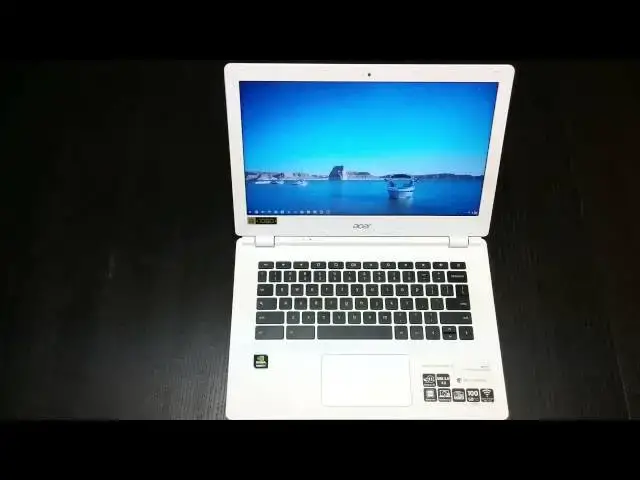
In this video I give my overall impressions of the Acer Chromebook 13. Hope this helps everyone considering this Chromebook!
Show More Show Less View Video Transcript
0:01
[Music]
0:13
hey folks Robbie pay for Chrome unbox
0:14
coming at you today with a four review
0:16
of the Acer Chromebook 13 also known as
0:19
the cv5 also known as many as Acer's
0:22
first and uh the industry's first
0:25
Chromebook with the Tegra K1 processor
0:28
for those of you who don't know what
0:29
that is uh the teger K1 is in the new
0:32
Nvidia Shield tablet it is uh nvidia's
0:35
newest mobile chip uh 192 GPU cores
0:39
quick uh mobile processing uh it's
0:41
actually what's going to be housed uh
0:43
just came out today what's going to be
0:44
housed in the uh Nexus 9 tablet uh
0:48
blazing fast for Android for mobile
0:50
applications and so a lot of people were
0:52
wondering and questioning how's this
0:54
thing going to hold up when it comes to
0:56
Chrome OS and so we're going to talk a
0:57
little bit about that but first uh
0:59
before we do anything else let's take a
1:00
tour of the device it is a 13.3 in
1:03
screen so it is a larger Chromebook I'll
1:05
bring in the Dell Chromebook 11 for
1:07
instance for uh you can kind of see the
1:10
size there however uh Weight Wise it's
1:13
about the same as most of the 11.6 in
1:15
devices uh comes in really thin and nice
1:19
matte um finish here on the on the
1:22
outside part doesn't really pick up too
1:24
much as far as fingerprints and that
1:25
kind of stuff so feels really nice a
1:27
little bit more premium uh than say the
1:29
Acer c720p with the the white finish as
1:33
well now we see kind of a unique hinge
1:35
here that we're going to see as well in
1:37
there their newer 11inch Chromebook uh
1:40
so it does kind of have that jut
1:41
sticking up out of there while we're
1:42
over here on the side we'll look USB 3.0
1:44
fullsize SD card slot it does sit flush
1:46
once it's in there around the front
1:48
nothing around the other side uh we have
1:51
the combo microphone headphone jack the
1:54
small charging port I'm not a huge fan
1:56
of those little bitty ones uh they feel
1:57
like they're going to break um and then
1:59
you have not exactly a Kensington lock
2:01
but something you can uh you could
2:03
actually put the thing down but I don't
2:05
know how well that would hold if it were
2:07
pinned down by that they could probably
2:08
be ripped up pretty easily on the back
2:11
uh which is another thing it's a little
2:12
odd to have stuff back here um but you
2:15
know you got to fit them fit them where
2:16
you can uh 3.0 another so that's a
2:18
second 3.0 USB port fulls sizee HDMI so
2:21
it's good to see even in a thin form
2:23
factor here uh and this guy is thin let
2:25
me bring in the Acer
2:28
c720p for
2:30
reference for you all and so those are
2:32
those two kind of side by side you can
2:33
see it cuts quite a bit off of the side
2:35
profile and the c720p is really not that
2:37
chunky for me my daily driver now is the
2:40
Dell uh Chromebook 11 and it is not the
2:43
thinnest guy around um and so this this
2:46
one's quite a bit thinner so that's kind
2:49
of your tour around if you look on the
2:50
bottom all the screws are exposed
2:53
speakers uh on both sides and obviously
2:56
no fans on this guy we are running that
2:57
Tegra um U mobile processor and so uh no
3:01
need for any kind of fans which keeps it
3:02
dead silent and it it stays nice and
3:04
cool so that's pretty awesome all the
3:06
screws are exposed there's probably one
3:08
under here well maybe
3:10
not looks like not so you probably get
3:12
into this thing without uh having to
3:14
take off any stickers and ruin your
3:16
warranty possibly so I don't know what
3:18
you would do in there uh usually with
3:20
mobile processors and such there's not a
3:22
lot you can get around um this does
3:26
uh does have a 13.3 in 1080 p screen uh
3:31
which is pretty awesome uh it is a matte
3:34
finish and it's impossible for me to get
3:35
this on camera for you um simply because
3:40
the the um the way that the angles would
3:43
show it I couldn't actually show you
3:45
exactly what I'm talking about for those
3:47
of you who have messed with a matte uh
3:50
display the the closest thing I can
3:52
relate it to is when you get off of a
3:54
cell phone call and you kind of have a
3:55
little bit of oil on your cell phone and
3:57
you look at the screen through that and
3:58
there's some a grain that happens to the
4:00
picture that's what Matt looks like all
4:03
the time to me um so it's insanely
4:05
aggravating I I'm not a huge fan I love
4:07
the fact they're anti-glare and that's
4:09
really cool especially for filming uh
4:11
it's very easy I don't have to worry
4:12
about seeing my reflection in the screen
4:14
so that's awesome uh I just I can't get
4:17
past the mat the matte display for some
4:18
of you that's not going to bother you at
4:20
all and so that's that's pretty cool if
4:22
it doesn't bother you you can kind of
4:23
take advantage of that um this one I
4:27
believe does uh have
4:30
let me check real quick for
4:38
you just to be sure I'm telling the
4:40
right thing I've got quite a few
4:41
Chromebooks here so I want to be sure
4:43
I'm saying the right thing before I make
4:45
some observations about its
4:47
performance um I believe this one does
4:50
have 4 gigs of RAM but I want to make
4:52
sure
5:05
yes okay so yes this is four gigs of RAM
5:07
like I said I got a few Chromebooks I
5:08
don't want to get mixed up um anyway
5:11
another another point on the 1080p
5:13
screen as I was just looking at that it
5:14
was a little bit difficult to read that
5:15
text because this thing isn't scaling
5:18
yet however in the uh some of the beta
5:20
builds of Chrome OS there finally is
5:23
some scaling so you could do a 1.2 1.4
5:26
scale not lose the sharpness of the
5:28
display but scale everything up in the
5:30
UI and it looks like it's going to work
5:32
really well uh for me again I work from
5:35
these and so I can't uh go over to Beta
5:38
very often I've had a couple issues and
5:40
it's messed with my workflow so
5:41
unfortunately work comes first for me
5:43
right now so maybe one day if I get to
5:45
do this for living I can run around on
5:47
beta and Dev channels and uh get to play
5:49
with all that stuff full time but for
5:50
right now I cannot do that uh a couple
5:52
other things about the hardware on this
5:54
device again the the the sharp screen if
5:56
it scale a little bit it's going to be
5:58
fantastic so seeing 1080 P screens start
6:00
to eek their way in you know they got
6:02
the Toshiba Chromebook 2 hopefully I'll
6:03
get my hands on that soon um these 1080p
6:06
screens are so much nicer on the eyes
6:08
everything's sharp and crisp and it
6:09
looks great especially across a 13.3
6:12
inch screen hopefully they don't make
6:13
the mistake of trying to cram that doing
6:15
11.6 inch granted with the scaling uh we
6:18
could actually have something worthwhile
6:20
so 11.6 inch screen with a 1080p uh
6:22
1080p resolution uh scaled up a little
6:25
bit would actually be really really
6:27
sweet anyway bezels are relatively good
6:30
uh the whole thing is made out of that
6:32
soft touch plastic so you really don't
6:33
get fingerprints anywhere um around the
6:36
screen any that kind of stuff when
6:37
you're lifting the lid trackpad is nice
6:39
and large I have decently sized hands
6:41
can pretty much just Palm a basketball
6:43
so it gives you an idea how big my hands
6:45
are and all five fingers fit straight
6:47
across that thing it's nice and wide uh
6:49
the the surface um is is not textured at
6:52
all almost has a a glassy type feel to
6:55
it the click is nice and
6:57
Silent uh it's just a good solid feeling
6:59
trackpad it performed really really well
7:01
keyboard travel is really good keys are
7:04
evenly spaced plenty of padding here for
7:06
your hands the the overall outside part
7:08
of this thing I'm really really a big
7:10
fan of I enjoy it I like the Slender
7:13
form factor I like the 1080p screen I'm
7:15
not a fan of that matte display uh and
7:17
the speakers like any other Chromebook
7:19
are average at best uh but you know it's
7:22
got your array of portch you're looking
7:23
for it's got all the input methods you
7:25
would want and feels really great so
7:27
it's checking all those boxes no one
7:29
surprised by a mediocre screen anymore
7:31
on a Chromebook hopefully things like
7:33
the Toshiba Chromebook are going to
7:34
start changing some of those perceptions
7:35
about what we can and cannot get in a
7:37
Chromebook but until that point
7:39
everybody kind of sees these uh these
7:41
kind of uh Bland screens is just a
7:44
normal thing I've got this the
7:45
brightness Turned Up full right now and
7:47
that's all you get um and so it's not it
7:50
is not impressive um so don't think just
7:52
because it's a 10 screen you're getting
7:54
something extra uh the colors the
7:56
reproduction of the colors uh the the
7:58
viewing angles
7:59
uh wash out and and polarize just like
8:02
they do on the C720 so nothing's
8:05
different here side by side viewing
8:06
angles are okay you lose quite a bit of
8:08
brightness um so don't expect the world
8:11
there uh you just get it a much sharper
8:13
and again once it bleeds down into
8:14
stable uh we have scaling and Chromo un
8:18
stable then we'll be all good um a
8:21
couple things to knowe though as much as
8:23
I like the hardware um I'm not a fan of
8:27
the Interior Hardware so the ior stuff's
8:30
pretty good again the screen's iffy uh
8:32
the internal Hardware is where this guy
8:34
sets itself apart having the tcher K1
8:37
ding ding inside and I was really really
8:40
rooting for this because I like arm
8:42
processors I like the idea of fanless
8:44
design I like mobile stuff I really
8:46
enjoy all that stuff and so I'm rooting
8:48
for an arm processor that can actually
8:50
Bear the weight of anything somewhere
8:52
even just similar uh to what Intel's
8:54
processors are doing and unfortunately
8:56
in this scenario now on an Android
8:58
tablet completely different story but in
8:59
a Chromebook right now it is just
9:02
absolutely not up to the task and one of
9:04
the problems in in even showing you some
9:06
of this is a lot of the things that I
9:08
would run normally to display these
9:10
things won't run on this so some of the
9:12
simple games like um you know I've got
9:14
Quake web quake in um um skid racer
9:19
these things won't run skid racer
9:21
haven't been able to get to run in
9:22
anything for a while U murder files for
9:24
instance you know doesn't run well I
9:26
open up Cut the Rope I do that on quite
9:28
a few reviews so for those you who
9:29
follow along you'll have something to
9:31
reference it to so let's go and cck play
9:35
ideally this thing should kill it on
9:36
games right I mean we shouldn't have any
9:39
problems we have 192 GPU cores rocking
9:41
here um and you're already starting to
9:43
see if you're paying attention frame
9:46
drops in the candy piece
9:50
um and for cheaper Chromebooks if ones
9:53
that don't have crazy processors in them
9:55
that wouldn't surprise me that much uh
9:58
but there's frame rate drops in this and
9:59
I don't know if you can see it on camera
10:02
it's not terrible it's playable so you
10:04
know hear me when I say that it's not
10:06
terrible it is playable U same thing
10:09
goes with Angry Birds if we load it up
10:12
uh frame rate drops all over the place
10:15
and who knows it could have changed
10:18
since I messed with
10:21
this
10:24
run nope um and for reference you know
10:28
Quake web Quake run runs perfectly
10:30
smooth kind of oh crashed um web Quake
10:33
runs perfectly smooth 60 frames per
10:35
second Everything's Awesome on you know
10:37
any of the Intel chips and so I don't
10:40
have a ton of stuff to be able to show
10:42
you um because a lot of stuff won't run
10:44
on arm processors and so that kind of
10:46
takes me back to the whole well you know
10:49
it's really not that impressive if a lot
10:51
of the stuff you want to run doesn't
10:52
work especially with some of the Intel
10:54
processors that are coming you know for
10:56
those of you who saw my review on the
10:57
Asus C uh C300 you know running a betay
11:01
processor I'm not even that impressed
11:02
with it but you know when we run Octane
11:05
on this we actually get a lower score
11:06
than we would on betrail betrail is
11:08
really not even that not that impressive
11:10
and so we're getting something even less
11:12
than that
11:14
um you know once the site renders in it
11:18
actually loads up and does okay and you
11:20
start to see things choke a little bit
11:24
um
11:25
YouTube got some of these standard pair
11:28
things let's open up
11:29
Google
11:30
Plus a few tabs running now multitasking
11:33
is not going to be a problem you
11:34
shouldn't see anything happen across
11:36
running multiple tabs at once what
11:37
you're really going to run into is just
11:39
the sheer uh processing
11:42
speed so we see it taking a little while
11:44
to render these things especially when
11:46
it's doing at the same time um
11:49
and
11:52
go pretty much failing the uh Google+
11:55
test
11:56
here so
11:59
when I look at that I know Google+ is
12:01
heavy I know it's hard to navigate I get
12:02
it I do but it should be able to get
12:05
around it a little bit um and so just
12:08
there look at there there's a story
12:09
about the new HP Chromebook 14 um a
12:12
redefined Style on a device that I
12:15
really enjoyed from last year but it's
12:16
going to be running this processor so
12:18
I'm automatically not happy and not even
12:21
considering getting that device so
12:25
um I'm just going to put it bluntly I'm
12:27
pretty disappointed in the the
12:29
processing power of this device I wish
12:31
that it uh I wish that it lived up a
12:33
little bit more to the hype and
12:34
unfortunately it doesn't and I read
12:36
quite a few reviews before I got my
12:37
hands on mine so I kind of knew what I
12:39
was expecting but there was still part
12:40
of me that was rooting for it and I
12:42
actually attempted to work from this
12:44
device and within a couple hours was so
12:46
frustrated by its slowness I had to move
12:48
back to one of my other Chromebooks and
12:50
so I'm still uh messing with the Haswell
12:54
acceleron processors it's just kind of
12:56
where I'm at right now um they still get
12:59
great battery life and performance is
13:01
unmatched in Chromebooks right now so
13:04
for me I think until we start seeing
13:05
Broadwell processors com out some sort
13:07
some form of that I know that's a
13:09
massive class just like Haswell
13:11
encompassed many many processors some
13:14
sort of
13:15
Broadwell processor in Chromebooks
13:17
hopefully we'll see a fanless powerful
13:20
Intel chip uh for this next Generation
13:22
maybe in the holidays probably early
13:24
2015 uh before we start seeing those but
13:26
right now for me we've been in a
13:28
performance L because everybody wants to
13:30
either use betro or this Tegra processor
13:32
now all of a sudden and none of them
13:35
really are up to Snuff if you're going
13:36
to do more than just basic web browsing
13:38
if you're doing just basic web browsing
13:40
for most part you're fine but again
13:41
Google+ to me is basic web browsing and
13:43
it can't barely handle that uh much less
13:47
you start opening up Twitter and
13:48
Facebook and these things that have just
13:50
a lot of stuff going on uh you need
13:52
sheer brute force uh processing power
13:54
and unfortunately right now um as far as
13:57
the way that Chrome OS is written and
13:59
runs it does not maybe it's not taking
14:01
full advantage of the K1 I'm not sure
14:04
but I can tell you that performance is
14:05
not great um it is it is very mediocre
14:08
so if you're looking for this thing to
14:09
come along and just smoke stuff this is
14:12
not the machine for you so um if you're
14:14
looking for raw performance I'm still
14:15
going to tell you to go towards a
14:17
Haswell Celeron so you're looking at the
14:18
Acer c720p looking at the Dell
14:21
Chromebook 11 which I'm going to do a
14:22
review on as well you're looking at the
14:24
HP 14 the last year's model any of those
14:28
devices are going to get give you much
14:29
better performance than what this is
14:31
unfortunately right now they are going
14:32
to come with fans and they are going to
14:34
come with the crazy battery life this
14:35
thing comes with I will say that the
14:37
battery on this thing's insane uh you
14:39
get 11 or 12 hours and that's legit
14:41
that's of use um out of the thing
14:44
unfortunately I couldn't stand to use it
14:46
for that long uh to really actually get
14:48
a test on it it it it was so infuriating
14:51
uh that it was so slow in so many things
14:53
and so that was a little bit of a bummer
14:55
and granted if you go to the the human
14:57
skeleton thing that that Nvidia put
14:59
pushes you to it does run that pretty
15:00
well uh but how many things actually are
15:03
running in webgl right now on the
15:05
internet not many and not many are going
15:07
to be for a long long time there's no
15:09
there's no point in it for most websites
15:11
there's no point in running webgl that's
15:13
that's for 3D graphics and so uh I'm I'm
15:16
just not sure what the play is here with
15:17
the K1 um it's not fast enough for
15:20
day-to-day use in my in my book my
15:23
opinion uh feel free to get disagree
15:25
with that feel free to kind of post
15:26
whatever you think in the comments if
15:27
you own one of these and you love it
15:29
post it in the comments if you own one
15:30
you hate it post it in the comments
15:31
whatever the case um post those things
15:34
down there I'll try to get back to those
15:36
as much as I can and and for those of
15:37
you who have commented and haven't heard
15:39
back from me in a little while the last
15:41
few weeks about a month or so I've just
15:43
been so swamped with work have not been
15:45
able to get back to a lot of things
15:46
right now so I don't really want that to
15:49
slow down that's how I make my living
15:50
but um I I would like to see a little
15:52
more space to do more stuff with with
15:54
the channel and so hopefully that will
15:56
come to fruition uh until then please
15:59
give it a thumbs up if you like the
16:00
video if you want to see more stuff like
16:01
this uh subscribe to the channel more
16:04
subscribers means more chances that
16:05
somebody will finally send me a
16:07
Chromebook that I don't have to pay for
16:09
out of my pocket and and try to get
16:11
returned or sold uh that would be great
16:13
it would be more uh uh stuff for the
16:15
channel more stuff for you guys to see
16:17
more stuff for me to get my hands on and
16:18
tell you about it so you can make an
16:20
informed decision before you buy
16:21
something until next time guys uh hang
16:24
in there um keep it locked to the
16:26
channel there'll be more stuff coming
16:27
we're coming up on the holiday surely
16:28
there's going to be some more
16:29
Chromebooks um more reviews coming
16:32
Toshiba Chromebook D Chromebook all
16:34
kinds of stuff coming down the pipe so
16:36
um until next time guys have a good one
#Computer Hardware
#Consumer Electronics