Up next in 10

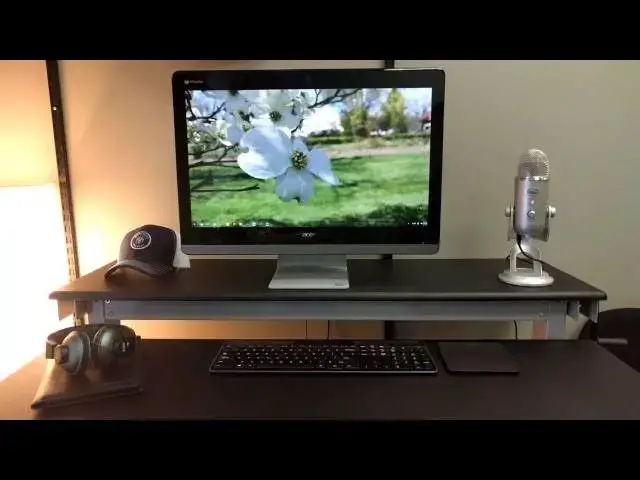
Acer Chromebase 24 Review
Jul 28, 2016


The Acer Chromebase 24, overall, is an exercise in safety. There's no innovation or taken risks, but there are also very few misses as a result. A solid build, solid performer, and overall 'pretty good' experience makes this device a forgettable one, but a functional one as well.
Read the full review here: http://chromeunboxed.com/acer-chromebase-24-review
Keep an eye on the channel by subscribing and check with the website chromeunboxed.com for up-to-date news.
Show More Show Less View Video Transcript
0:00
hey folks Robbie Payne with chrome unbox
0:02
coming at you today with a full review
0:04
of the Acer Chromebase 24. now this
0:07
device comes in packing a Celeron 3215
0:10
CPU four gigs of RAM and 16 gigs of
0:14
internal storage and this is the entry
0:15
level model starting at 429 at certain
0:18
outlets and this device is available
0:19
across many outlets but there are also
0:22
multiple configurations you can get
0:23
yourself into all the way up to an i5
0:25
with eight gigs of RAM so let's check
0:28
out this device and see if it's the
0:30
right fit for your home your office your
0:32
school or whatever place you might use
0:34
it
0:35
[Music]
0:41
so let's start up top with the screen
0:43
we're looking at this device we have a
0:44
24 inch 1080p display that gets
0:47
reasonably bright if I pump up the
0:49
brightness over the two-thirds of the
0:51
way it is right now it'll actually blow
0:53
the camera out a little bit so I do want
0:56
to show you one thing though if I pop
0:58
the brightness down just a little bit
0:59
you can probably start seeing
1:00
reflections pretty quickly because this
1:03
device is actually relatively glare
1:05
heavy
1:06
I work right next to a window and it was
1:09
picking up glare all over the place
1:12
part of that is because you can see
1:14
there is actually a separation between
1:16
the front panel of plastic or glass and
1:19
the actual screen and so that usually
1:21
creates some pretty serious glare
1:23
the display also is a bit washed out
1:26
looking but Pretty good overall it is an
1:28
IPS display so it has nice wide viewing
1:31
angles and
1:33
it doesn't feel bad to look at the color
1:35
temperature seems a little bit off to me
1:37
but overall it wasn't that bad to look
1:40
at and I'm used to working on a 25 inch
1:43
Quad HD screen so everything being a
1:45
little bit bigger made it feel a little
1:47
bit nicer to work on if not a little bit
1:49
claustrophobic moving on around the
1:52
device we have numerous ports including
1:54
two USB 3.0s on the back right next to a
1:57
USB 2.0 and the full size HDMI and then
2:01
moving around to the side
2:03
you actually have another USB 3.0 Port
2:05
full size SD card slot in the headphone
2:08
microphone Jack moving back to the front
2:10
of the device around the edges we have a
2:13
considerable bezel
2:15
and then underneath we have stereo
2:17
speakers that get quite loud and are
2:20
quite full
2:21
but they're not
2:23
the most balanced sound in the world the
2:26
stand underneath the screen that comes
2:28
with it if you choose not to mount it
2:30
with a mount is actually very robust
2:33
made of solid aluminum it's quite heavy
2:35
and works very well and it allows the
2:38
screen to actually adjust a handful back
2:42
and forth and not have to be just
2:44
straight up and down
2:45
so it holds the device very steadily and
2:48
allows for good movement as you can see
2:50
on the desk I have a couple peripherals
2:52
working with this device as well and
2:53
just like any other Chrome OS device
2:55
most keyboards track pads mice all work
2:59
with this device but I'm particularly
3:01
using is the t650 track pad which if
3:04
some of you have seen the HP Chromebook
3:06
13 G1 review you realize there was a
3:09
little bit of an issue they had moving
3:10
forward on some of these newer kernels
3:13
they are working through that issue
3:15
working through that bug but it wasn't
3:17
working with all the gestures I'm happy
3:19
to say that it works just fine with this
3:21
device all of your multi-touch gestures
3:23
work performance hasn't really been an
3:25
issue
3:27
we'll log out really quickly
3:29
and run an octane okay we're here in
3:32
guest mode and you can kind of see some
3:34
of that glare I was talking about
3:37
and that's at full brightness so I've
3:39
seen quite a bit of glare here and we're
3:40
just about finished here yeah 16 262 so
3:44
it's performing pretty well uh for
3:46
Celeron for a base model device I've
3:49
been impressed and been able to work
3:50
from it actually hooked uh to a
3:52
secondary Quad HD monitor with no issues
3:56
so to wrap up I've been pretty happy
3:58
with this device working from it hasn't
4:00
been frustrating there have been a few
4:02
hiccups here and there but I get that
4:03
it's a Celeron Processor the memory is
4:06
is small but it seems like as time goes
4:09
by Chrome OS is adapting better to lower
4:12
end hardware and that's a win for
4:14
everybody it means that we don't have to
4:15
pay these exorbitant amounts for these
4:17
high level processors in order to get
4:19
good performance on a 429 dollar device
4:23
I'm getting performance of what feels
4:25
like much much more is it the best
4:27
screen in the world no is it the the
4:30
best of speakers that you can get no but
4:32
overall the build quality feels good it
4:34
feels solid the performance is good and
4:36
I've been really happy with it and if
4:38
you really wanted to you could upgrade
4:39
and get a little bit better performance
4:41
but imagine being able to take advantage
4:43
of all the the games and the apps that
4:46
Android's going to bring in the fall
4:49
imagine playing Fruit Ninja or tap tap
4:52
go or things like that on this device
4:54
it'd be a lot of fun for kids this could
4:56
be a great device in the house it's just
4:58
kind of centralized Computing device I I
5:01
highly recommend it it's it's been very
5:03
good and I've enjoyed having it here in
5:05
the office guys if you have any comments
5:07
questions please leave them in the
5:09
comments below you can leave them on the
5:11
website Google Plus Twitter Facebook
5:12
Chrome unboxed is everywhere socially if
5:16
you like the video please subscribe
5:18
below it helps us get more videos out
5:20
give it a thumbs up if you liked it and
5:22
until we get to the next one thanks
5:24
we'll see you next time
5:27
[Music]