Up next in 10



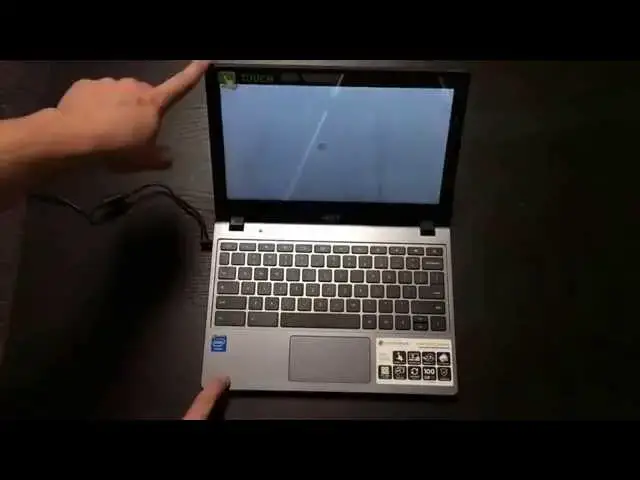
Today I'm unboxing the Acer C720P with 4GB of RAM. The reason I am even messing with this device is I want it to become my main work device. I really enjoyed the original C720P, but was underwhelmed with the performance due to the 2GB of RAM. This time around, this and the HP 14 are on even ground.
We'll see if it makes the cut!
Show More Show Less View Video Transcript
0:02
hey folks Robbie Pay Here Again with
0:04
chrome unboxed coming at you today with
0:06
an unboxing of the
0:08
c720p uh the difference in this
0:10
particular device and the one that is on
0:12
my channel before actually I've got two
0:14
other
0:15
c720p devices unboxed and reviewed on
0:18
the on the channel as well the
0:20
difference in this guy is this is
0:21
actually the touchscreen model in the
0:24
gray and black version with 4 gigs so
0:27
we're not going to see a whole lot of
0:28
new stuff here but I wanted to unbox it
0:30
um on screen cuz well I just know that
0:33
you guys like that stuff
0:37
so and Acer's tape is always very
0:44
pesky I'm going to try to do this
0:47
without ripping the Box up
0:53
but see if I succeeded here
1:07
[Music]
1:11
and it's going to rip again got
1:16
figure it's insanely difficult and from
1:18
what I've understood I'm not the only
1:20
person that's had issues with that thing
1:23
so without further
1:28
Ado here we are
1:30
and again as I say setup guides very
1:34
simple get it out plug it in turn it on
1:37
it's
1:39
Chromebook and we're seeing it packaging
1:42
um exactly like the other ones um
1:45
charging
1:46
block all that good stuff and here we
1:50
are a6c 720p now we'll be interested to
1:53
see what the screen looks like on the
1:58
inside cuz it's not the matte finish
2:00
screen um for those of you who haven't
2:03
seen the other video maybe you're just
2:04
tuning in and seeing uh this channel for
2:06
the first time I'll quickly walk around
2:08
this guy we've got the um USB sorry USB
2:13
2.0 get focused in here USB 2.0
2:16
Kensington lock full size SD card slot
2:19
over on the other side you got 3.0 USB
2:22
combo headphone microphone Jack full
2:24
sizee HDMI and your power slot across
2:27
the back some fans more fans on the
2:29
bottom feet the beautiful thing about
2:31
the Acer C720 you can take these screws
2:34
out pop this guy open replace the solid
2:36
state there's lots of people who have
2:37
done so uh if I end up keeping this
2:39
which is my plan to start working from
2:41
this guy for a little while um I
2:43
probably will actually do that um
2:45
purchase maybe a 64 gig solid state or
2:48
128 something like that and place it in
2:51
here and so if I do that I will uh make
2:53
a video showing you guys how that's
2:57
done pop it open here you got got the
3:00
big sticker says hey I'm a touchscreen
3:02
uh it's very excited about
3:04
that Focus back
3:18
here okay now we're starting up here and
3:22
I will say um the reason I decided to do
3:25
this was because I found the 4 Gig
3:27
version I want to say it was 350
3:30
uh so it's got four gigs touchscreen all
3:32
the goodies um for whatever reason of
3:35
late I've been working from my wife's
3:38
ACR
3:39
C720 um from time to
3:42
time
3:44
and just finding myself enjoying it and
3:46
then around the living room and stuff A
3:47
lot of times just grabbing it to look
3:48
something up real quick or move through
3:51
something so um I thought you know I
3:54
really like this device and the screen
3:56
is no better or worse than any of the
3:58
other screens and I've I've gone on
3:59
about that at length um and so I decided
4:03
you know what I'm going to give this one
4:04
another try as a work computer of late
4:06
I've also been hooking my uh device into
4:09
a external Monitor and kind of using it
4:11
that way so uh really not a big deal as
4:15
far as it being a smaller device I can
4:16
actually use it around the house I'm not
4:19
going to get into uh anything else here
4:21
I I'll come back with a review kind of
4:23
saying hey here's it versus the hp14
4:25
which now this is exactly the same spec
4:28
as the hp14 internally same Haswell 2995
4:31
u u same 4 gigs of RAM all that good
4:34
stuff so we're seeing a very similar
4:37
Chrome experience here minus the fact
4:39
that this is a smaller lighter um maybe
4:43
not quite as equally well-built device
4:45
but pretty close both with very
4:49
um less than spectacular screens but
4:52
this one has touch so in your lap
4:54
sitting on the couch at home using a
4:57
touchcreen is is a kind of a nice touch
4:59
so
5:00
all you see what I did there anyway um
5:02
I'm going to spend some time with this
5:04
like I said I I plan on making this my
5:05
work device so um the review will maybe
5:08
be a little bit more in depth but I just
5:10
wanted to show you guys uh that this
5:12
device does exist uh a 4 gig acerc 720p
5:15
is out there you can get it on Amazon I
5:17
got it pretty quickly like I said around
5:19
$350 $360 so um it's a great price for
5:22
basically the the highest end um low end
5:25
you know take the pixel out this is the
5:27
highest end kind of that Chromebooks get
5:29
for right now until Acer unveils the I3
5:32
uh model of this guy so um that's all
5:35
for today uh like I said I'll be back in
5:38
I don't know a week or so and kind of
5:40
give you my thoughts as I'm using this
5:42
guy as my primary device workwise I know
5:45
I ran into some issues with the RAM and
5:46
stuff like that with the the original
5:48
c720p so it'll be a really interesting
5:51
comparison this go around guys thanks
5:53
for tuning in if you like the video
5:54
please give it a thumbs up please
5:56
subscribe down below and uh stick around
5:59
there's lot lots more Chromebook stuff
6:00
coming y'all have a good one
#Consumer Electronics