0:00
hey guys Gabriel with chrome unboxed and
0:02
today we are talking chromeboxes before
0:12
we dig in this video is brought to you
0:14
by wordpress.com whether you're our
0:16
blogger small business or whatever if
0:18
you're looking to build an SEO rich
0:20
beautiful website WordPress has all the
0:22
tools and more you want to learn more
0:24
you can go to Chrome on box.com forward
0:27
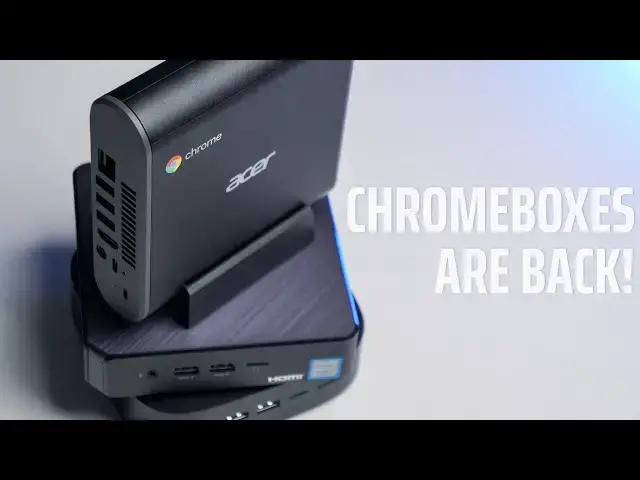
slash WordPress so chrome boxes are back
0:30
just two short years ago we weren't sure
0:33
if we were gonna see any more of these
0:34
hit the market now there's more than you
0:36
can choose from so today we're gonna
0:38
take a look and maybe help you decide
0:40
which ones for you and so if you're in
0:42
the market for a new chrome box and
0:44
you're not sure which one to buy we kind
0:47
of have to take a different approach
0:48
here chrome boxes are essentially Chrome
0:51
OS in its purest form we don't look at
0:53
things like display size resolution
0:56
peripherals pins convertible clamshell
0:59
tablet none of that matters you're gonna
1:01
have your monitor you're gonna have your
1:03
keyboard you buy whatever you want it's
1:04
all about what's inside this box and
1:06
honestly it's kind of dealer's choice
1:09
we've got a wide range here but which
1:12
one's for you really depends on what you
1:15
need out of a chrome box all right so
1:17
let's walk through what matters when
1:18
you're looking to buy a new chrome box
1:20
like I said there's a pretty wide range
1:22
you've got a base seller on process or
1:25
all the way up to core i7 like this HP
1:27
it has 16 gigs of ram and honestly it's
1:31
a beast and you probably aren't gonna
1:32
use what's inside for most users if
1:35
you're just setting this on your desk at
1:36
home and you're just gonna be using it
1:38
to do some banking Facebook watch some
1:40
cat videos don't be afraid of the
1:42
Celeron processor the 38 65 has plenty
1:45
of power and if you can get one upgraded
1:48
with eight gigs of ram it's gonna do
1:50
everything that you need it to do
1:52
these I sevens and I fives they're
1:54
geared more towards enterprise guys that
1:56
are running a lot of stuff like Linux
1:58
and things like that and if that's what
2:00
you want or that's what you need you
2:01
want to tinker around with some graphic
2:03
editors or whatnot I'd say go for it
2:05
but all of these devices are essentially
2:08
the same when it comes to port selection
2:11
boards are identical they're all going
2:13
to support 4k all of that so it really
2:15
just boils down to how much power you
2:17
need and then price like I said for a
2:20
daily driver around the house just to do
2:22
little things the Celeron processors
2:24
processors more than enough and you can
2:27
grab one of those for around two hundred
2:28
two hundred fifty bucks on Amazon
2:30
there's even a site that will upgrade it
2:32
and trick it out for you and give you an
2:34
ASIS box with a nice skin on it and the
2:37
extra four gigs our amp for right at
2:39
$300 for everyday use that's the one I'd
2:42
go with but it's really going to boil
2:44
down to price and which one you like I'm
2:48
a fan of the Acer because I like it's a
2:50
little bit different in the shape it
2:52
comes with this little base so you can
2:53
mount it vertically by your computer but
2:55
at the end of the day it's going to be
2:57
tucked behind your monitor and it
2:58
doesn't really matter but when we go
3:01
back to what's on the inside there is
3:04
one key thing I will point out if you're
3:06
doing the seller on go ahead and spring
3:08
for a gigs a ram if the manufacturer
3:11
offers it if they don't that's another
3:14
beautiful thing about these devices
3:16
they're easily upgradable some of them
3:19
more so than others the Acer is a little
3:21
bit more difficult to get apart than say
3:23
the Asus but at the end of the day once
3:26
you pop them open switching out the RAM
3:27
and even the storage going up to the
3:30
nvme half a terabyte whatever you want
3:32
it's just not that hard and it kind of
3:35
future-proof these so if you're happy
3:37
with the processor and the device don't
3:39
get hung up on how much RAM it's got or
3:42
how much storage it has you can adjust
3:44
that at will so find the device that
3:47
works for you as far as processing power
3:49
and price get it and then a month from
3:53
now you want to throw some more storage
3:54
in it's no problem and we're going to be
3:56
doing some breakdown videos of the ones
3:58
we have on hand to show you just how
4:00
easy it is to upgrade so you can check
4:02
those out later if there's a specific
4:03
device you're interested in
4:14
all that being said which chromebox is
4:16
right for you personally I'm still gonna
4:19
go with the Acer because I like the way
4:20
it's designed I like the way it looks
4:22
and I do like having the powerful
4:24
processor and all that together that's
4:26
the one I'm gonna pick at the end of the
4:27
day if money doesn't matter but if
4:29
you're worried about price or you just
4:31
don't care about having all that and you
4:32
don't care about how it looks and maybe
4:34
you do want to upgrade it down the road
4:36
I've got to go with the ASIS so far to
4:39
my knowledge it's the easiest one to
4:40
take apart the easiest one to upgrade
4:42
and you can get these all day long on
4:44
Amazon for two hundred twenty two
4:46
hundred and forty dollars and again it's
4:49
got a great processor in it that's gonna
4:51
do more than enough for you at home you
4:53
can upgrade it and you can tuck it away
4:55
behind your monitor you can even mount
4:56
it on the back if you want so if you
4:58
absolutely hate the way it looks you
5:00
don't have to look at it so there you
5:01
have it guys for my pick I'm going with
5:04
the Asus is the chrome box that you
5:06
should buy guys if you liked the video
5:07
give us a thumbs up subscribe and don't
5:10
forget to hit the notification bell cuz
5:11
we're gonna have to tear down videos
5:12
coming soon and you're not going to want
5:14
to miss those so until next time see you