0:07
there's something so rewarding about a
0:09
clean uncluttered desktop but for many
0:12
of us as we go day-to-day to our jobs
0:15
and we return to the same desk it's easy
0:17
to start collecting all kinds of things
0:19
on that desk and it's very easy for all
0:22
of those things to become kind of
0:24
necessary to get your job done whether
0:26
it be a monitor or a certain keyboard
0:27
setup or specific things you keep in
0:29
your drawers whatever it is it's very
0:32
easy to fall into the trap of having to
0:34
go to that desk to get your job done
0:36
every single day I know that for me as a
0:38
person who technically has been able to
0:41
do my job for years remotely I've kind
0:44
of been chained to a desk because I kept
0:45
working on my perfect desktop setup and
0:48
I got it just the way I wanted it and
0:49
then I found that I kind of became a
0:51
slave to that because if I'd have once
0:53
an at that desk every single day I felt
0:56
like I couldn't be quite as productive
0:57
as I wanted to be and so I've been
0:59
experimenting with some stuff lately to
1:00
get me back into a mode of work where I
1:03
could pick my stuff up and work from
1:05
just about anywhere and be just as
1:07
productive as I am at the desk at the
1:09
office and I want to show it to you
1:17
before we get into that whole new
1:19
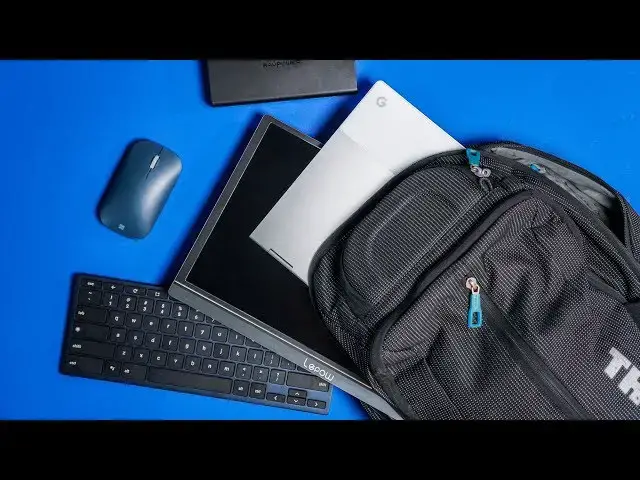
desktop in a bag setup this video is
1:22
brought to you by Nord VPN and they are
1:24
the VPN used by millions and millions of
1:26
people because they are fantastic what
1:28
they do and what they do is keep your
1:30
browsing secure and safe when you're out
1:33
and about or even at home if you'd like
1:34
to learn more about them and about how
1:36
to get started today just go to Chrome
1:39
forward slash Nord VPN from a purely
1:42
technological standpoint if I'm being
1:44
fair back six eight years ago when I
1:47
started web development and started
1:48
working at a job where I could decide
1:50
where I wanted to work a lot of the
1:52
stuff I'm going to show you didn't exist
1:54
back then or if it did it existed in a
1:56
form that I didn't want to use it a lot
1:58
of things have changed over the course
1:59
of those years and because of those
2:01
things and my desire to be more mobile
2:03
at this point I picked up some gear that
2:05
I want to show you piece by piece kind
2:07
of how I've built this mobile working
2:09
moveable desktop so first up we have the
2:11
power right at the core of all of this
2:13
set up and it is for me the ravpower
2:16
super c series battery it doesn't matter
2:19
if you buy this one specifically will
2:20
link it obviously below but there's
2:22
quite a few on Amazon and at Walmart
2:24
BestBuy what you really need to know is
2:27
that this power pack and others like it
2:29
can actually deliver the same wattage
2:31
that you would get from being able to
2:33
plug your power adapter into a wall so
2:36
45 watts which is like big wall adapter
2:39
kind of charging power in your pocket
2:41
and this thing is twenty thousand one
2:43
hundred milliamp hours so it's gonna be
2:45
able to charge a Chromebook a couple of
2:47
times maybe three times over depending
2:48
on the size of the battery and so you've
2:50
basically replaced a wall outlet with
2:52
something you can slide in your bag it's
2:53
not crazy heavy and it's gonna charge
2:56
your Chromebook and anything you've got
2:57
attached to your Chromebook just like
2:59
your plugged into a wall outlet so again
3:01
being able to move and keep this in your
3:03
bag power cables all that junk solved so
3:06
the second key element for me at least
3:08
in this whole set up is a good USB C
3:11
secondary monitor because in general
3:12
there are a lot of tasks I like to do
3:15
with a second screen and that's one of
3:16
the things that kept me chained to my
3:17
desk all the time I had that nice big
3:20
monitor and I hooked my Chromebook into
3:22
it so multi monitor display setups are
3:25
kind of crucial for a lot of people
3:27
anybody student data entry you got kind
3:29
to be able to glance back and forth and
3:31
it really hurts your productivity if
3:34
you're used to that and then you're like
3:35
well I'm gonna go down to the coffee
3:36
shop and work and you've got one little
3:38
screen you're working on so this is a
3:40
very very key part in this whole thing
3:42
and honestly part of what kicked all of
3:44
this off for me in my brain was lip pal
3:47
sent us USBC monitor and it's a 15.6
3:50
inch all aluminum relatively light just
3:53
over a pound with a magnetic enclosure
3:55
here that acts as a stand and it's works
3:58
it stood solid it feels great the screen
4:01
looks really good nice punchy colors IPS
4:04
display all that kind of stuff but the
4:05
most important thing is it's USB type-c
4:07
it's powered from USB type-c one cable
4:10
hooks from it to the Chromebook and I
4:12
can see my secondary display I don't
4:14
have to plug power cables in or all that
4:16
kind of stuff you can if you want to but
4:18
in general I can pass this power right
4:21
through this monitor right to my
4:22
Chromebook and it's just one link one
4:24
cable from here to there one cable from
4:26
here to there and everything is powered
4:28
and matter of fact this thing puts out
4:29
so much power it'll charge my Chromebook
4:32
while it's outputting both displays at
4:35
the same time and so it's this nice
4:36
productive kind of enclosed setup and
4:39
the last piece to the puzzle for me at
4:41
least is having a good keyboard and
4:43
trackpad or mouse that is secondary so
4:45
this only comes into play honestly if
4:47
you are using a convertible or a tablet
4:49
or something like that for me I like
4:51
being able to fold the keyboard and
4:53
trackpad portion of the pixel book back
4:55
away from me so that I can bring both
4:57
screens nice up and close because you
4:59
know we're talking about a 15.6 inch
5:00
screen and a twelve point three inch
5:02
screen so these aren't massive screens
5:04
that I want far away and kind of be
5:05
sitting back I mean I want more of a
5:07
lean for experience here because I'm not
5:09
dealing with such a massive monitor so
5:11
that allows me to kind of bring it up
5:12
closer well when I do that then I need a
5:15
secondary keyboard and mouse or trackpad
5:17
now Bridge is supposed to be coming out
5:19
with a trackpad pretty soon I will
5:21
absolutely replace anything I'm using
5:22
with that once that thing rolls out but
5:25
for now I'm using the Microsoft mobile
5:27
surface Mouse which is pretty decent and
5:29
it's a bluetooth only so no dongles
5:31
needed just hold the button down go in
5:33
your Bluetooth settings pair it up it
5:35
works like you'd expect it to and then
5:38
ctype wireless keyboard it again is
5:41
bluetooth as well pairs up very easily
5:43
it is a true Chrome OS layout so all of
5:46
your shortcut keys are here where you
5:48
need them to be so in general I just
5:50
kind of have this setting here my two
5:51
displays up battery stuck back there
5:54
behind it a few cables and my entire
5:56
thing is set up my desktops ready to go
5:59
I'm ready to sit down be productive and
6:01
fold it all up slides right in the
6:03
backpack goes with me and so wherever it
6:05
is I sit down and choose to work I can
6:08
do so and I can do so on the same level
6:10
of productivity that I can whether I'm
6:13
in the office or not and for me as
6:15
someone who's able to go and work mobile
6:18
II and get out and choose different
6:19
places to work that's an important thing
6:22
and I need to take advantage of that and
6:23
I would assume that if you're watching
6:25
this and you've watched it this far
6:26
you're at least intrigued by the idea of
6:28
doing this and I would encourage you do
6:30
the same thing go out take advantage of
6:32
the fact that you have a job where you
6:33
can go out and move and be mobile and
6:35
experience working in different
6:36
environments and all that kind of stuff
6:38
because it's a great advantage and it's
6:40
a great thing to be able to do as long
6:42
as you take advantage of it and as long
6:43
as you have the tech that allows you to
6:45
take advantage of it but guys that's it
6:47
for this one if you liked it give it a
6:48
thumbs up hit the subscribe button down
6:50
below and make sure to hit the
6:51
notification bell if you'd like to be
6:53
alerted when we put out new videos just
6:54
like this one until next time we'll see