0:28
so back in May of this year we were up
0:30
in New York City at a sirs Hardware
0:32
event where they unveiled all sorts of
0:34
things and one of those things was the
0:35
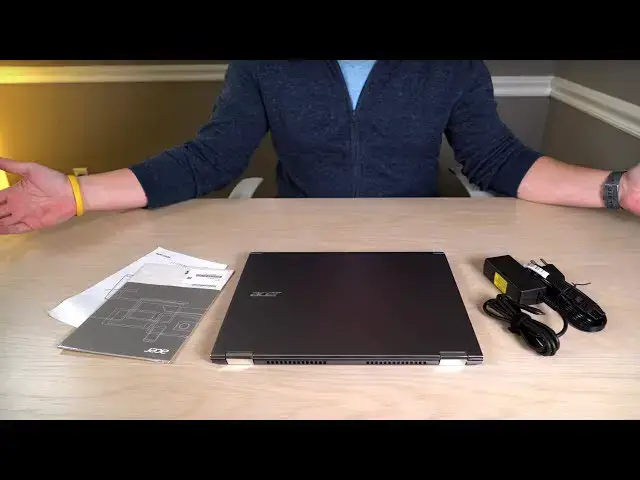
Acer Chromebook spin 13 which is the
0:37
device we have right here and we wanted
0:39
to give you guys a quick look at it some
0:41
of our initial impressions as we're
0:43
spending time with it to prepare our
0:45
review but before we get into all that
0:46
this video is brought to you by audible
0:48
and I don't know about you but for me
0:50
and with my busy schedule it's it's very
0:52
difficult to get in reading when I want
0:55
to and so for all of our viewers audible
0:57
is actually offering a free audiobook
0:59
with a 30-day trial you just need to go
1:01
to audibletrial.com/preneurcast ik
1:14
bottom or only an aluminum lid this is
1:17
all aluminum all around and it feels
1:19
really great the size is really great
1:21
too it's a 13.5 inch display which we've
1:24
not seen up to this point with Chrome OS
1:27
devices and so you're talking a full
1:29
inch it's actually 1.2 inches larger
1:32
than the pixel book display and it comes
1:34
in at a higher definition than most
1:37
Chromebooks not quite as high definition
1:39
as the pixel book and the pixel count on
1:42
it actually I've got to grab the box
1:44
because nobody could remember this
1:46
random number let's see here it is 20
1:50
256 by 1504 that seems random but all
1:57
you need to know is powering it up
1:59
opening it up the first time it's really
2:01
high resolution the colors pop it looks
2:03
great it's 3 by 2 which you guys know
2:05
I'm a big fan of and so when it's in
2:07
tablet mode it feels really good
2:09
it's it's a fantastic display great
2:11
viewing angles nice brightness
2:12
everything looks really good on it so
2:14
far now we got a backlit keyboard you've
2:16
got Gorilla Glass on the trackpad
2:17
Gorilla Glass on the screen stowable
2:20
stylus there's really nothing on the
2:22
checklist that you can't find here and
2:24
it comes in a wide variety of
2:26
specifications as well so we've got the
2:28
core m3 a Core i5 and core i7 version
2:31
different ran variations we'll get into
2:34
all that stuff in the review but what I
2:36
can tell you is using this device just
2:39
I'm not over the moon for the keyboard
2:42
it seems okay but it's backlit so that's
2:44
really good for a lot of you and some
2:46
people aren't really that picky with
2:47
keyboards so I think the keyboards
2:50
passable Gorilla Glass edge trackpad
2:53
which is really awesome it feels just as
2:54
smooth as the pixel book click mechanism
2:57
feels really good if there's a little
2:58
cramped in its size but again we'll talk
3:00
more about this stuff when we when we
3:02
fully review and spend a little bit more
3:04
time with the device but the panel is
3:07
great and the workspace that that's the
3:10
one thing I want to get to on this
3:12
device it from just initial impressions
3:14
here when I open this device up and
3:17
actually use it the size of the screen
3:19
again I've talked about this before but
3:21
three by two screens actually make the
3:23
diagonal measure feel much larger so for
3:26
instance if we're working with an 11.6
3:28
inch device that's sixteen by nine so
3:30
very rectangular you take that same 11.6
3:33
inches and make it more square that the
3:36
screen real estate physically is bigger
3:38
so if you do the math and you multiply
3:39
that you actually get more square inches
3:41
same thing goes here it's a three by two
3:43
screen so a 13.5 inch display we talked
3:47
about like MacBooks for instance are
3:48
13.3 inches at 16 by 10 feel certain
3:52
size this actually feels larger so when
3:54
I set this next to another 13 inch
3:56
display that's 16 by 9 this thing feels
3:59
massive in comparison and it makes a
4:01
huge difference when this is your only
4:03
device if you're not extending to
4:04
another display are you just using this
4:06
device as in a coffee shop or at your
4:08
desk the display really really makes a
4:11
difference an Acer has absolutely just
4:12
knocked it out of the park on that we'll
4:14
get to more of the the specifics of this
4:17
device as we spend more time with it but
4:19
for now I can tell you I'm really really
4:21
impressed just for the first few hours
4:23
of using it there are some things that I
4:25
think are gonna be alarming and and I
4:28
may not like and may not think are
4:30
perfect with this device but overall so
4:33
far from what I can tell they sir has
4:35
delivered something really good at a
4:36
really really compelling price point
4:38
right now especially going into a season
4:39
where we're gonna see lots of Chrome
4:41
books at the roughly same price point as
4:44
this device comes in at so definitely
4:47
keep it locked to the channel and keep
4:49
up with what we're doing if you if you
4:50
haven't subscribed yet for sure
4:52
I don't normally say that to the end of
4:54
the video but for sure subscribe because
4:55
there are lots of Chromebooks coming out
4:57
and roughly in this price range roughly
4:59
with this kind of build quality that
5:01
you're gonna want to know about
5:02
especially going into the holiday season
5:04
so guys that's gonna be it for this one
5:06
if you liked it give it a thumbs up
5:07
again hit that subscribe button there's
5:09
lots more stuff coming and until next